
There are a number of places inside the F5 Dashboard project where the database needs to be modified. A good example of this is from the F5 info gathering page.
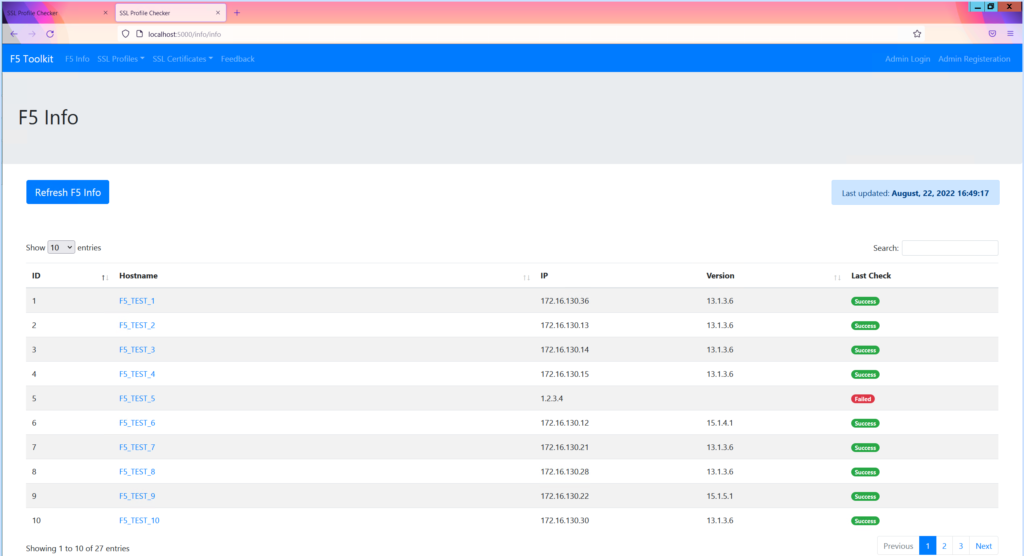
The F5 info page is displaying some columns from a database table.
There are a few things going on here so I will start at the top with the refresh button.
Refresh Button
This is what starts the entire process off. This will run a python script that runs a few info gathering GET requests to all the F5s. This is executed sequentially in the order of the F5s.
Once the JSON output is returned from the API’s that is then parsed and we look for certain things as you can see in the table.
This is then saved to the database along with the time it was performed.
The HMTL page will display the database table, and in the top left will grab one of the columns that has the last updated date/time in and display that. I think I am using the last entry in the table for this.
from flask import Blueprint, render_template, redirect, url_for, session, request, jsonify
from website.db_controller import DBcontroller
from website.info.background_processes import F5BackgroundProcesses
from website.models import F5Info
from datetime import datetime
import json


info_blueprint = Blueprint('info',__name__,
                                    template_folder='templates/info')


@info_blueprint.route('/info', methods = ['GET', 'POST'])
def info():
    """
    Button on the info page to run a script that gets the info for the F5s
    Table displays; F5 name, Serial Number, Software Version, Mgmt IP, last check status, number of VIPs
    This all goes into a dictionary
    """

    # Import db table from Models and query it all
    f5_table = F5Info.query.all()


    swDB = DBcontroller()
    lastupdate = swDB.getLastUpdate()
    print(lastupdate)

    return render_template('info.html', f5_table=f5_table, lastupdate=lastupdate)


@info_blueprint.route('/<hostname>', methods = ['GET', 'POST'])
def f5_info(hostname):
    # var hostname is required

    # Get details to pass into template
    f5_stats = DBcontroller()
    f5_info = f5_stats.get_f5_detail(hostname)
    # print(f5_info)

    return render_template('detail.html', hostname=hostname, f5_info=f5_info)


@info_blueprint.route('/bg_get_info', methods = ['GET', 'POST'])
def bg_get_info():

    # List of F5 IP Addresses
    f5_ip_list = ["172.16.130.36",
                    "172.16.130.13",
                    "172.16.130.14",
                    "172.16.130.15",
                    "1.2.3.4",
                    "172.16.130.12",
                    "172.16.130.21",
                    "172.16.130.28",
                    "172.16.130.22",
                    "172.16.130.30",
                    "172.16.130.20",
                    "172.16.130.23",
                    "172.16.130.29",
                    "5.6.7.8",
                    "172.16.130.36",
                    "172.16.130.13",
                    "172.16.130.14",
                    "172.16.130.15",
                    "172.16.130.12",
                    "172.16.130.21",
                    "172.16.130.28",
                    "9.10.11.12",
                    "172.16.130.22",
                    "172.16.130.30",
                    "172.16.130.20",
                    "172.16.130.23",
                    "172.16.130.29"]

    get_info = F5BackgroundProcesses()
    # Get F5 basic Info
    path = 'cm/device'
    f5_info = get_info.get_f5_info(f5_ip_list, path)
    # print(json.dumps(f5_info, sort_keys=True, indent=4))

    # Get F5 HA failover active (days)
    path = 'sys/failover'
    f5_failover1 = get_info.get_f5_info(f5_ip_list, path)
    # print(json.dumps(f5_failover1, sort_keys=True, indent=4))

    # Get F5 HA failover mate
    path = 'cm/failover-status'
    f5_failover2 = get_info.get_f5_info(f5_ip_list, path)
    # print(json.dumps(f5_failover2, sort_keys=True, indent=4))

    now = datetime.now()
    timestamp = now.strftime("%B, %d, %Y %H:%M:%S")


    i = 0
    my_dict = {}

    for ip in f5_ip_list:

        try:
            # if lastCheck failed, nothing in DB except IP and failure IP
            if f5_info[i]['lastCheck']:
                lastCheck = f5_info[i]['lastCheck']
                updated = timestamp
                my_dict[i] = {"hostname":"",
                                "ip":ip,
                                "serial_number":"",
                                "version":"",
                                "failover_active":"",
                                "failover_mate":"",
                                "failover_status":"",
                                "failover_lastmsg":"",
                                "lastCheck":lastCheck,
                                "updated":updated}
                print(my_dict)

        except KeyError:
            hostname = (f5_info[i]['items'][0]['hostname']).split(".")[0]
            ip = f5_info[i]['items'][0]['managementIp']
            serial_number = f5_info[i]['items'][0]['baseMac']
            version = f5_info[i]['items'][0]['version']
            failover_active = (f5_failover1[i]['apiRawValues']['apiAnonymous']).split(" ")[3]
            failover_mate = f5_failover2[i]['entries']['https://localhost/mgmt/tm/cm/failover-status/1']['nestedStats']['entries']['remoteDeviceName']['description']
            failover_status = f5_failover2[i]['entries']['https://localhost/mgmt/tm/cm/failover-status/1']['nestedStats']['entries']['status']['description']
            failover_lastmsg = f5_failover2[i]['entries']['https://localhost/mgmt/tm/cm/failover-status/1']['nestedStats']['entries']['lastMsg']['description']

            updated = timestamp
            lastCheck = "Successful"

            # Create dict and use that for adding DB. Only 1 DB connection and write needed then
            my_dict[i] = {"hostname":hostname,
                            "ip":ip,
                            "serial_number":serial_number,
                            "version":version,
                            "failover_active":failover_active,
                            "failover_mate":failover_mate,
                            "failover_status":failover_status,
                            "failover_lastmsg":failover_lastmsg,
                            "lastCheck":lastCheck,
                            "updated":updated}

        i += 1

    # Write to DB in one go
    f5_stats = DBcontroller()
    f5_stats.delete_all_f5_info()
    for key in my_dict:
        # print(my_dict[key]['hostname'])
        f5_stats.add_f5_info((my_dict[key]['hostname']),
                             (my_dict[key]['ip']),
                             (my_dict[key]['serial_number']),
                             (my_dict[key]['version']),
                             (my_dict[key]['failover_active']),
                             (my_dict[key]['failover_mate']),
                             (my_dict[key]['failover_status']),
                             (my_dict[key]['failover_lastmsg']),
                             (my_dict[key]['lastCheck']),
                             (my_dict[key]['updated']))
    f5_stats.close_db_conn()


    return jsonify([["Completed", "Collected data, added to DB"]])
The Process
The user will go to the /info view. This will query the database table called F5Info and pass that to the HTML template to render. there is some JavaScript to make the table look neater.
The refresh F5 info button may then be pressed to perform the function view called /bg_get_info.
This is what will run through can send the API GET requests to each F5. The return JSON is parsed and then the the database table data is deleted and new data added.
Database Calls
The below code is partial calling another python file that contains all of the database modification commands.
It is doing three things; deleting all data in the F5Info table, then adding new data and finally closing the connection
In all the below I have added the class to make it easier to refer back to. In reality these functions are all part of the same DBcontroller class.
    f5_stats = DBcontroller()
    f5_stats.delete_all_f5_info()
    for key in my_dict:
        # print(my_dict[key]['hostname'])
        f5_stats.add_f5_info((my_dict[key]['hostname']),
                             (my_dict[key]['ip']),
                             (my_dict[key]['serial_number']),
                             (my_dict[key]['version']),
                             (my_dict[key]['failover_active']),
                             (my_dict[key]['failover_mate']),
                             (my_dict[key]['failover_status']),
                             (my_dict[key]['failover_lastmsg']),
                             (my_dict[key]['lastCheck']),
                             (my_dict[key]['updated']))
    f5_stats.close_db_conn()
Deleting F5Info Table Data
class DBcontroller:

    def __init__(self):
        #self.connection = connection
        self.basedir = os.path.abspath(os.path.dirname(__file__))
        self.connection = sqlite3.connect(self.basedir+'/data.sqlite')

    def delete_all_f5_info(self):
        """
        F5 Info Table
        Delete all rows in the f5_domains table
        :param connection: Connection to the SQLite database
        :return:
        """
        sql = 'DELETE FROM f5_info_table'
        cur = self.connection.cursor()
        cur.execute(sql)
        self.connection.commit()
Adding New F5Info Table Data
class DBcontroller:

    def __init__(self):
        #self.connection = connection
        self.basedir = os.path.abspath(os.path.dirname(__file__))
        self.connection = sqlite3.connect(self.basedir+'/data.sqlite')

    def add_f5_info(self, hostname, ip, serial_number, version, failover_active, failover_mate, failover_status, failover_lastmsg, lastCheck, updated):
        """
        F5 Info Table
        """

        cursor = self.connection.cursor()
        cursor.execute("INSERT INTO f5_info_table\
                        (hostname, ip, serial_number, version, failover_active, failover_mate, failover_status, failover_lastmsg, lastCheck, updated)\
                        VALUES (?,?,?,?,?,?,?,?,?,?)",
                        (hostname, ip, serial_number, version, failover_active, failover_mate, failover_status, failover_lastmsg, lastCheck, updated) )
        self.connection.commit()
Close Database Connection
class DBcontroller:

    def __init__(self):
        #self.connection = connection
        self.basedir = os.path.abspath(os.path.dirname(__file__))
        self.connection = sqlite3.connect(self.basedir+'/data.sqlite')

    def close_db_conn(self):
        self.connection.close()
Final Part – Get Last Update Time/Date
class DBcontroller:

    def __init__(self):
        #self.connection = connection
        self.basedir = os.path.abspath(os.path.dirname(__file__))
        self.connection = sqlite3.connect(self.basedir+'/data.sqlite')

    def getLastUpdate(self):
        """
        F5 Info Table
        Return last runtime
        """

        # select the last ID
        sql = " SELECT updated from f5_info_table WHERE id = 1;"

        cur = self.connection.cursor()
        cur.execute(sql)
        result = cur.fetchall()
        try:
            lastupdate = result[0][0]
        except:
            lastupdate = None
        return lastupdate