This post follows on from the NetBox setup post, upto the API token setup.
SSL Configuration with Nginx
In that previous post, SSL was not used. The connection was made insecure and ignored. Here, I will detail the steps to use Nginx as a proxy for the NetBox docker container.
Add SAN to SSL Creation
I have used a self-signed SSL for this, and I found that SANs needed to be added to the SSL certificate creation.
sudo cp /usr/lib/ssl/openssl.cnf ~/openssl.my.cnfsudo nano ~/openssl.my.cnf[ v3_req ]
...
subjectAltName = @alt_names
[ alt_names ]
DNS.1 = netboxtest.test
DNS.2 = *.netboxtest.test
Create SSL Certificate
sudo openssl req -x509 -nodes -days 99999 -newkey rsa:2048 -keyout /etc/ssl/private/netboxtest-selfsigned.key -out /etc/ssl/certs/netboxtest-selfsigned.crt -config ~/openssl.my.cnf -extensions 'v3_req'

Generating a RSA private key
............................................................................................................................................+++++
...............+++++
writing new private key to '/etc/ssl/private/netboxtest-selfsigned.key'
-----
You are about to be asked to enter information that will be incorporated
into your certificate request.
What you are about to enter is what is called a Distinguished Name or a DN.
There are quite a few fields but you can leave some blank
For some fields there will be a default value,
If you enter '.', the field will be left blank.
-----
Country Name (2 letter code) [AU]:GB
State or Province Name (full name) [Some-State]:London
Locality Name (eg, city) []:London
Organization Name (eg, company) [Internet Widgits Pty Ltd]:
Organizational Unit Name (eg, section) []:IT
Common Name (e.g. server FQDN or YOUR name) []:netboxtest.test
Email Address []:
stef@stef-VirtualBox:~/netbox-docker3_6/netbox-docker/ssl$
Add Certificate to CA Certificate Store
As I will be using the same Linux host to host NetBox and run the Terraform, I will add the self-signed certificate to the CA store. If Terraform was to be run from another host, I would need to copy the certificate to that CA store.
sudo cp /etc/ssl/certs/netboxtest-selfsigned.crt /usr/local/share/ca-certificates
sudo update-ca-certificates

Updating certificates in /etc/ssl/certs...
rehash: warning: skipping ca-certificates.crt,it does not contain exactly one certificate or CRL
rehash: warning: skipping duplicate certificate in netboxtest-selfsigned.crt
1 added, 0 removed; done.
Running hooks in /etc/ca-ce
Create Nginx Server Block (vHost)
Copy the SSL cert and key into the nginx/ssl directory
sudo mkdir /etc/nginx/ssl
sudo cp /etc/ssl/certs/netboxtest-selfsigned.crt /etc/nginx/ssl/netboxtest-selfsigned.crt
sudo cp /etc/ssl/private/netboxtest-selfsigned.key /etc/nginx/ssl/netboxtest-selfsigned.key
Create the server block
sudo nano /etc/nginx/sites-available/netboxtest

server {
    listen 443 ssl;
    server_name 127.0.0.1;  # Replace with your actual domain or IP address

    ssl_certificate /etc/nginx/ssl/netboxtest-selfsigned.crt;
    ssl_certificate_key /etc/nginx/ssl/netboxtest-selfsigned.key;

    # Forward headers
    # proxy_set_header X-Forwarded-For $proxy_add_x_forwarded_for;
    # proxy_set_header X-Forwarded-Proto $scheme;


    location / {
        proxy_pass http://localhost:8000;  # Adjust the port to match your Docker Compose setup
        proxy_set_header Host $host;
        proxy_set_header X-Real-IP $remote_addr;
        proxy_set_header X-Forwarded-For $proxy_add_x_forwarded_for;
        proxy_set_header X-Forwarded-Proto $scheme;
    }
}


server {
    listen 80;
    server_name 127.0.0.1;
    return 301 https://$host$request_uri;
}
sudo ln -s /etc/nginx/sites-available/netboxtest /etc/nginx/sites-enabled/Setup PYTHON AND ANSIBLE
This is a basic environment. I have created my own Python Virtual env, and installed; Ansible, PyNetbox and the Ansible galaxy NetBox collection.
python3 -m virtualenv .venv
source .venv/bin/activate

python -m pip install pynetbox
python -m pip install ansible-core
ansible --version
ansible-galaxy collection install netbox.netbox
ansible-galaxy collection install community.general
Previously, I have created an API token in NetBox. The NetBox domain will be netboxtest.test and in the previous step I created the SSL certificate for this domain.
export NETBOX_URL="https://netboxtest.test"
export NETBOX_API_KEY="API-KEY"
bASIC pLAYBOOK
This is a basic playbook that will use a role I have created called customisations. It will create a tag only. All the modules can be found at this link. I am going to demonstrate custom field.
(.venv) stef@stef-VirtualBox:~/netbox-docker3_6/netbox-ansible/netbox-iac$ tree
.
├── group_vars
│   └── all.yml
├── README.md
├── roles
│   ├── customisation
│   │   ├── defaults
│   │   │   └── main.yml
│   │   ├── tasks
│   │   │   └── main.yml
│   │   └── vars
│   │       └── main.yml
└── site.yml
All Group Vars
---
netbox_api_url: "{{ lookup('env', 'NETBOX_URL') }}"
netbox_api_token: "{{ lookup('env', 'NETBOX_API_KEY') }}"
Customisations Vars
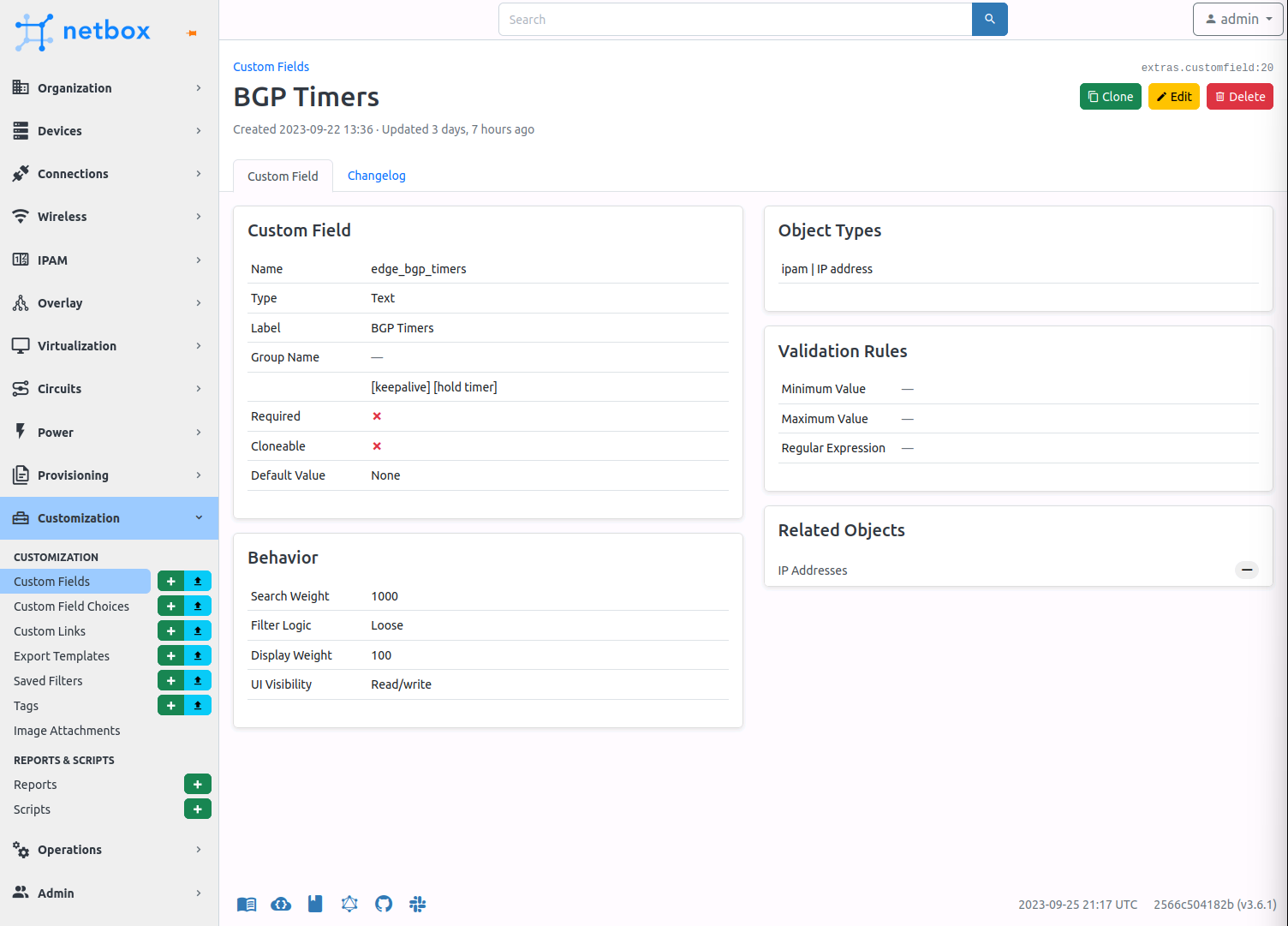
This is simply creating a custom field for BGP timers
---
custom_fields:
  - name: edge_bgp_timers
    content_types:
      - ipam.ipaddress
    type: text
    label: BGP Timers
    description: "[keepalive] [hold timer]"
Customisations Task
This Ansible task is taking the list of custom_fields, and for each item it will execute whatever data is inside the list and add the custom field to NetBox with a state value of present.
---
- name: SETUP CUSTOM FIELDS
  netbox.netbox.netbox_custom_field:
    netbox_url: "{{ netbox_api_url }}"
    netbox_token: "{{ netbox_api_token }}"
    data: "{{ item }}"
    state: present
    validate_certs: False
  loop: "{{ custom_fields }}"
BGP Timers Custom Field
source .venv/bin/activate
ansible-playbook site.yml