
Adding an Interface in GNS3
I needed a new VM in my lab as I was having issues with my older one. There are two NICs on the VM, one for access to the internet via my home network and another NIC to connect to the actual lab.
Ensure that the second NIC is configured on the GNS3 VM, remember the NIC MAC address as it will be required for the configuration. Well specifically in my case the last character.
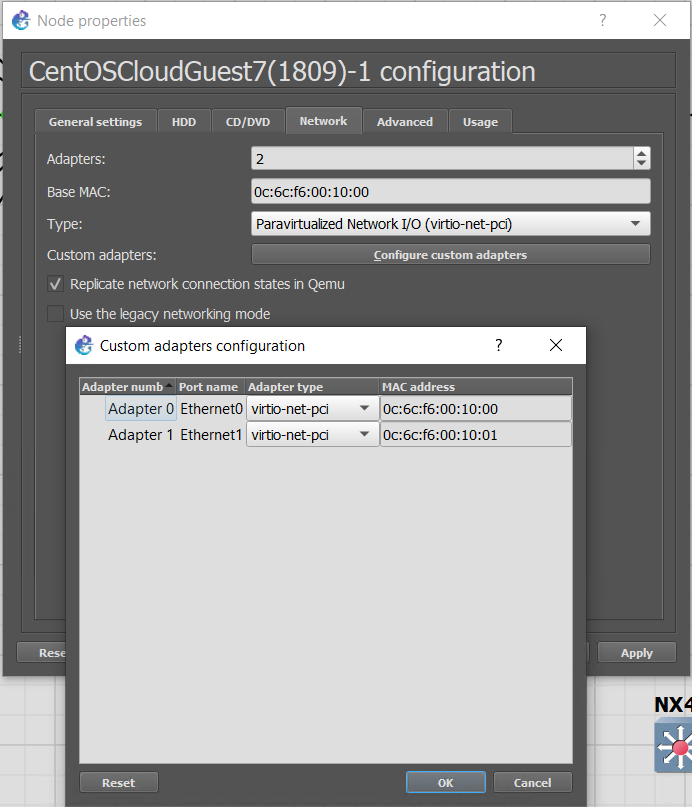
Boot up the VM and check what is there. Only a single NIC getting DHCP. eth1 should also be getting an IP address on the 10.10.30.0/24 network
-bash-4.2$ ip a
1: lo: <LOOPBACK,UP,LOWER_UP> mtu 65536 qdisc noqueue state UNKNOWN group default qlen 1000
    link/loopback 00:00:00:00:00:00 brd 00:00:00:00:00:00
    inet 127.0.0.1/8 scope host lo
       valid_lft forever preferred_lft forever
    inet6 ::1/128 scope host
       valid_lft forever preferred_lft forever
2: eth0: <BROADCAST,MULTICAST,UP,LOWER_UP> mtu 1500 qdisc pfifo_fast state UP group default qlen 1000
    link/ether 0c:6c:f6:00:10:00 brd ff:ff:ff:ff:ff:ff
    inet 192.168.122.85/24 brd 192.168.122.255 scope global dynamic eth0
       valid_lft 3559sec preferred_lft 3559sec
    inet6 fe80::e6c:f6ff:fe00:1000/64 scope link
       valid_lft forever preferred_lft forever
3: eth1: <BROADCAST,MULTICAST> mtu 1500 qdisc noop state DOWN group default qlen 1000
    link/ether 0c:6c:f6:00:10:01 brd ff:ff:ff:ff:ff:ff
Check what is configured for eth0
-bash-4.2$ cat /etc/sysconfig/network-scripts/ifcfg-eth0
BOOTPROTO=dhcp
DEVICE=eth0
HWADDR=0c:6c:f6:00:10:00
ONBOOT=yes
TYPE=Ethernet
USERCTL=no
Add interface details as eth1. Be sure to update the DEVICE= and HWADDR correctly as this is a different interface.
sudo vi /etc/sysconfig/network-scripts/ifcfg-eth1

BOOTPROTO=dhcp
DEVICE=eth1
HWADDR=0c:6c:f6:00:10:01
ONBOOT=yes
TYPE=Ethernet
USERCTL=no
Once we have configured and saved the new interface. We need to reboot or shut/no shut the interface, but in the Linux way not in the Cisco way.
sudo ifdown eth1
sudo ifup eth1
Now we are getting an IP address and should have access to the internet
-bash-4.2$ ip a
1: lo: <LOOPBACK,UP,LOWER_UP> mtu 65536 qdisc noqueue state UNKNOWN group default qlen 1000
    link/loopback 00:00:00:00:00:00 brd 00:00:00:00:00:00
    inet 127.0.0.1/8 scope host lo
       valid_lft forever preferred_lft forever
    inet6 ::1/128 scope host
       valid_lft forever preferred_lft forever
2: eth0: <BROADCAST,MULTICAST,UP,LOWER_UP> mtu 1500 qdisc pfifo_fast state UP group default qlen 1000
    link/ether 0c:6c:f6:00:10:00 brd ff:ff:ff:ff:ff:ff
    inet 192.168.122.85/24 brd 192.168.122.255 scope global dynamic eth0
       valid_lft 3584sec preferred_lft 3584sec
    inet6 fe80::e6c:f6ff:fe00:1000/64 scope link
       valid_lft forever preferred_lft forever
3: eth1: <BROADCAST,MULTICAST,UP,LOWER_UP> mtu 1500 qdisc pfifo_fast state UP group default qlen 1000
    link/ether 0c:6c:f6:00:10:01 brd ff:ff:ff:ff:ff:ff
    inet 10.10.30.196/24 brd 10.10.30.255 scope global dynamic eth1
       valid_lft 7187sec preferred_lft 7187sec
    inet6 fe80::e6c:f6ff:fe00:1001/64 scope link
       valid_lft forever preferred_lft forever
-bash-4.2$ [   28.686274] random: crng init done