
This is a very quick and dirty way to backup network devices rom my GNS3 lab. I will likely expand on this in the future.
This is a simple Paramiko script that will SSH into each device perform “show run” and sve that output with in a text file with the IP, year, month and day in the title.
Everything is hard coded into this file, hostnames, IPs, credentials. This is only good for a lab and I’ll be working on something to improve this and probably include it in my Scrapli & Flask project.
I needed something quick and it’s a reuse of somthing I wrote in 2018 for practice. If it works, it works!
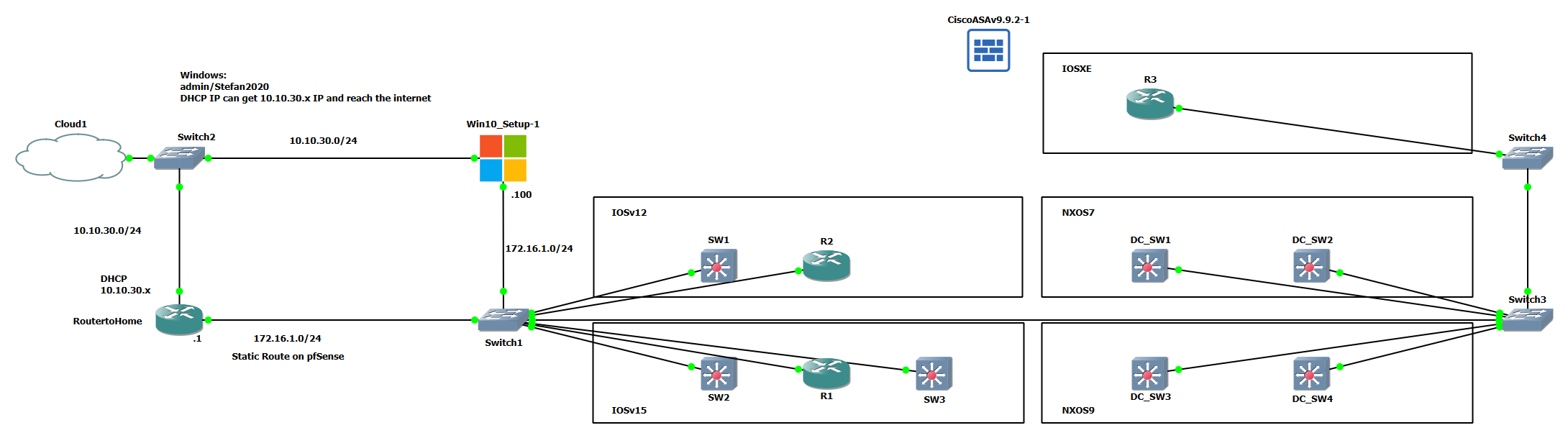
How it Works
import paramiko
import time

def connect(server_ip, server_port, user, passwd):
    ssh_client = paramiko.SSHClient()
    ssh_client.set_missing_host_key_policy(paramiko.AutoAddPolicy())
    print(f"Connecting to {server_ip}")
    ssh_client.connect(hostname=server_ip, port=server_port, username=user, password=passwd,
                        look_for_keys=False, allow_agent=False)

    return ssh_client

def get_shell(ssh_client):
    shell = ssh_client.invoke_shell()
    return shell

def send_command(shell, command, timeout=1):
    print(f"Sending command: {command}")
    shell.send(command + "\n")
    time.sleep(timeout)

def show(shell, n=10000):
    output = shell.recv(n)
    return output.decode()

def close(ssh_client):
    if ssh_client.get_transport().is_active() == True:
      print("Closing the connection")
      ssh_client.close()
import U_myparamiko
from datetime import datetime
SW1 = {"server_ip": "172.16.1.101", "server_port": "22", "user": "admin", "passwd": "Stefan2020"}
SW2 = {"server_ip": "172.16.1.102", "server_port": "22", "user": "admin", "passwd": "Stefan2020"}
SW3 = {"server_ip": "172.16.1.103", "server_port": "22", "user": "admin", "passwd": "Stefan2020"}
R1 = {"server_ip": "172.16.1.104", "server_port": "22", "user": "admin", "passwd": "Stefan2020"}
R2 = {"server_ip": "172.16.1.105", "server_port": "22", "user": "admin", "passwd": "Stefan2020"}
R3 = {"server_ip": "172.16.1.106", "server_port": "22", "user": "admin", "passwd": "Stefan2020"}
DC_SW1 = {"server_ip": "172.16.1.111", "server_port": "22", "user": "admin", "passwd": "Stefan2020"}
DC_SW2 = {"server_ip": "172.16.1.112", "server_port": "22", "user": "admin", "passwd": "Stefan2020"}
DC_SW3 = {"server_ip": "172.16.1.113", "server_port": "22", "user": "admin", "passwd": "Stefan2020"}
DC_SW4 = {"server_ip": "172.16.1.114", "server_port": "22", "user": "admin", "passwd": "Stefan2020"}
devices = [SW1,SW2,SW3,R1,R2,R3,DC_SW1,DC_SW2,DC_SW3,DC_SW4]
for router in devices:
print(router["server_ip"])
client = U_myparamiko.connect(**router)
shell = U_myparamiko.get_shell(client)
# U_myparamiko.send_command(shell, "enable")
# U_myparamiko.send_command(shell, "cisco")
U_myparamiko.send_command(shell, "term len 0")
U_myparamiko.show(shell) #Clears shell buffer to 0, only receive the output from below, no banner
U_myparamiko.send_command(shell, "sh run")
output = U_myparamiko.show(shell)
output_list = output.splitlines()
output_list = output_list[11:-1]
output = "\n".join(output_list)
now = datetime.now()
year = now.year
month = now.month
day = now.day
file_name = f'{router["server_ip"]}_{year}-{month}-{day}_backup.cfg'
with open(file_name, "w") as f:
f.write(output)
U_myparamiko.close(client)
Problems
There are many many problems with a script like this, apart from the obvious security issues with including usernames/passwords in the script the major issue is everything is hard coded and there is no error checking.
Having everything hard coded is annoying as it’s not dynamic, the script cannot be picked up and moved or applied to new devices without major changes. We don’t want to perform a rewrite each time we use this.
We want to feed the script devices to backup and it then perform the backup. Minimal input!
The second major issue is that there is no error checking. When running this script I ran up against this problem as some devices in GNS3 had got into a non response state. The script hung and eventually errored when Paramiko hit the default timeout for the SSH connection. I ended up with only 2 devices backuped up properly. This is not what we want.
A third error is the script is linear. There is a no parallelism. If a single device takes 3 seconds to SSH into and backup, then 10 will take 30 seconds. This does not scale well.
backup_test.py
172.16.1.101
Connecting to 172.16.1.101
Sending command: term len 0
Sending command: sh run
Closing the connection
172.16.1.102
Connecting to 172.16.1.102
Sending command: term len 0
Sending command: sh run
Closing the connection
172.16.1.103
Connecting to 172.16.1.103
Traceback (most recent call last):
  File "/home/stef/Python/ScrapliFlaskLab/scrapli_lab/testing/backup_test.py", line 24, in <module>
    client = U_myparamiko.connect(**router)
  File "/home/stef/Python/ScrapliFlaskLab/scrapli_lab/testing/U_myparamiko.py", line 8, in connect
    ssh_client.connect(hostname=server_ip, port=server_port, username=user, password=passwd,
  File "/home/stef/Python/ScrapliFlaskLab/scrapli/lib/python3.8/site-packages/paramiko/client.py", line 349, in connect
    retry_on_signal(lambda: sock.connect(addr))
  File "/home/stef/Python/ScrapliFlaskLab/scrapli/lib/python3.8/site-packages/paramiko/util.py", line 279, in retry_on_signal
    return function()
  File "/home/stef/Python/ScrapliFlaskLab/scrapli/lib/python3.8/site-packages/paramiko/client.py", line 349, in <lambda>
    retry_on_signal(lambda: sock.connect(addr))
TimeoutError: [Errno 110] Connection timed out