
This is going to follow on from the previous post to get a basic three switch topology up and running with VXLAN. This time however, instead of doing more VXLAN I will concentrate on a way to automate the adding of spine and leaf switches to the fabric.
The purpose of this automation piece is to turn on all the switches in a new topology or add additional spine or leaf switches, and they will configure themselves with a working VXLAN config using one VRF and two VLANs.
The scripts used for this post can be found here on my GitHub.
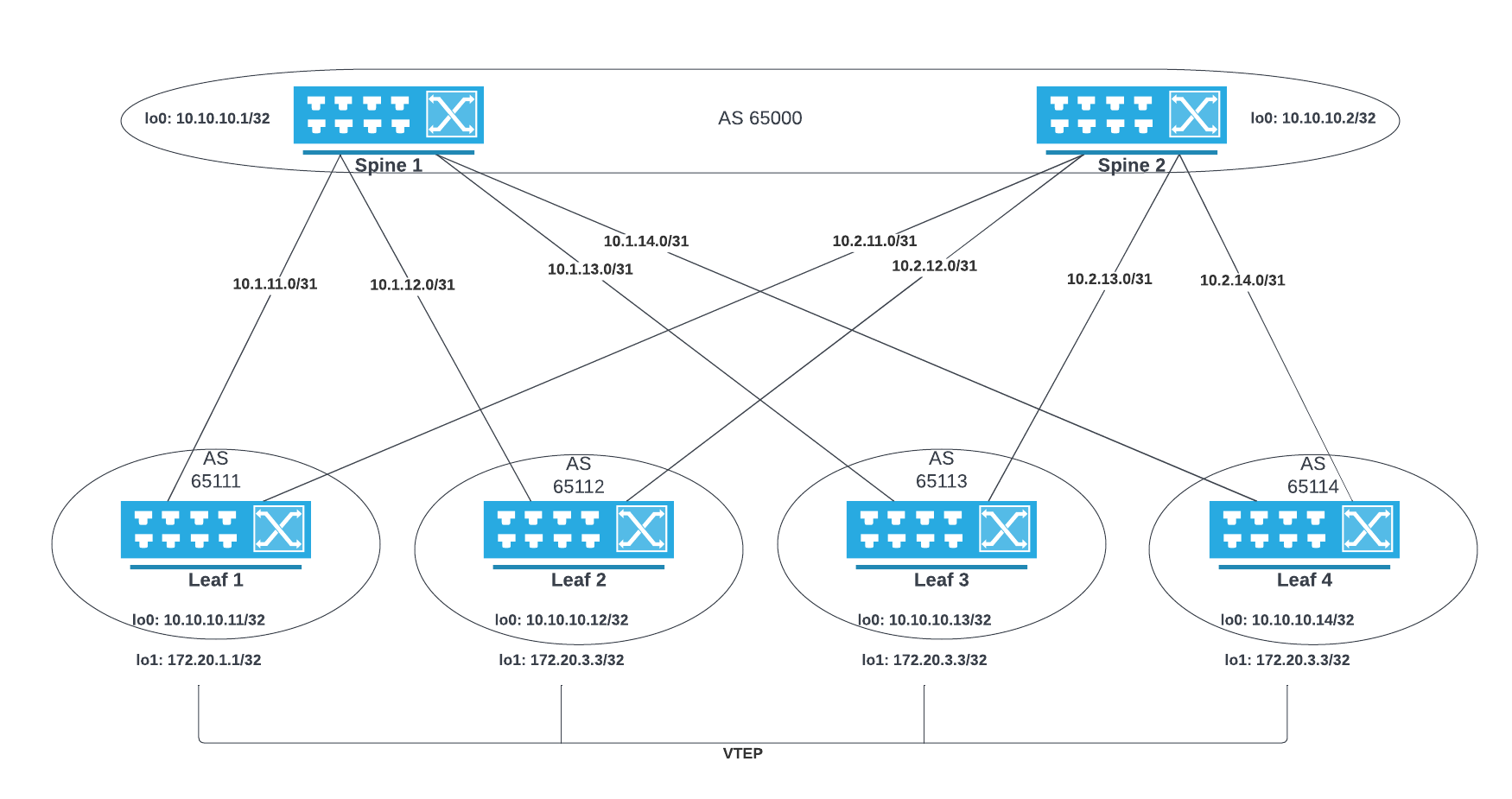
The automation piece will be using previous posts that cover DHCP Options, ZTP and AEM.
The phases of what will happen are;
1 DHCP Options
DHCP options direct a new and unconfigured switch to retrieve the file config-ztp-fix.cfg
I have discussed how I managed to do this in this post on a Checkpoint firewall. This file is giving IP connectivity on the management interface and adding an AEM event that will download, run a python script to understand if it is a spine or leaf switch and then reload itself to boot into the new config.
The config file will also download another python script that will be used later for the VXLAN configuration.
!
hostname provision-me
!
!
interface Management1
 description Provisioning-in-progress
 ip address dhcp

ip route 0.0.0.0/0 172.17.3.254
!
ip routing
event-handler ZTP1
 trigger on-startup-config
 action bash `FastCli -p 15 -c 'copy tftp:172.17.2.10/ZTP1.py flash:'`; `FastCli -p 15 -c 'copy tftp:172.17.2.10/AEM_VXLAN_DeviceReady.py flash:'`; python3 /mnt/flash/ZTP1.py; `FastCli -p 15 -c 'reload in 1 force reason ZTP1 provisioning'`
2 AEM Runs ZTP1 Python Script
This has been previously described in this post.
The AEM event will run the previously downloaded python script that determines if the switch is a spine or leaf based off the number of connections that are active. If there are four or more interfaces active, then it is a spine, if not it is a leaf. There may be some issues with this approach as the topology grows, but that is to be seen. For the lab topology of six switches, it is fine.
Now the script has determined the switch type, it will determine the number off LLDP connected port numbers and then create a management IP address of the switch type and number.
Hostnames & Management IPs
Spine 1: 172.17.3.101/24
Spine 2: 172.17.3.102/24
Leaf 1: 172.17.3.1/24
Leaf 2: 172.17.3.2/24
Leaf 1: 172.17.3.3/24
Leaf 2: 172.17.3.4/24
The python script will perform two more tasks, which are to remove the AEM config that started this process and to configure another AEM event that will run the VXLAN on reload. Now that the Python script has run, the switch is reloaded to boot into its new configuration.
There is a 60-second sleep timer on this script to allow all the devices to run the show lldp neoghbor command to be able to see each other. If the switch doesn’t see all f the switches that will be in the spine leaf topology, the hostname and IP will be different, causing a misconfiguration for the next stage.
#!/usr/bin/python

from collections import Counter
import subprocess
import sys
import time

# Delay for a 60 seconds
time.sleep(60)
output = subprocess.Popen(["/usr/bin/FastCli", "-c", "show lldp neigh"], stdout=subprocess.PIPE).communicate()[0]
out2 = list(iter(output.decode().split()))

# Count interfaces for spine
lookup = ["Ethernet1", "Ethernet2", "Ethernet3", "Ethernet4"]
all_counts = Counter(out2)
counts = {k: all_counts[k] for k in lookup}
print(f"all counts {all_counts}")
print(f"counts {counts}")
print(f"counts {counts.values()}")

# Determine if spine or leaf
for value in counts.values():
    print(value)
    if value >= 4:
        switch = "spine"
        break
    else:
        switch = "leaf"

# Determine spine number
for key, value in counts.items():
    if value >= 4:
        spine_num = key[8:]
        break

# Assing spine number hostname and IP
if switch == "spine":
    hostname = "spine{}".format(spine_num)
    ip_addr = "172.17.3.10{}".format(spine_num)

# Determine and assign leaf hostname and IP
if switch == "leaf":
    out3 = list(iter(output.decode().splitlines()))
    intnum = out3[8].split()[2][8:]
    hostname = "leaf{}".format(intnum)
    ip_addr = "172.17.3.{}".format(intnum)


# Add AEM for vxlan python script
# download python script from tftp
# create AEM


# Create startup-config file
f = open("/mnt/flash/startup-config", "w")
f.write("\nhostname {}".format(hostname))
f.write("\ninterface Management1\nip address {}/24".format(ip_addr))
f.write("\nip routing")
f.write("\nip route 0.0.0.0/0 172.17.3.254")
# Remove AEM ZTP1
f.write("\nno event-handler ZTP1")
# Add AEM for VXLAN
f.write("\nevent-handler VXLAN_CONFIG")
f.write("\ntrigger on-startup-config")
# Reload switch to run VXLAN AEM
f.write("\n action bash python3 /mnt/flash/AEM_VXLAN_DeviceReady.py; `FastCli -p 15 -c 'reload in 1 force reason VXLAN Configuration'`")

f.close()
sys.exit( 0 )
3 AEM Runs AEM_VXLAN_DeviceReady Python Script
I have previously written an AEM script that follows the same steps above, and then configures the XMPP feature using the hostname as the foundation for the XMPP username the switch will configure for itself. That can be found in this post.
This script will configure the spine and leaf switches with all the configuration to get VXLAN working. I have also added a VRF and 2 VLANs for a CUSTOMER1. This is used as a test tenant. All that is needed to be added is the VLANs on ports and some test PCs configuring to confirm network connectivity.
There is an important point to this script about the timing. The devices for a fresh topology must be booted around the same time. I have included a 60-second sleep timer in the script to allow all switches to boot and the `show lldp neighbor` command to run while they are all up. If this command runs when switches aren’t all in a fully operational mode, the configuration will not be correct.
import os
import subprocess
from collections import Counter
import time


def get_hostname():

    with open('/mnt/flash/startup-config') as f:
    # with open('startup-config') as f:
        startup = f.readlines()

    # Get Hostname
    for line in startup:
        if "hostname" in line:
            hostname = line.split("\n")[0][9:]
    return hostname


def get_lldp_interfaces():
    # run lldp bash command from python
    output = subprocess.Popen(["/usr/bin/FastCli", "-c", "show lldp neigh | i Ethernet"], stdout=subprocess.PIPE).communicate()[0]
    out2 = list(iter(output.split()))

    leaf_count = 0
    spine_count = 0
    switch_list = []
    for switch in out2:
        # print(switch.decode())
        if "leaf" in switch.decode():
            leaf_count + 1
            switch_list.append(switch.decode())
        elif "spine" in switch.decode():
            spine_count + 1
            switch_list.append(switch.decode())

    return switch_list


# Configure IP Addresses
def interface_config(hostname, switch_list):
    interface = []

    if "spine" in hostname:
        for switch in switch_list:
            eth = f"\
interface ethernet{switch[-1]}\n\
description LINK to {switch.upper()}.LAB\n\
mtu 9200\n\
logging event link-status\n\
no switchport\n\
ip address 10.{hostname[-1]}.1{switch[-1]}.0/31\n\
arp aging timeout 1200\n\
"
            interface.append(eth)

        lo0 = f"\
interface loopback 0\n\
description MANAGEMENT\n\
ip address 10.10.10.{hostname[-1]}/32\n\
"
        interface.extend([lo0])

    elif "leaf" in hostname:
        print(f"{hostname} Interface IP Addresses will be...")
        eth1 = f"10.{hostname[-1]}.1{hostname[-1]}.1/31"
        eth2 = f"10.{hostname[-1]}.1{hostname[-1]}.1/31"

        for switch in switch_list:
            eth = f"\
interface ethernet{switch[-1]}\n\
description LINK to {switch.upper()}.LAB\n\
mtu 9200\n\
logging event link-status\n\
no switchport\n\
ip address 10.{switch[-1]}.1{hostname[-1]}.1/31\n\
arp aging timeout 1200\n\
"
            interface.append(eth)

        lo0 = f"\
interface loopback 0\n\
description MANAGEMENT\n\
ip address 10.10.10.1{hostname[-1]}/32\n\
"

        lo1 = f"\
interface loopback 1\n\
description LOGICAL VTEP\n\
ip address 172.20.{hostname[-1]}.{hostname[-1]}/32\n\
"
        interface.extend([eth1, eth2, lo0, lo1])

    interface_text = "\n".join(interface)
    print(interface_text)

    return interface


# BGP Underlay Config
def underlay_config(hostname, switch_list):

# ['leaf1', 'leaf2', 'leaf3', 'leaf4']

    if "spine" in hostname:
        # Create BGP Config
        bgp_config = []
        asn = 'router bgp 65000'
        router_id = f" router-id 10.10.10.{hostname[-1]}"
        distance = ' distance bgp 20 200 200'

        bgp_config.insert(0,asn)
        bgp_config.insert(1,router_id)
        bgp_config.insert(2,distance)

        for switch in switch_list:
            neighbour = f"\
 neighbor LEAFS6511{switch[-1]} peer group\n\
 neighbor LEAFS6511{switch[-1]} remote-as 6511{switch[-1]}\n\
 neighbor 10.{hostname[-1]}.1{switch[-1]}.1 peer group LEAFS6511{switch[-1]}\n\
 neighbor 10.{hostname[-1]}.1{switch[-1]}.1 description LEAF{switch[-1]}.LAB\n\
"
            bgp_config.append(neighbour)

    elif "leaf" in hostname:
        # Create BGP Config
        bgp_config = []
        asn = f'router bgp 6511{hostname[-1]}'
        router_id = f" router-id 10.10.10.1{hostname[-1]}"
        distance = ' distance bgp 20 200 200'
        bgp_group = ' neighbor SPINE peer group'
        bgp_group_asn = ' neighbor SPINE remote-as 65000'
        redistribute = ' redistribute connected\n'

        bgp_config.insert(0,asn)
        bgp_config.insert(1,router_id)
        bgp_config.insert(2,distance)
        bgp_config.insert(3,bgp_group)
        bgp_config.insert(4,bgp_group_asn)

        # ['spine1', 'spine2', 'spine3', 'spine4']
        for switch in switch_list:
            neighbour = f"\
 neighbor 10.{switch[-1]}.1{hostname[-1]}.0 peer group SPINE\n\
 neighbor 10.{switch[-1]}.1{hostname[-1]}.0 description SPINE{switch[-1]}.LAB\n\
"
            bgp_config.append(neighbour)
        bgp_config.append(redistribute)

    return bgp_config


# VTEP Config
def vtep_config(hostname):
    vtep_config = []
    asn = f'router bgp 6511{hostname[-1]}'
    router_id = f" router-id 10.10.10.1{hostname[-1]}"
    vtep_net = f" network 172.20.{hostname[-1]}.{hostname[-1]}/32\n"

    vtep_config.insert(0,asn)
    vtep_config.insert(1,router_id)
    vtep_config.insert(2,vtep_net)

    return vtep_config


# VXLAN EVPN
def vxlan_config(hostname, switch_list):

    if "spine" in hostname:
        vtep_bgp = [
                    "router bgp 65000",
                    " neighbor EVPN peer group",
                    " neighbor EVPN next-hop-unchanged",
                    " neighbor EVPN update-source Loopback0",
                    " neighbor EVPN ebgp-multihop 3",
                    " neighbor EVPN send-community extended",
                    " !"
                    ]

        for switch in switch_list:
            neighbour1 = f" neighbor 10.10.10.1{switch[-1]} peer group EVPN"
            neighbour2 = f" neighbor 10.10.10.1{switch[-1]} remote-as 6511{switch[-1]}"
            neighbour3 = f" neighbor 10.10.10.1{switch[-1]} description LEAF{switch[-1]}"

            vtep_bgp.extend([neighbour1, neighbour2, neighbour3])

    elif "leaf" in hostname:
        vtep_bgp = [
                    "interface Vxlan1",
                    " vxlan source-interface Loopback1",
                    " vxlan udp-port 4789\n!",
                    f"router bgp 6511{hostname[-1]}",
                    " neighbor EVPN peer group",
                    " neighbor EVPN remote-as 65000",
                    " neighbor EVPN update-source Loopback0",
                    " neighbor EVPN ebgp-multihop 3",
                    " neighbor EVPN send-community extended",
                    "!"
                    ]

        for switch in switch_list:
            neighbour1 = f" neighbor 10.10.10.{switch[-1]} peer group EVPN"
            neighbour2 = f" neighbor 10.10.10.{switch[-1]} description SPINE{switch[-1]}.LAB"

            vtep_bgp.extend([neighbour1, neighbour2])

    redistribute = ' redistribute connected'
    evpn_family = '!\n address-family evpn'
    evpn_active = '  neighbor EVPN activate\n'
    service = f'service routing protocols model multi-agent'

    vtep_bgp.extend([redistribute, evpn_family, evpn_active])
    vtep_bgp.insert(0,service)

    return vtep_bgp


# VXLAN EVPN VRF
def vxlan_vrf_config(hostname):

    vrf_config = [
                "vrf instance CUSTOMER1",
                "ip routing vrf CUSTOMER1",
                "vlan 20",
                "vlan 30",
                "interface Vlan20",
                "no autostate",
                "vrf CUSTOMER1",
                "ip address virtual 192.168.20.1/24",
                "interface Vlan30",
                "no autostate",
                "vrf CUSTOMER1",
                "ip address virtual 192.168.30.1/24",
                "interface Vxlan1",
                "vxlan vlan 20 vni 10020",
                "vxlan vlan 30 vni 10030",
                "vxlan vrf CUSTOMER1 vni 20120",
                f"router bgp 6511{hostname[-1]}",
                " vlan 20",
                f"rd 10.10.10.1{hostname[-1]}:20",
                "route-target both 20:20",
                "redistribute learned",
                "vlan 30",
                f"rd 10.10.10.1{hostname[-1]}:30",
                "route-target both 30:30",
                "redistribute learned",
                "vrf CUSTOMER1",
                f"rd 10.10.10.1{hostname[-1]}:20120",
                "route-target import evpn 20:120",
                "route-target export evpn 20:120",
                "route-target import evpn 30:130",
                "route-target export evpn 30:130",
                "redistribute connected",
                ]

    return vrf_config


# Save to the special location, see AEM post


if __name__ == '__main__':
    # introduce a wait period of 1 minute before executing so all switches are up and have basic hostnames
    time.sleep(60)
    hostname = get_hostname()
    switch_list = get_lldp_interfaces()

    # Standard config for all switches
    interfaces = interface_config(hostname, switch_list)
    underlay = underlay_config(hostname, switch_list)

    # Leaf specific config
    if "leaf" in hostname:
        vtep = vtep_config(hostname)

    # VXLAN config spine and leaf
    vxlan = vxlan_config(hostname, switch_list)

    if "leaf" in hostname:
        vrf = vxlan_vrf_config(hostname)


    # Save config to file
    with open('/mnt/flash/vxlan_config.cfg', 'w') as f:
        f.write('\n'.join(interfaces))
        f.write('\n'.join(underlay))
        if "leaf" in hostname:
            f.write('\n'.join(vtep))
        f.write('\n'.join(vxlan))
        if "leaf" in hostname:
            f.write('\n'.join(vrf))
        # Remove VXLAN AEM
        f.write("\nno event-handler VXLAN_CONFIG")


    subprocess.Popen(["/usr/bin/FastCli", "-p 15", "-c", "copy flash:vxlan_config.cfg running-config"], stdout=subprocess.PIPE).communicate()[0]
    subprocess.Popen(["/usr/bin/FastCli", "-p 15", "-c", "wr mem"], stdout=subprocess.PIPE).communicate()[0]
    # Reload for multi-agent service
    subprocess.Popen(["/usr/bin/FastCli", "-p 15", "-c", "reload in 1 force reason VXLAN service multi-agent"], stdout=subprocess.PIPE).communicate()[0]
Testing
Test 1 – Three Switch Topology
For the first test, I have used the other half of my spine/leaf topology. This will be for three switches only. Spine2, Leaf3 and Leaf4 will be automatically configured from nothing. All configuration and scripts will be removed from them, and they will be booted up at the same time.
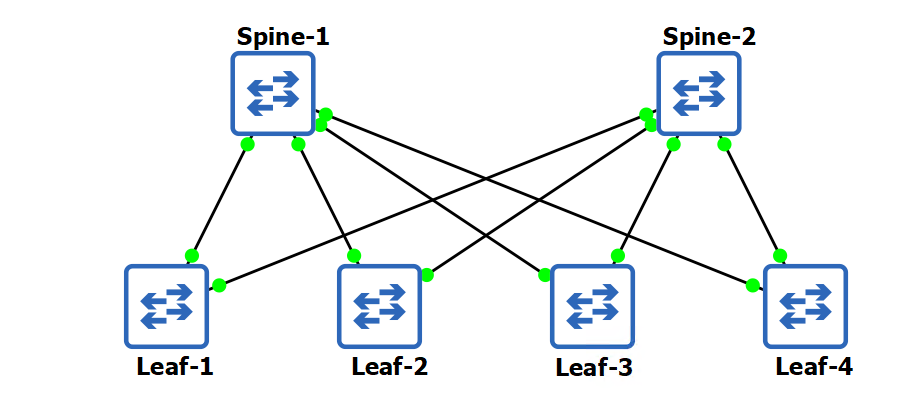
Below is a video of the process of the three switches booting up for the first time. There are a couple of reboots but once configured the only configuration left is to add the VLANs to the switchports and cable the Ubuntu PCs up.
Test 2 – Six Switch Topology Adding ECMP
I repeated the test buy this time used all six switches in the topology. The results were the same. Each spine and leaf got the correct hostname and IP. With this, they were able to configure all the elements correctly of my VXLAN topology, and I was then able to add in some PCs to ping between the leaf switches in the same network or different.
The next steps to this was to manually implement ECMP. This is only a single line in each switch’s BGP configuration. After testing, I can add it to the script.
ECMP allows for more than one route to be added to the routing table. This is useful for the VTEPs as they can use both spine switches, so have two links to utilise.
! Spines
router bgp 65000
maximum-paths 4 ecmp 64

! Leaf 1,2,3,4
router bgp 65111
maximum-paths 4 ecmp 64
router bgp 65112
maximum-paths 4 ecmp 64
router bgp 65113
maximum-paths 4 ecmp 64
router bgp 65114
maximum-paths 4 ecmp 64
The below output is taken from leaf1. This shows that BGP has two routes to the VTEPS via spine 1 and 2.
leaf1(config-router-bgp)#sh ip bgp
BGP routing table information for VRF default
Router identifier 10.10.10.11, local AS number 65111
Route status codes: s - suppressed, * - valid, > - active, E - ECMP head, e - ECMP
                    S - Stale, c - Contributing to ECMP, b - backup, L - labeled-unicast
                    % - Pending BGP convergence
Origin codes: i - IGP, e - EGP, ? - incomplete
RPKI Origin Validation codes: V - valid, I - invalid, U - unknown
AS Path Attributes: Or-ID - Originator ID, C-LST - Cluster List, LL Nexthop - Link Local Nexthop

          Network                Next Hop              Metric  AIGP       LocPref Weight  Path
 * >Ec    172.20.2.2/32          10.1.11.0             0       -          100     0       65000 65112 i
 *  ec    172.20.2.2/32          10.2.11.0             0       -          100     0       65000 65112 i
 *  E     172.20.2.2/32          10.1.12.1             0       -          100     0       65000 65112 i
 *  e     172.20.2.2/32          10.2.12.1             0       -          100     0       65000 65112 i
 * >Ec    172.20.3.3/32          10.1.11.0             0       -          100     0       65000 65113 i
 *  ec    172.20.3.3/32          10.2.11.0             0       -          100     0       65000 65113 i
 *  E     172.20.3.3/32          10.2.13.1             0       -          100     0       65000 65113 i
 *  e     172.20.3.3/32          10.1.13.1             0       -          100     0       65000 65113 i
 * >Ec    172.20.4.4/32          10.2.11.0             0       -          100     0       65000 65114 i
 *  ec    172.20.4.4/32          10.1.11.0             0       -          100     0       65000 65114 i
 *  E     172.20.4.4/32          10.1.14.1             0       -          100     0       65000 65114 i
 *  e     172.20.4.4/32          10.2.14.1             0       -          100     0       65000 65114 i
Next is the BGP routing table. This shows the VTEPs have the two routes installed into the routing table.
leaf1(config-router-bgp)#sh ip route bgp

VRF: default
Codes: C - connected, S - static, K - kernel,
       O - OSPF, IA - OSPF inter area, E1 - OSPF external type 1,
       E2 - OSPF external type 2, N1 - OSPF NSSA external type 1,
       N2 - OSPF NSSA external type2, B - BGP, B I - iBGP, B E - eBGP,
       R - RIP, I L1 - IS-IS level 1, I L2 - IS-IS level 2,
       O3 - OSPFv3, A B - BGP Aggregate, A O - OSPF Summary,
       NG - Nexthop Group Static Route, V - VXLAN Control Service,
       DH - DHCP client installed default route, M - Martian,
       DP - Dynamic Policy Route, L - VRF Leaked,
       G  - gRIBI, RC - Route Cache Route

 B E      10.1.12.0/31 [20/0] via 10.1.11.0, Ethernet1
 B E      10.1.13.0/31 [20/0] via 10.1.11.0, Ethernet1
 B E      10.1.14.0/31 [20/0] via 10.1.11.0, Ethernet1
 B E      10.2.12.0/31 [20/0] via 10.2.11.0, Ethernet2
 B E      10.2.13.0/31 [20/0] via 10.2.11.0, Ethernet2
 B E      10.2.14.0/31 [20/0] via 10.2.11.0, Ethernet2
 B E      10.10.10.1/32 [20/0] via 10.1.11.0, Ethernet1
 B E      10.10.10.2/32 [20/0] via 10.2.11.0, Ethernet2
 B E      10.10.10.12/32 [20/0] via 10.1.11.0, Ethernet1
                                via 10.2.11.0, Ethernet2
 B E      10.10.10.13/32 [20/0] via 10.1.11.0, Ethernet1
                                via 10.2.11.0, Ethernet2
 B E      10.10.10.14/32 [20/0] via 10.1.11.0, Ethernet1
                                via 10.2.11.0, Ethernet2
 B E      172.20.2.2/32 [20/0] via 10.1.11.0, Ethernet1
                               via 10.2.11.0, Ethernet2
 B E      172.20.3.3/32 [20/0] via 10.1.11.0, Ethernet1
                               via 10.2.11.0, Ethernet2
 B E      172.20.4.4/32 [20/0] via 10.1.11.0, Ethernet1
                               via 10.2.11.0, Ethernet2
Running a ping from 192.168.20.101 on leaf 1 to 192.168.30.101 on leaf 3 yields the following EVPN BGP output.
leaf1(config-router-bgp)#show bgp evpn route-type mac-ip
BGP routing table information for VRF default
Router identifier 10.10.10.11, local AS number 65111
Route status codes: s - suppressed, * - valid, > - active, E - ECMP head, e - ECMP
                    S - Stale, c - Contributing to ECMP, b - backup
                    % - Pending BGP convergence
Origin codes: i - IGP, e - EGP, ? - incomplete
AS Path Attributes: Or-ID - Originator ID, C-LST - Cluster List, LL Nexthop - Link Local Nexthop

          Network                Next Hop              Metric  LocPref Weight  Path
 * >     RD: 10.10.10.11:20 mac-ip 0cb0.c92c.e800
                                 -                     -       -       0       i
 * >     RD: 10.10.10.11:20 mac-ip 0cb0.c92c.e800 192.168.20.101
                                 -                     -       -       0       i
 * >Ec   RD: 10.10.10.14:30 mac-ip 0cb0.c938.2d00
                                 172.20.4.4            -       100     0       65000 65114 i
 *  ec   RD: 10.10.10.14:30 mac-ip 0cb0.c938.2d00
                                 172.20.4.4            -       100     0       65000 65114 i
 * >Ec   RD: 10.10.10.14:30 mac-ip 0cb0.c938.2d00 192.168.30.102
                                 172.20.4.4            -       100     0       65000 65114 i
 *  ec   RD: 10.10.10.14:30 mac-ip 0cb0.c938.2d00 192.168.30.102
                                 172.20.4.4            -       100     0       65000 65114 i
 * >Ec   RD: 10.10.10.14:20 mac-ip 0cb0.c966.ce00
                                 172.20.4.4            -       100     0       65000 65114 i
 *  ec   RD: 10.10.10.14:20 mac-ip 0cb0.c966.ce00
                                 172.20.4.4            -       100     0       65000 65114 i
 * >Ec   RD: 10.10.10.14:20 mac-ip 0cb0.c966.ce00 192.168.20.102
                                 172.20.4.4            -       100     0       65000 65114 i
 *  ec   RD: 10.10.10.14:20 mac-ip 0cb0.c966.ce00 192.168.20.102
                                 172.20.4.4            -       100     0       65000 65114 i
 * >Ec   RD: 10.10.10.13:30 mac-ip 0cb0.c996.2000
                                 172.20.3.3            -       100     0       65000 65113 i
 *  ec   RD: 10.10.10.13:30 mac-ip 0cb0.c996.2000
                                 172.20.3.3            -       100     0       65000 65113 i
 * >Ec   RD: 10.10.10.13:30 mac-ip 0cb0.c996.2000 192.168.30.101
                                 172.20.3.3            -       100     0       65000 65113 i
 *  ec   RD: 10.10.10.13:30 mac-ip 0cb0.c996.2000 192.168.30.101
                                 172.20.3.3            -       100     0       65000 65113 i