
Here I have a collection of commands for reference. Ansible can be run using ad-hoc commands or playbooks.
Ad-hoc commands are all in the single command. Raw commands are entered in the Ad-hoc mode and are the commands that would usually be entered into the CLI of the network device or server.
Playbooks are a series of plays to commands that will be run and on which devices. They can have variables in and get fairly complex.
This post will be a quick reference guide for Ansible commands on my Cisco lab.
All of the playbooks can be found on my Github
Quick Contents
Ad-hoc Commands
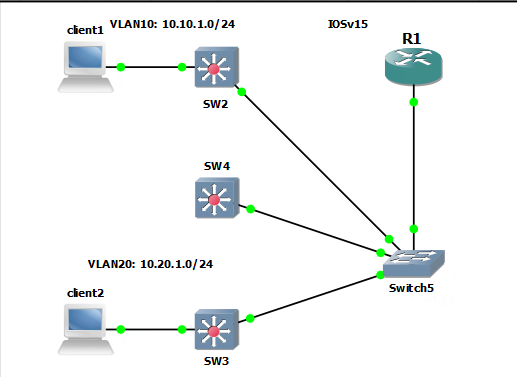
My Ansible inventory file has 4 devices that are split into two groups. There are only IP addresses as I am not using any DNS for the lab. In a larger environment have DNS and device hostnames is a better idea.
[lab_core]
172.16.1.104

[lab_access]
172.16.1.102
172.16.1.103
172.16.1.124
Switch2 that has the IP address of 172.16.1.102 is on an older version of IOS that supports DH1 and SHA1 only. Meaning that I can SSH to it. The fix I found that worked for me was to use paramiko. This can be set when running the Ansible command “-c paramiko”.
ansible-playbook -i inventory/router_switch_inv.ini playbooks/pb_showmac -u admin -k -c paramikoRun commands for all devices in the inventory
ansible all -i ./router_switch_inv.ini -m raw -a "show ip int br" -u admin -kRun commands for the group lab_access in the inventory
ansible lab_access -i ./router_switch_inv.ini -m raw -a "show ip int br" -u admin -kRun commands for a group, and grep for the “show version” uptime. Output included.
$ ansible lab_core -i ./router_switch_inv.ini -m raw -a "show version" -u admin -k | grep uptime
SSH password:
R1 uptime is 1 day, 3 hours, 49 minutes
There is an option to redirect the output into a text file instead of displaying it to the terminal.
ansible lab_access -i ./router_switch_inv.ini -m raw -a "show run" -u admin -k | grep username > usernames.txtPlaybooks
The playbooks are a way of running more than just single commands. There can be multiple plays, tasks and logic applied.
All of these playbooks can be found on my Github
Basic Playbook
I have tested a basic playbook that just runs the command “show mac address table”. This is a raw command as was performed in the ad hoc mode.
My router 172.16.1.104 does not have a MAC table as it is not a switch and so has an error.
This is where groups come in handy.
$ ansible-playbook -i inventory/router_switch_inv.ini playbooks/pb1_basic.yml -u admin -k -c paramiko
SSH password:

PLAY [Get MAC address table information] **************************************************************************

TASK [show MAC address table] *************************************************************************************
changed: [172.16.1.102]
changed: [172.16.1.103]
changed: [172.16.1.124]
changed: [172.16.1.104]

TASK [debug] ******************************************************************************************************
ok: [172.16.1.104] => {
    "print_output.stdout_lines": [
        "",
        "Line has invalid autocommand \"show mac address-table\""
    ]
}
ok: [172.16.1.102] => {
    "print_output.stdout_lines": [
        "          Mac Address Table",
        "-------------------------------------------",
        "",
        "Vlan    Mac Address       Type        Ports",
        "----    -----------       --------    -----",
        "   1    0cec.3167.8301    DYNAMIC     Et0/0",
        "Total Mac Addresses for this criterion: 1"
    ]
}
ok: [172.16.1.103] => {
    "print_output.stdout_lines": [
        "          Mac Address Table",
        "-------------------------------------------",
        "",
        "Vlan    Mac Address       Type        Ports",
        "----    -----------       --------    -----",
        "   1    0cec.3167.8301    DYNAMIC     Et0/0",
        "Total Mac Addresses for this criterion: 1"
    ]
}
ok: [172.16.1.124] => {
    "print_output.stdout_lines": [
        "          Mac Address Table",
        "-------------------------------------------",
        "",
        "Vlan    Mac Address       Type        Ports",
        "----    -----------       --------    -----",
        "   1    0cec.3167.8301    DYNAMIC     Et0/0",
        "Total Mac Addresses for this criterion: 1"
    ]
}

PLAY RECAP ********************************************************************************************************
172.16.1.102               : ok=2    changed=1    unreachable=0    failed=0    skipped=0    rescued=0    ignored=0
172.16.1.103               : ok=2    changed=1    unreachable=0    failed=0    skipped=0    rescued=0    ignored=0
172.16.1.104               : ok=2    changed=1    unreachable=0    failed=0    skipped=0    rescued=0    ignored=0
172.16.1.124               : ok=2    changed=1    unreachable=0    failed=0    skipped=0    rescued=0    ignored=0
The playbook to get this output is show below
---
- name: Get MAC address table information
  hosts: all
  gather_facts: false


  tasks:
    - name: show MAC address table
      raw: "show mac address-table"
      register: print_output
    - debug: var=print_output.stdout_lines
IOS Show Command Playbook
This playbook uses the IOS command module which needs to first be installed. Documentation can be found here.
This is for running “show” type commands only.
The install is run in the terminal.
ansible-galaxy collection install cisco.ios
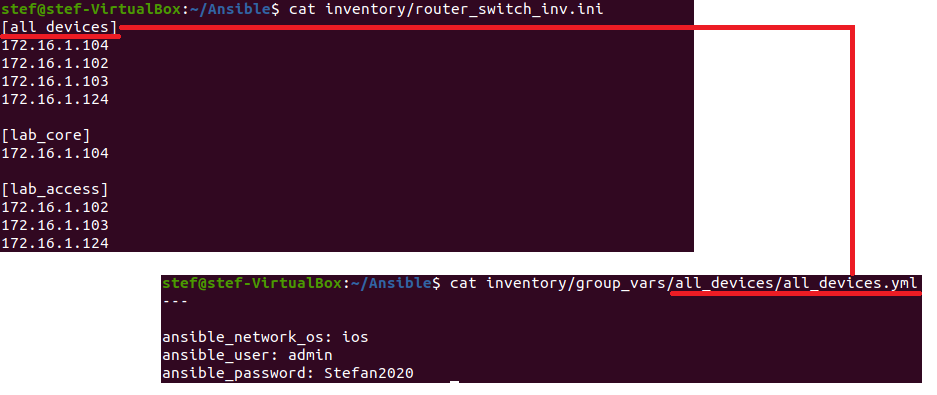
I also need to update my inventory file to group all the devices together in a single group. This is done to use group variables. The variables can hold things such as credentials and device types.
Original Inventory
[lab_core]
172.16.1.104

[lab_access]
172.16.1.102
172.16.1.103
172.16.1.124
New Inventory
[all_devices]
172.16.1.104
172.16.1.102
172.16.1.103
172.16.1.124

[lab_core]
172.16.1.104

[lab_access]
172.16.1.102
172.16.1.103
172.16.1.124
The name of the groups are used in the group variables is used in the group variable directory and the file name. This is very important otherwise it will not work. See the diagram.
Another change I have made is to the default inventory file. This is now pointing to my inventory file.
The change is made in the ansible.cfg file located in /etc/ansible.
These are the two line I added
[defaults]
inventory	= /home/stef/Ansible/inventory/router_switch_inv.ini
The good thing is the the “-c paramiko” flag still works so access to all fours devices still. and the command is much smaller.
ansible-playbook playbooks/pb2_ioscommand.yml -c paramiko
PLAY [show version and other user level commands] ********************************************************************************************
TASK [run multiple commands on remote nodes] *************************************************************************************************
[WARNING]: ansible-pylibssh not installed, falling back to paramiko
[WARNING]: ansible-pylibssh not installed, falling back to paramiko
[WARNING]: ansible-pylibssh not installed, falling back to paramiko
[WARNING]: ansible-pylibssh not installed, falling back to paramiko
ok: [172.16.1.102]
ok: [172.16.1.103]
ok: [172.16.1.124]
ok: [172.16.1.104]
TASK [debug] *********************************************************************************************************************************
ok: [172.16.1.102] => {
"print_output.stdout_lines": [
[
"Cisco IOS Software, Linux Software (I86BI_LINUX_L2-UPK9-M), Experimental Version 15.0(20121031:162848) [dstivers-oct25-2012-golden_spike 103]",
"Copyright (c) 1986-2012 by Cisco Systems, Inc.",
"Compiled Wed 31-Oct-12 09:42 by dstivers",
"",
"ROM: Bootstrap program is Linux",
"",
" SW2 uptime is 2 hours, 49 minutes",
"System returned to ROM by reload at 0",
"System image file is \"unix:/opt/gns3/images/IOU/i86bi-linux-l2-upk9-15.0b.bin\"",
"Last reload reason: Unknown reason",
"",
"",
"",
"This product contains cryptographic features and is subject to United",
"States and local country laws governing import, export, transfer and",
"use. Delivery of Cisco cryptographic products does not imply",
"third-party authority to import, export, distribute or use encryption.",
"Importers, exporters, distributors and users are responsible for",
"compliance with U.S. and local country laws. By using this product you",
"agree to comply with applicable laws and regulations. If you are unable",
"to comply with U.S. and local laws, return this product immediately.",
"",
"A summary of U.S. laws governing Cisco cryptographic products may be found at:",
"http://www.cisco.com/wwl/export/crypto/tool/stqrg.html",
"",
"If you require further assistance please contact us by sending email to",
"export@cisco.com.",
"",
"Linux Unix (Intel-x86) processor with 202485K bytes of memory.",
"Processor board ID 2048002",
"16 Ethernet interfaces",
"16K bytes of NVRAM.",
"",
"Configuration register is 0x0"
],
[
"Interface IP-Address OK? Method Status Protocol",
"Ethernet0/0 unassigned YES unset up up ",
"Ethernet0/1 unassigned YES unset up up ",
"Ethernet0/2 unassigned YES unset up up ",
"Ethernet0/3 unassigned YES unset up up ",
"Ethernet1/0 unassigned YES unset up up ",
"Ethernet1/1 unassigned YES unset up up ",
"Ethernet1/2 unassigned YES unset up up ",
"Ethernet1/3 unassigned YES unset up up ",
"Ethernet2/0 unassigned YES unset up up ",
"Ethernet2/1 unassigned YES unset up up ",
"Ethernet2/2 unassigned YES unset up up ",
"Ethernet2/3 unassigned YES unset up up ",
"Ethernet3/0 unassigned YES unset up up ",
"Ethernet3/1 unassigned YES unset up up ",
"Ethernet3/2 unassigned YES unset up up ",
"Ethernet3/3 unassigned YES unset up up ",
"Vlan1 172.16.1.102 YES NVRAM up up"
]
]
}
ok: [172.16.1.124] => {
"print_output.stdout_lines": [
[
"Cisco IOS Software, Solaris Software (I86BI_LINUXL2-IPBASEK9-M), Experimental Version 15.1(20130726:213425) [dstivers-july26-2013-team_track 105]",
"Copyright (c) 1986-2013 by Cisco Systems, Inc.",
"Compiled Fri 26-Jul-13 16:12 by dstivers",
"",
"ROM: Bootstrap program is Linux",
"",
"SW4 uptime is 3 hours, 34 minutes",
"System returned to ROM by reload at 0",
"System image file is \"unix:/opt/gns3/images/IOU/i86bi-linux-l2-ipbasek9-15.1g.bin\"",
"Last reload reason: Unknown reason",
"",
"",
"",
"This product contains cryptographic features and is subject to United",
"States and local country laws governing import, export, transfer and",
"use. Delivery of Cisco cryptographic products does not imply",
"third-party authority to import, export, distribute or use encryption.",
"Importers, exporters, distributors and users are responsible for",
"compliance with U.S. and local country laws. By using this product you",
"agree to comply with applicable laws and regulations. If you are unable",
"to comply with U.S. and local laws, return this product immediately.",
"",
"A summary of U.S. laws governing Cisco cryptographic products may be found at:",
"http://www.cisco.com/wwl/export/crypto/tool/stqrg.html",
"",
"If you require further assistance please contact us by sending email to",
"export@cisco.com.",
"",
"Linux Unix (Intel-x86) processor with 199474K bytes of memory.",
"Processor board ID 2048005",
"16 Ethernet interfaces",
"1 Virtual Ethernet interface",
"16K bytes of NVRAM.",
"",
"Configuration register is 0x0"
],
[
"Interface IP-Address OK? Method Status Protocol",
"Ethernet0/0 unassigned YES unset up up ",
"Ethernet0/1 unassigned YES unset up up ",
"Ethernet0/2 unassigned YES unset up up ",
"Ethernet0/3 unassigned YES unset up up ",
"Ethernet1/0 unassigned YES unset up up ",
"Ethernet1/1 unassigned YES unset up up ",
"Ethernet1/2 unassigned YES unset up up ",
"Ethernet1/3 unassigned YES unset up up ",
"Ethernet2/0 unassigned YES unset up up ",
"Ethernet2/1 unassigned YES unset up up ",
"Ethernet2/2 unassigned YES unset up up ",
"Ethernet2/3 unassigned YES unset up up ",
"Ethernet3/0 unassigned YES unset up up ",
"Ethernet3/1 unassigned YES unset up up ",
"Ethernet3/2 unassigned YES unset up up ",
"Ethernet3/3 unassigned YES unset up up ",
"Vlan1 172.16.1.124 YES manual up up"
]
]
}
ok: [172.16.1.104] => {
"print_output.stdout_lines": [
[
"Cisco IOS Software, 7200 Software (C7200-ADVIPSERVICESK9-M), Version 15.2(4)S5, RELEASE SOFTWARE (fc1)",
"Technical Support: http://www.cisco.com/techsupport",
"Copyright (c) 1986-2014 by Cisco Systems, Inc.",
"Compiled Thu 20-Feb-14 06:51 by prod_rel_team",
"",
"ROM: ROMMON Emulation Microcode",
"BOOTLDR: 7200 Software (C7200-ADVIPSERVICESK9-M), Version 15.2(4)S5, RELEASE SOFTWARE (fc1)",
"",
"R1 uptime is 3 hours, 6 minutes",
"System returned to ROM by unknown reload cause - suspect boot_data[BOOT_COUNT] 0x0, BOOT_COUNT 0, BOOTDATA 19",
"System image file is \"tftp://255.255.255.255/unknown\"",
"Last reload type: Normal Reload",
"Last reload reason: unknown reload cause - suspect boot_data[BOOT_COUNT] 0x0, BOOT_COUNT 0, BOOTDATA 19",
"",
"",
"",
"This product contains cryptographic features and is subject to United",
"States and local country laws governing import, export, transfer and",
"use. Delivery of Cisco cryptographic products does not imply",
"third-party authority to import, export, distribute or use encryption.",
"Importers, exporters, distributors and users are responsible for",
"compliance with U.S. and local country laws. By using this product you",
"agree to comply with applicable laws and regulations. If you are unable",
"to comply with U.S. and local laws, return this product immediately.",
"",
"A summary of U.S. laws governing Cisco cryptographic products may be found at:",
"http://www.cisco.com/wwl/export/crypto/tool/stqrg.html",
"",
"If you require further assistance please contact us by sending email to",
"export@cisco.com.",
"",
"Cisco 7206VXR (NPE400) processor (revision A) with 491520K/32768K bytes of memory.",
"Processor board ID 4279256517",
"R7000 CPU at 150MHz, Implementation 39, Rev 2.1, 256KB L2 Cache",
"6 slot VXR midplane, Version 2.1",
"",
"Last reset from power-on",
"",
"PCI bus mb0_mb1 (Slots 0, 1, 3 and 5) has a capacity of 600 bandwidth points.",
"Current configuration on bus mb0_mb1 has a total of 240 bandwidth points. ",
"This configuration is within the PCI bus capacity and is supported. ",
"",
"PCI bus mb2 (Slots 2, 4, 6) has a capacity of 600 bandwidth points.",
"Current configuration on bus mb2 has a total of 0 bandwidth points ",
"This configuration is within the PCI bus capacity and is supported. ",
"",
"Please refer to the following document \"Cisco 7200 Series Port Adaptor",
"Hardware Configuration Guidelines\" on Cisco.com <http://www.cisco.com>",
"for c7200 bandwidth points oversubscription and usage guidelines.",
"",
"",
"4 Ethernet interfaces",
"1 FastEthernet interface",
"509K bytes of NVRAM.",
"",
"8192K bytes of Flash internal SIMM (Sector size 256K).",
"Configuration register is 0x2102"
],
[
"Interface IP-Address OK? Method Status Protocol",
"FastEthernet0/0 172.16.1.104 YES NVRAM up up ",
"Ethernet1/0 unassigned YES NVRAM up up ",
"Ethernet1/0.10 10.10.1.1 YES NVRAM up up ",
"Ethernet1/0.20 10.20.1.1 YES NVRAM up up ",
"Ethernet1/1 unassigned YES NVRAM administratively down down ",
"Ethernet1/2 unassigned YES NVRAM administratively down down ",
"Ethernet1/3 unassigned YES NVRAM administratively down down"
]
]
}
ok: [172.16.1.103] => {
"print_output.stdout_lines": [
[
"Cisco IOS Software, Solaris Software (I86BI_LINUXL2-IPBASEK9-M), Experimental Version 15.1(20130726:213425) [dstivers-july26-2013-team_track 105]",
"Copyright (c) 1986-2013 by Cisco Systems, Inc.",
"Compiled Fri 26-Jul-13 16:12 by dstivers",
"",
"ROM: Bootstrap program is Linux",
"",
"SW3 uptime is 3 hours, 33 minutes",
"System returned to ROM by reload at 0",
"System image file is \"unix:/opt/gns3/images/IOU/i86bi-linux-l2-ipbasek9-15.1g.bin\"",
"Last reload reason: Unknown reason",
"",
"",
"",
"This product contains cryptographic features and is subject to United",
"States and local country laws governing import, export, transfer and",
"use. Delivery of Cisco cryptographic products does not imply",
"third-party authority to import, export, distribute or use encryption.",
"Importers, exporters, distributors and users are responsible for",
"compliance with U.S. and local country laws. By using this product you",
"agree to comply with applicable laws and regulations. If you are unable",
"to comply with U.S. and local laws, return this product immediately.",
"",
"A summary of U.S. laws governing Cisco cryptographic products may be found at:",
"http://www.cisco.com/wwl/export/crypto/tool/stqrg.html",
"",
"If you require further assistance please contact us by sending email to",
"export@cisco.com.",
"",
"Linux Unix (Intel-x86) processor with 199474K bytes of memory.",
"Processor board ID 2048003",
"16 Ethernet interfaces",
"1 Virtual Ethernet interface",
"16K bytes of NVRAM.",
"",
"Configuration register is 0x0"
],
[
"Interface IP-Address OK? Method Status Protocol",
"Ethernet0/0 unassigned YES unset up up ",
"Ethernet0/1 unassigned YES unset up up ",
"Ethernet0/2 unassigned YES unset up up ",
"Ethernet0/3 unassigned YES unset up up ",
"Ethernet1/0 unassigned YES unset up up ",
"Ethernet1/1 unassigned YES unset up up ",
"Ethernet1/2 unassigned YES unset up up ",
"Ethernet1/3 unassigned YES unset up up ",
"Ethernet2/0 unassigned YES unset up up ",
"Ethernet2/1 unassigned YES unset up up ",
"Ethernet2/2 unassigned YES unset up up ",
"Ethernet2/3 unassigned YES unset up up ",
"Ethernet3/0 unassigned YES unset up up ",
"Ethernet3/1 unassigned YES unset up up ",
"Ethernet3/2 unassigned YES unset up up ",
"Ethernet3/3 unassigned YES unset up up ",
"Vlan1 172.16.1.103 YES NVRAM up up"
]
]
}
PLAY RECAP ***********************************************************************************************************************************
172.16.1.102 : ok=2 changed=0 unreachable=0 failed=0 skipped=0 rescued=0 ignored=0
172.16.1.103 : ok=2 changed=0 unreachable=0 failed=0 skipped=0 rescued=0 ignored=0
172.16.1.104 : ok=2 changed=0 unreachable=0 failed=0 skipped=0 rescued=0 ignored=0
172.16.1.124 : ok=2 changed=0 unreachable=0 failed=0 skipped=0 rescued=0 ignored=0
Magic Variable Playbook
A magic variable is a way of getting variables into the playbook. Jinja is used, this is a way of getting python like syntax. I have used this in flask for the HTML templates.
This playbook is going to connect to the devices, run “show version”, print the output to the console and then save that output as the inventory hostname. In my case the IP address of each device.
---
- name: Backup show version and other user level commands
  hosts: all
  gather_facts: false
  connection: network_cli

  tasks:
    - name: Show an save version ./output
      ios_command:
        commands:
          - show version

      register: print_output

    -  debug: var=print_output.stdout_lines

    - name: save output to a file
      copy: content="{{ print_output.stdout[0] }}" dest="./output/{{ inventory_hostname }}.txt"
The output as expected…
$ ansible-playbook -c paramiko playbooks/pb3_magicvars.yml

$ ls output/
172.16.1.102.txt  172.16.1.103.txt  172.16.1.104.txt  172.16.1.124.txt

$ head output/172.16.1.102.txt
Cisco IOS Software, Linux Software (I86BI_LINUX_L2-UPK9-M), Experimental Version 15.0(20121031:162848) [dstivers-oct25-2012-golden_spike 103]
Copyright (c) 1986-2012 by Cisco Systems, Inc.
Compiled Wed 31-Oct-12 09:42 by dstivers

ROM: Bootstrap program is Linux

 SW2 uptime is 3 hours, 9 minutes
System returned to ROM by reload at 0
System image file is "unix:/opt/gns3/images/IOU/i86bi-linux-l2-upk9-15.0b.bin"
Cisco Facts Playbook
Gathering facts is a default option that can be performed on Linux servers. For network devices they need an additional install for Ansible to know what to look for.
This is the Cisco facts module, use the examples to get different facts out. The examples go into a task. The playbooks below show examples of the output being saved as a JSON file for easy manipulation.
---
- name: Gather legacy and resource facts
  hosts: all_devices
  gather_facts: false
  connection: network_cli

  tasks:
    - name: ssh facts
      register: iosfacts_out
      ios_facts:
    - copy: content="{{ iosfacts_out | to_nice_json }}" dest="output/{{inventory_hostname}}_iosfacts.json"
stef@stef-VirtualBox:~/Ansible$ansible-playbook -c paramiko playbooks/pb4_iosfacts.yml

stef@stef-VirtualBox:~/Ansible$ ls output/
172.16.1.102_iosfacts.json  172.16.1.103_iosfacts.json  172.16.1.104_iosfacts.json  172.16.1.124_iosfacts.json
stef@stef-VirtualBox:~/Ansible$ cat output/172.16.1.102_iosfacts.json
{
    "ansible_facts": {
        "ansible_net_api": "cliconf",
        "ansible_net_gather_network_resources": [],
        "ansible_net_gather_subset": [
            "default"
        ],
        "ansible_net_hostname": " SW2",
        "ansible_net_image": "unix:/opt/gns3/images/IOU/i86bi-linux-l2-upk9-15.0b.bin",
        "ansible_net_iostype": "IOS",
        "ansible_net_python_version": "3.8.10",
        "ansible_net_serialnum": "2048002",
        "ansible_net_system": "ios",
        "ansible_net_version": "15.0(20121031:162848)",
        "ansible_network_resources": {}
    },
    "changed": false,
    "failed": false
A second playbook to get the idea of using the examples to get different output. This playbook gets interface facts and running config. Everything but the hardware.
---
- name: Gather legacy and resource facts
  hosts: all_devices
  gather_facts: false
  connection: network_cli

  tasks:

    - name: Gather legacy and resource facts
      register: iosfacts_out
      cisco.ios.ios_facts:
        gather_subset:
        - '!hardware'
    - copy: content="{{ iosfacts_out | to_nice_json }}" dest="output/{{inventory_hostname}}_iosfacts2.json"
stef@stef-VirtualBox:~/Ansible$ ansible-playbook -c paramiko playbooks/pb5_iosfacts2.yml
stef@stef-VirtualBox:~/Ansible$ head output/172.16.1.102_iosfacts2.json
{
"ansible_facts": {
"ansible_net_all_ipv4_addresses": [
"172.16.1.102"
],
"ansible_net_all_ipv6_addresses": [],
"ansible_net_api": "cliconf",
"ansible_net_config": "Building configuration...\n\nCurrent configuration : 1799 bytes\n!\nversion 15.0\nservice timestamps debug datetime msec\nservice timestamps log datetime msec\nno service password-encryption\n!\nhostname SW2\n!\nboot-start-marker\nboot-end-marker\n!\n!\nlogging discriminator EXCESS severity drops 6 msg-body drops EXCESSCOLL \nlogging buffered 50000\nno logging console\nenable secret 5 $1$bqnu$ZgPpJtmAWhtm.XOeqqmGl1\n!\nusername admin password 0 Stefan2020\naaa new-model\n!\n!\n!\n!\n!\naaa session-id common\nno ip icmp rate-limit unreachable\n!\nip cef\nno ip domain-lookup\nip domain-name scrap.lab\n!\nno ipv6 cef\n!\n!\n!\nspanning-tree mode pvst\nspanning-tree extend system-id\n!\nvlan internal allocation policy ascending\n!\nip tcp synwait-time 5\nip ssh version 2\n! \n!\n!\n!\n!\n!\ninterface Ethernet0/0\n switchport mode access\n duplex auto\n!\ninterface Ethernet0/1\n switchport access vlan 10\n switchport mode access\n duplex auto\n!\ninterface Ethernet0/2\n duplex auto\n!\ninterface Ethernet0/3\n duplex auto\n!\ninterface Ethernet1/0\n duplex auto\n!\ninterface Ethernet1/1\n duplex auto\n!\ninterface Ethernet1/2\n duplex auto\n!\ninterface Ethernet1/3\n duplex auto\n!\ninterface Ethernet2/0\n duplex auto\n!\ninterface Ethernet2/1\n duplex auto\n!\ninterface Ethernet2/2\n duplex auto\n!\ninterface Ethernet2/3\n duplex auto\n!\ninterface Ethernet3/0\n duplex auto\n!\ninterface Ethernet3/1\n duplex auto\n!\ninterface Ethernet3/2\n duplex auto\n!\ninterface Ethernet3/3\n switchport trunk encapsulation dot1q\n switchport mode trunk\n duplex auto\n!\ninterface Vlan1\n ip address 172.16.1.102 255.255.255.0\n!\n!\nip forward-protocol nd\nno ip http server\nip route 0.0.0.0 0.0.0.0 172.16.1.1\n!\n!\n!\n!\n!\ncontrol-plane\n!\n!\nline con 0\n exec-timeout 0 0\n privilege level 15\n logging synchronous\nline aux 0\n exec-timeout 0 0\n privilege level 15\n logging synchronous\nline vty 0 4\n privilege level 15\n password Stefan2020\n transport input ssh\n!\nend",
"ansible_net_gather_network_resources": [],
"ansible_net_gather_subset": [
Playbook IOS Configuration – Single Device
This, like the IOS command playbook requires an Ansible module. This is the same as was installed previously.
ansible-galaxy collection install cisco.iosThe biggest hurdle to overcome for this is getting past the enable password. There are three methods I have used to do this.
The first is probably the most simple, configure SSH users logging in with privilege level 15 as part of the standard device config.
The second is to store the passwords in the group_vars file. This can be revisited later for Ansible vault.
$ cat inventory/group_vars/all_devices/all_devices.yml
---

ansible_network_os: ios
ansible_user: admin
ansible_password: Stefan2020
ansible_become: yes
ansible_become_method: enable
ansible_become_password: cisco
The third is to ask for the credentials when running the Ansible playbook, and having the “become” modules in the playbook task. I have used this one as a demonstration. The playbook logins into R1 172.16.1.104 and configures OSPF for all addresses.
$ ansible-playbook playbooks/pb6_iosconfig.yml --ask-become-pass---
- name: Manage GNS3 devices
hosts: 172.16.1.104
gather_facts: false
connection: network_cli
tasks:
- name: enable ospf
ios_config:
parents: router ospf 1
lines:
- network 0.0.0.0 255.255.255.255 area 0
become: yes
become_method: enable
register: print_output
- debug: var=print_output
Playbook IOS Configuration – Multi Device
Each play in a playbook can be performed on a set of devices. These can be groups, single or multiple hosts.
Group named lab_core
---
- name: Play1 - Manage GNS3 devices
  hosts: lab_core
Single device, as appears in the inventory
---
- name: Play1 - Manage GNS3 devices
  hosts: 172.16.1.102
Multiple device, as they appear in the inventory
---
- name: Play1 - Manage GNS3 devices
  hosts: 172.16.1.102, 172.16.1.104, 172.16.1.124
Playbook IOS Configuration – Multiple Tasks
There can be multiple tasks in a single playbook that performs different functions for the same devices or a subset of them. In this playbook there tare two tasks to configure basic commands on the switches of the lab topology.
$ ansible-playbook -c paramiko playbooks/pb8_multitasks.yml ---
- name: Manage GNS3 devices
hosts: lab_access
gather_facts: false
connection: network_cli
tasks:
- name: TASK1 - Global config settings
ios_config:
lines:
- vtp mode transparent
- spanning-tree mode rapid-pvst
- errdisable recovery cause all
- port-channel load-balance src-dst-ip
- ip name-server 8.8.8.8
- snmp-server community python1 RO
- snmp-server community python2 RW
become: yes
become_method: enable
register: print_output
- debug: var=print_output
- name: TASK2 - Global config settings
ios_config:
parents: ipv6 nd raguard policy HOST_POLICY
lines:
- ntp server 87.81.181.2
- ntp update-calendar
- clock timezone PST -8
- clock summer-time PDT recurring
- service timestamps debug datetime msec localtime
- service timestamps log datetime msec localtime
become: yes
become_method: enable
register: print_output
- debug: var=print_output Playbook IOS Configuration – Multiple Plays
There can be multiple plays in a single playbook. Each play has its own set of hosts to select and tasks associated with that play.
I have moved the enable password into the group_vars file for these plays.
$ tree
.
├── default ansible hosts
├── inventory
│             ├── group_vars
│             │             └── all_devices
│             │                 └── all_devices.yml
│             ├── router_switch_inv.ini
│             └── usernames.txt
├── output
│             ├── 172.16.1.102_iosfacts2.json
│             ├── 172.16.1.103_iosfacts2.json
│             ├── 172.16.1.104_iosfacts2.json
│             └── 172.16.1.124_iosfacts2.json
└── playbooks
    ├── pb1_basic.yml
    ├── pb2_ioscommand.yml
    ├── pb3_magicvars.yml
    ├── pb4_iosfacts.yml
    ├── pb5_iosfacts2.yml
    ├── pb6_iosconfig.yml
    ├── pb7_multitasks.yml
    └── pb8_multiplays.yml

5 directories, 16 files
cat all_devices.yml
---

ansible_network_os: ios
ansible_user: admin
ansible_password: Stefan2020
ansible_become_password: cisco
In this example playbook I have two plays. The first is to enable OSPF on the router. And the second play is to create 4 VLANs on the selected switches.
ansible-playbook -c paramiko playbooks/pb8_multiplays.yml

ansible-playbook -c paramiko playbooks/pb8_multiplays.yml --ask-become-pass
---
- name: Play1 - Manage GNS3 devices
  hosts: 172.16.1.104
  gather_facts: false
  connection: network_cli

  tasks:
    - name: enable ospf
      ios_config:
        parents: router ospf 1
        lines:
          - network 0.0.0.0 255.255.255.255 area 0
      become: yes
      become_method: enable

      register: print_output

    -  debug: var=print_output


- name: Play 2 - Switch specific config
  hosts: 172.16.1.103, 172.16.1.124
  gather_facts: false
  connection: network_cli

  tasks:
    - name: Create VLANs
      ios_config:
        lines:
          - vlan 200
          - vlan 201
          - vlan 202
          - vlan 203
      become: yes
      become_method: enable

      register: print_output

    -  debug: var=print_output