
The ISE posture scanning will work on wired, wireless and VPNs. There are multiple steps to getting the posture policy configured. This post will go through each step.
Client Provisioning Policy
This part has three main components
– Upload AnyConnect VPN and ISE Compliance Module
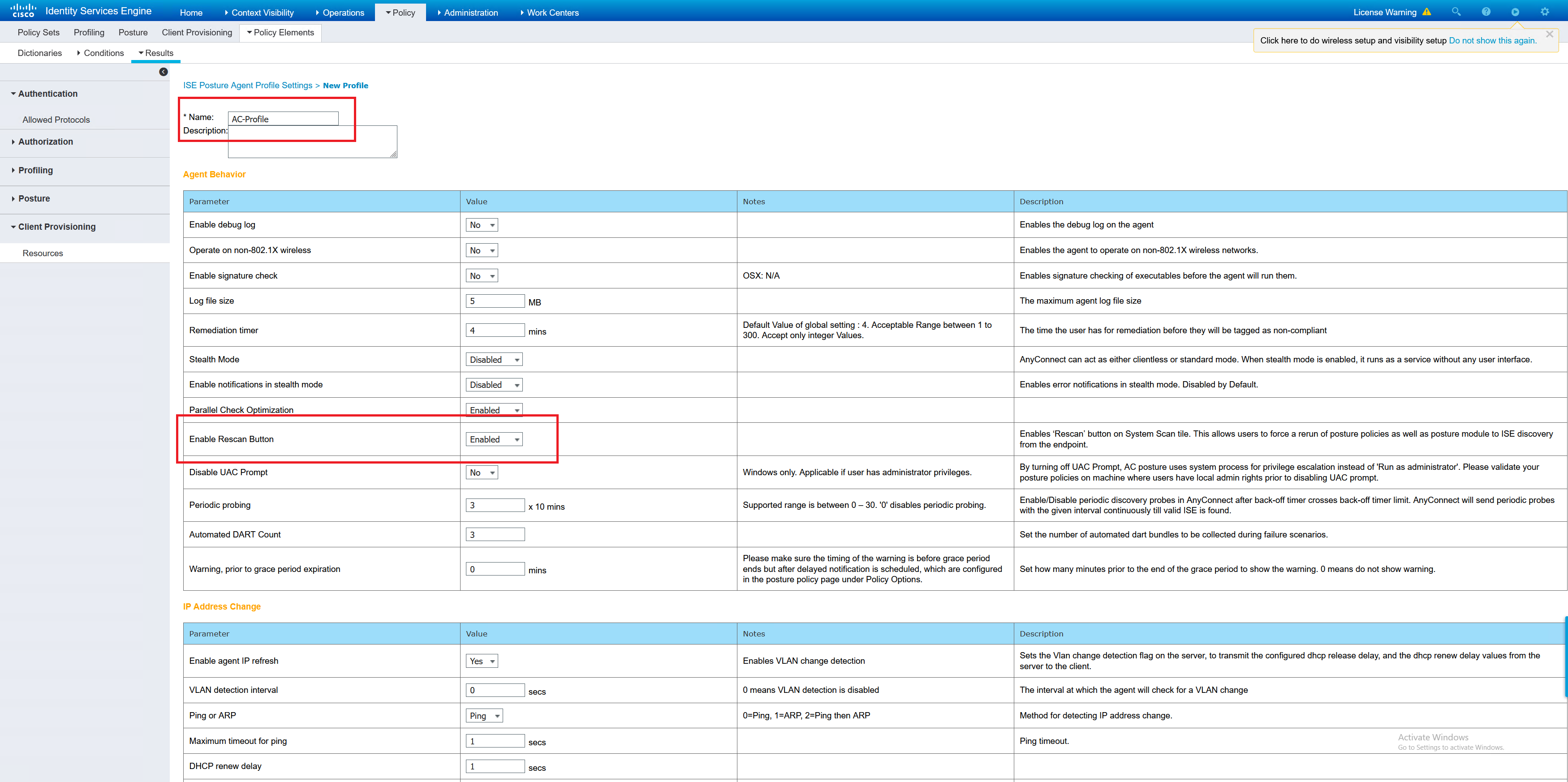
– Create Posture Profile
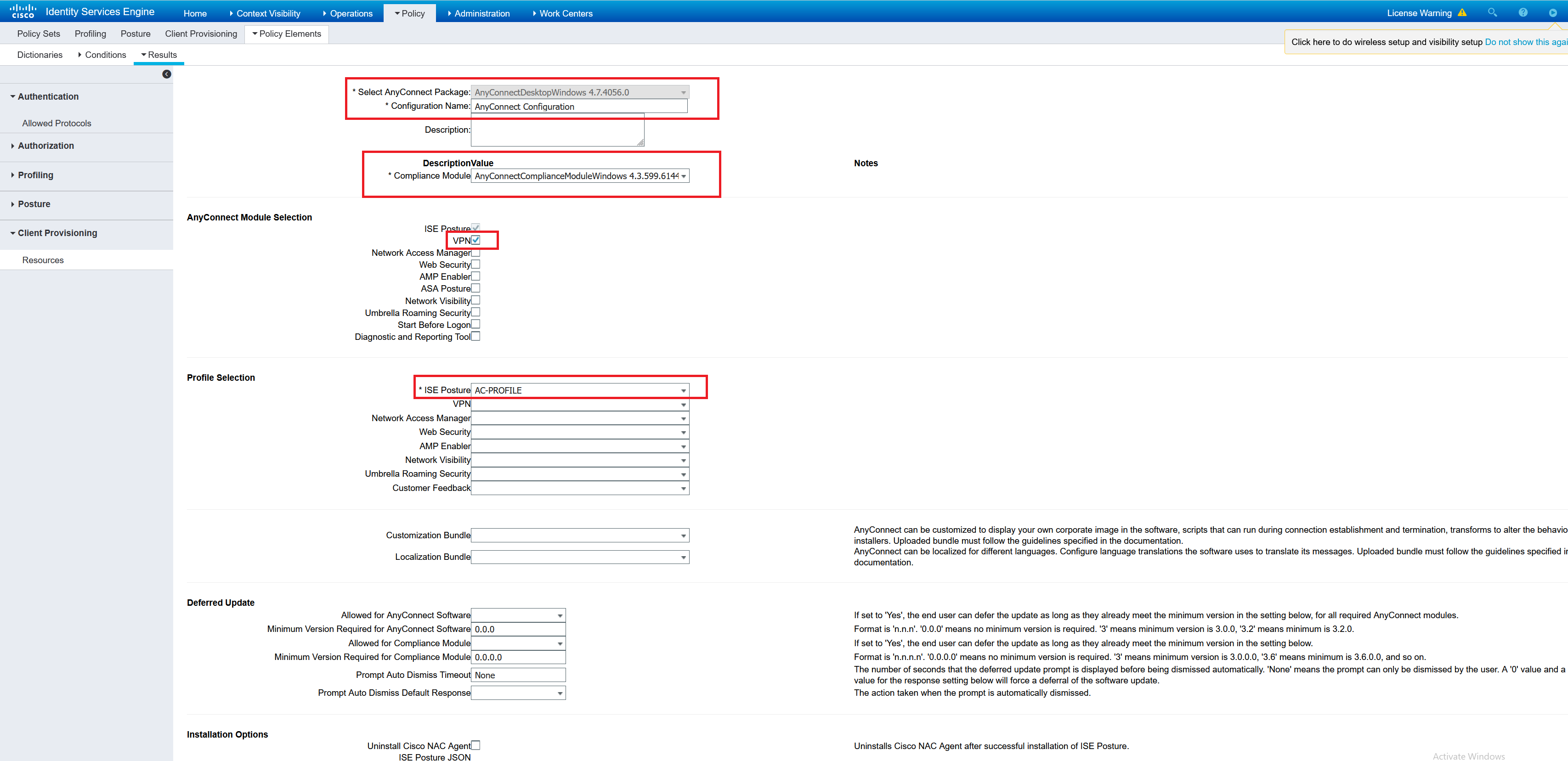
– Create AnyConnect Configuration
The files that need to be uploaded are the webdeploy VPN package and the ISE compliance module package. These are difficult to get if ISE isn’t licensed. So with just the ISE trial you can’t do this. You will need to download them from the Cisco site under a valid service contract. I tried finding the ISE compliance module on the internet. I couldn’t find it anywhere. Luckily, I had one from a previous company.
anyconnect-win-4.7.04056-webdeploy-k9.pkg
anyconnect-win-4.3.599.6144-isecompliance-webdeploy-k9.pkg
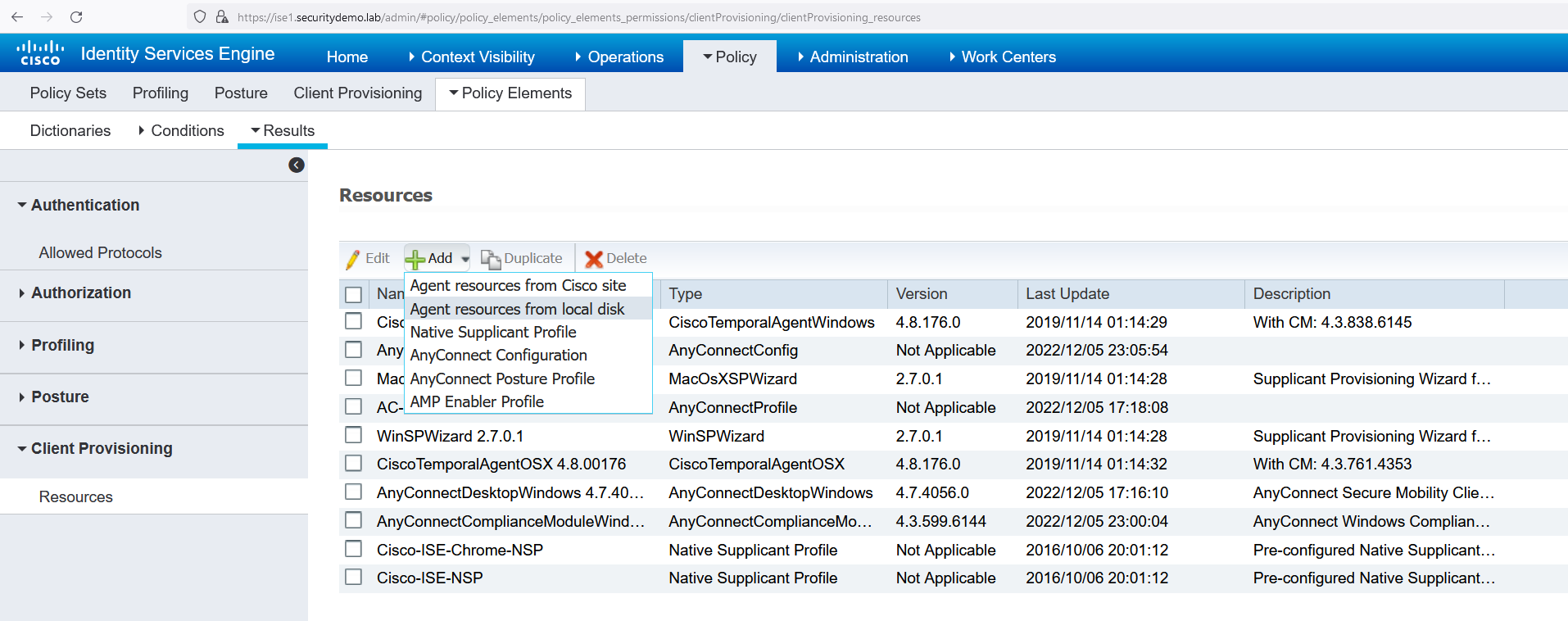
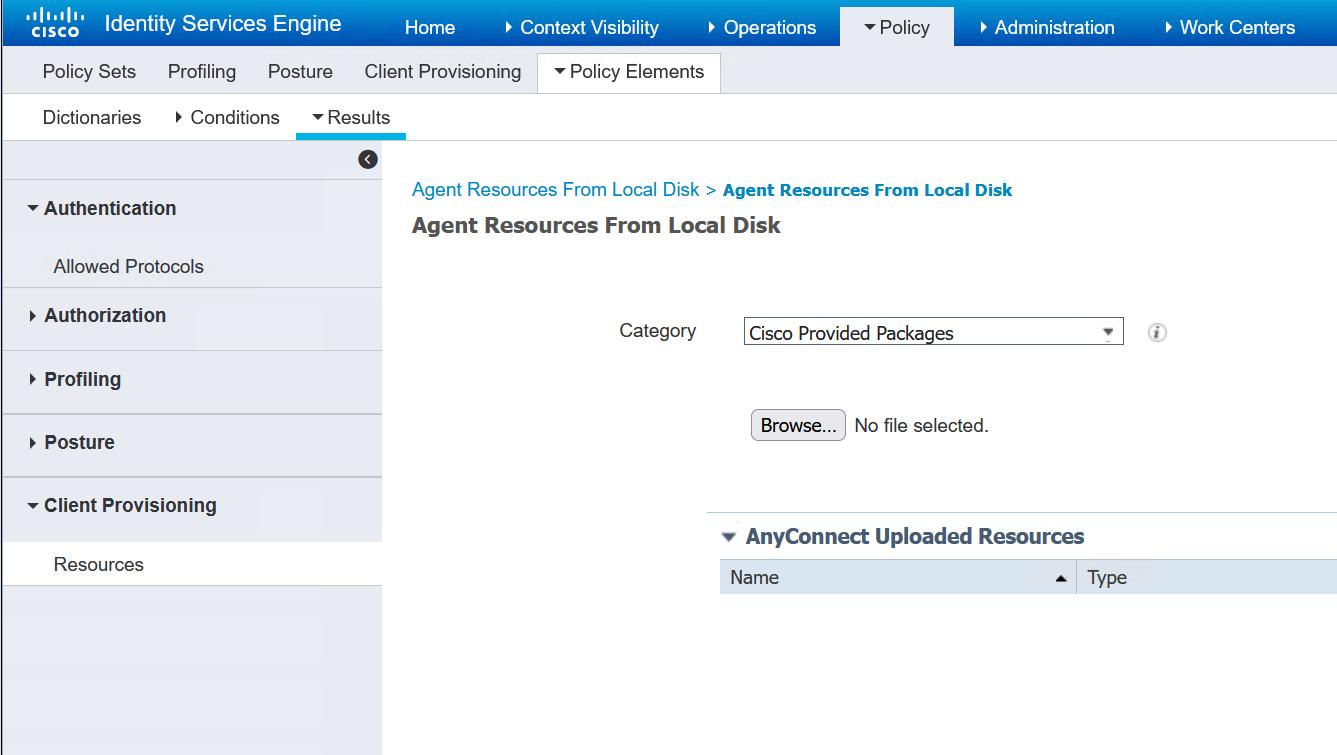
Now the files have been uploaded next is to create the posture profile
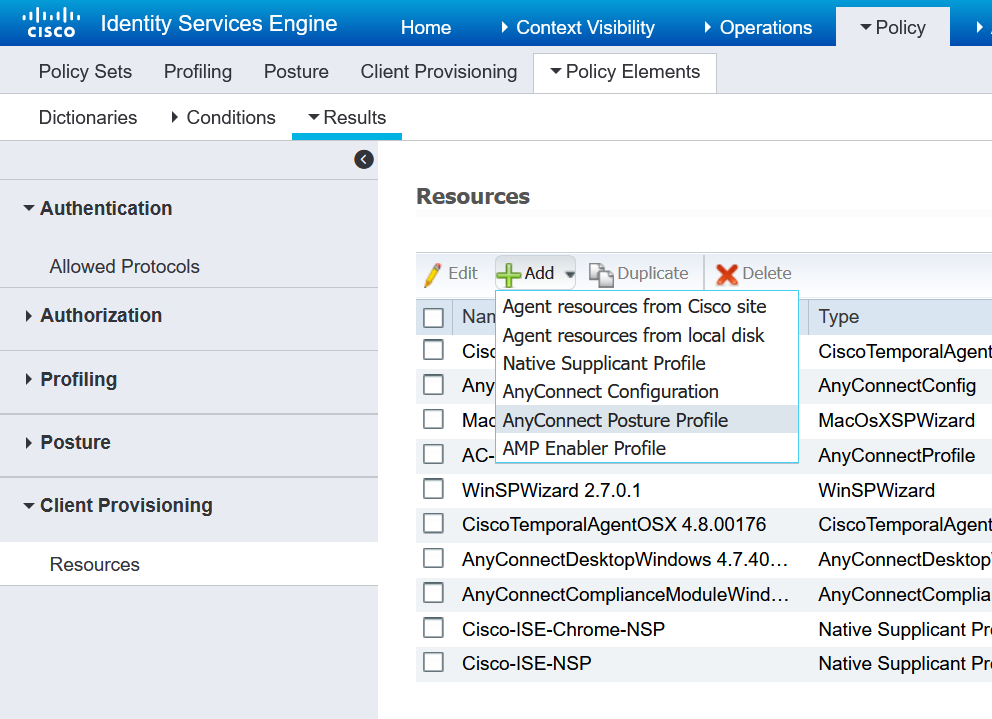
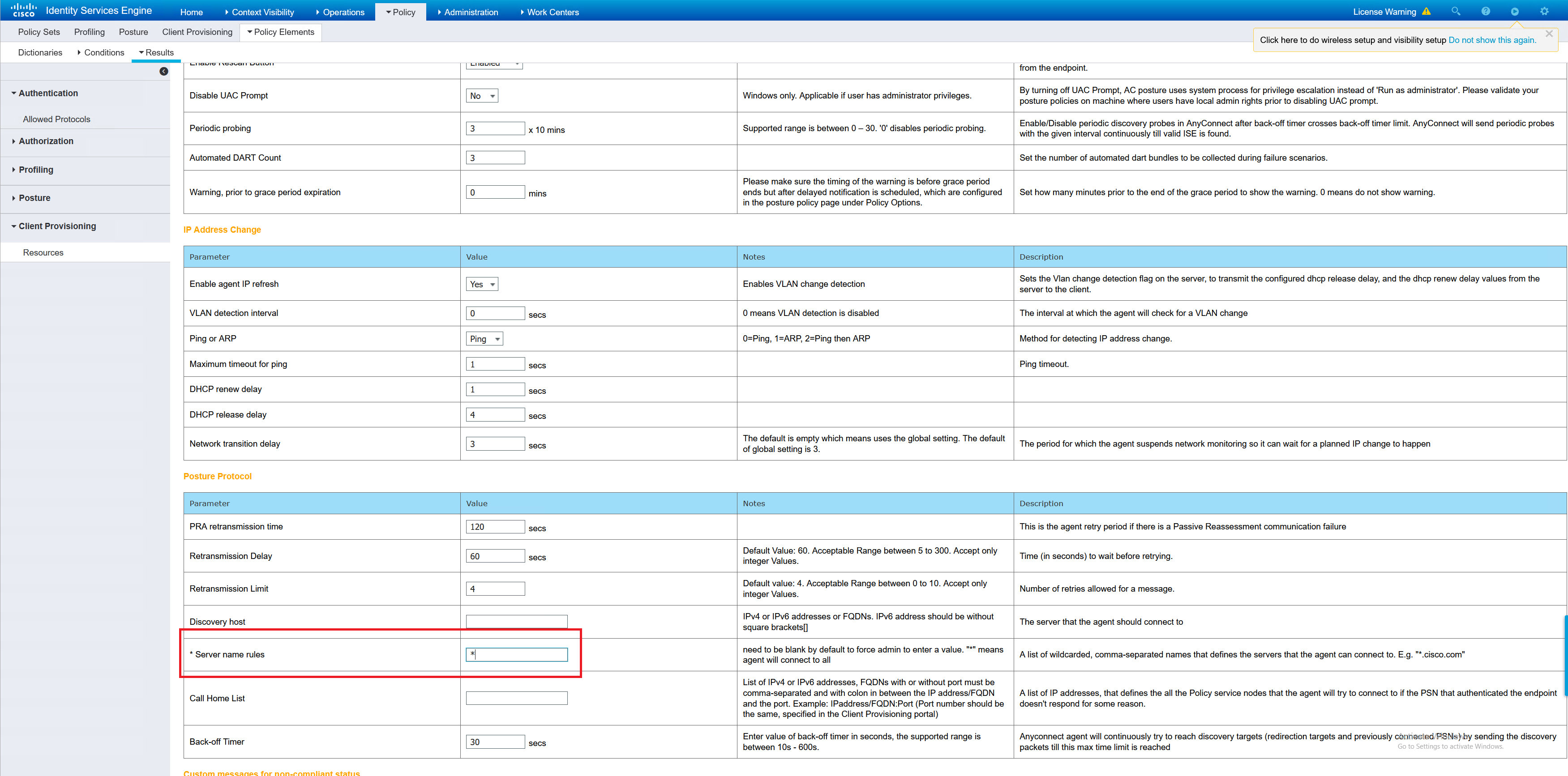
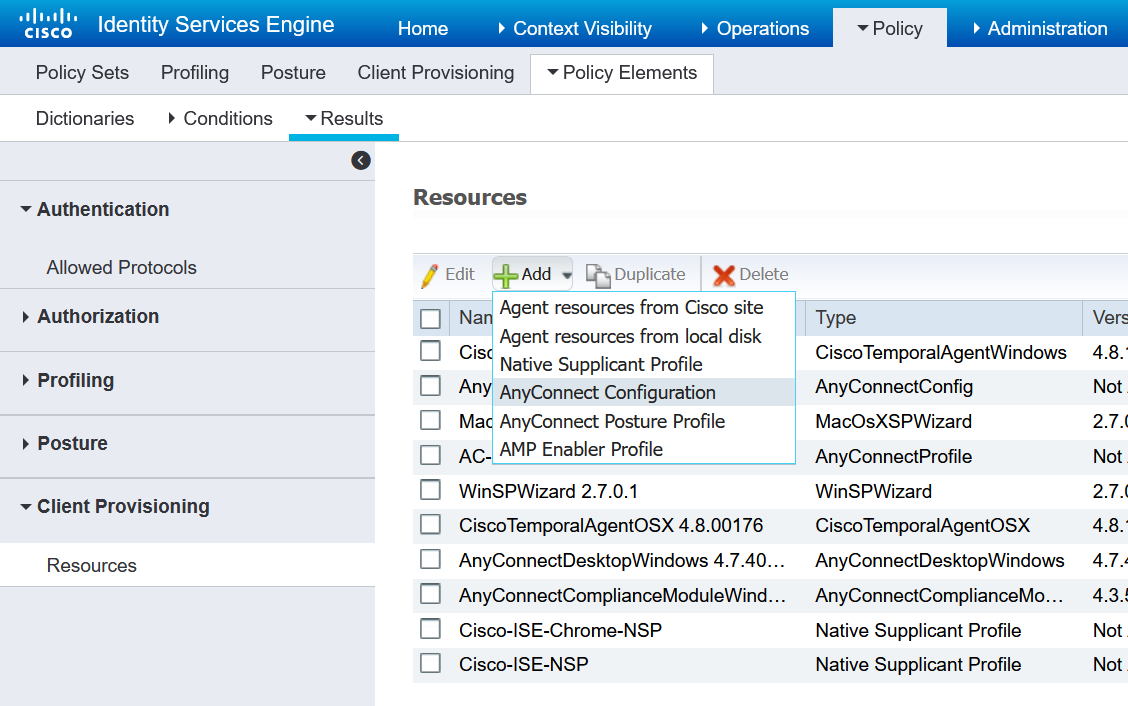
Now to create the AnyConnect configuration which will tie these things together.
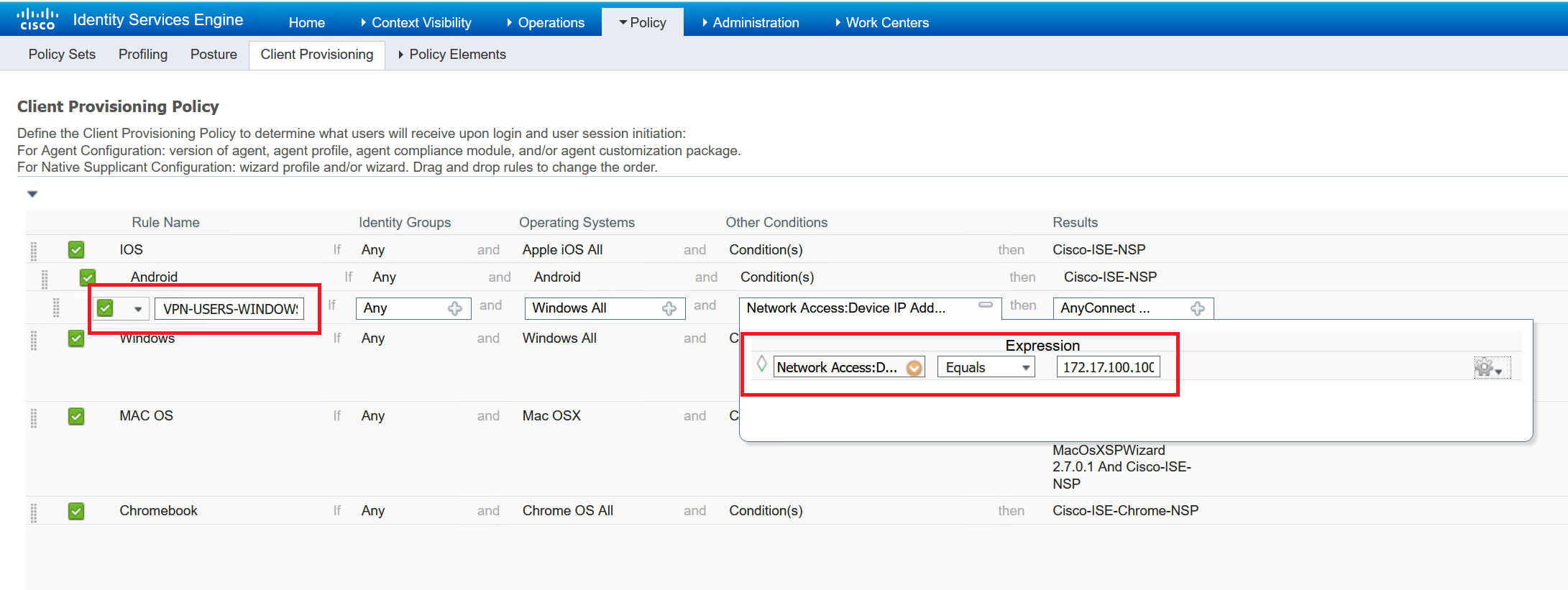
The last part is to create the Client Provisioning Policy that references the AnyConnect configuration.
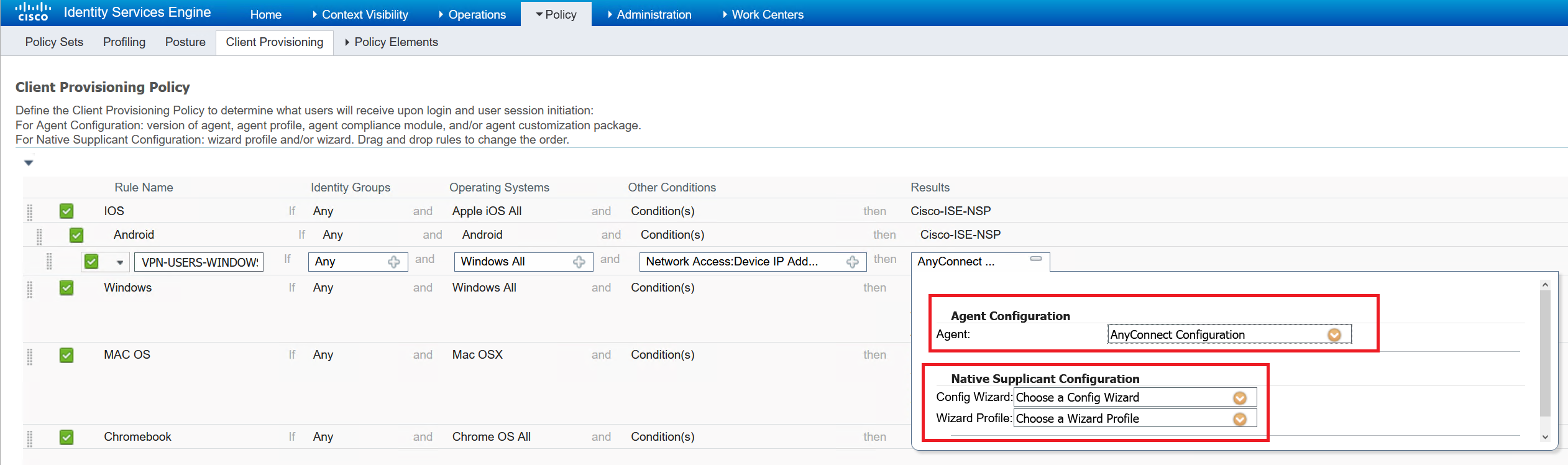
Posture Policy
This is where ISE can scan a client machine to determine if it is permitted onto the network. We can determine if it is a corporate machine, or does it have the latest Windows updates, a firewall/antivirus enabled and many other options.
To enable this there are several steps that must be configured. The most important step is to determine what the posture is looking for.
I am going to just perform a file scan to determine if the machine is a corporate or 3rd party machine. This will be in the form of a txt file name. Either “CORP” or “3rdPARTY”.
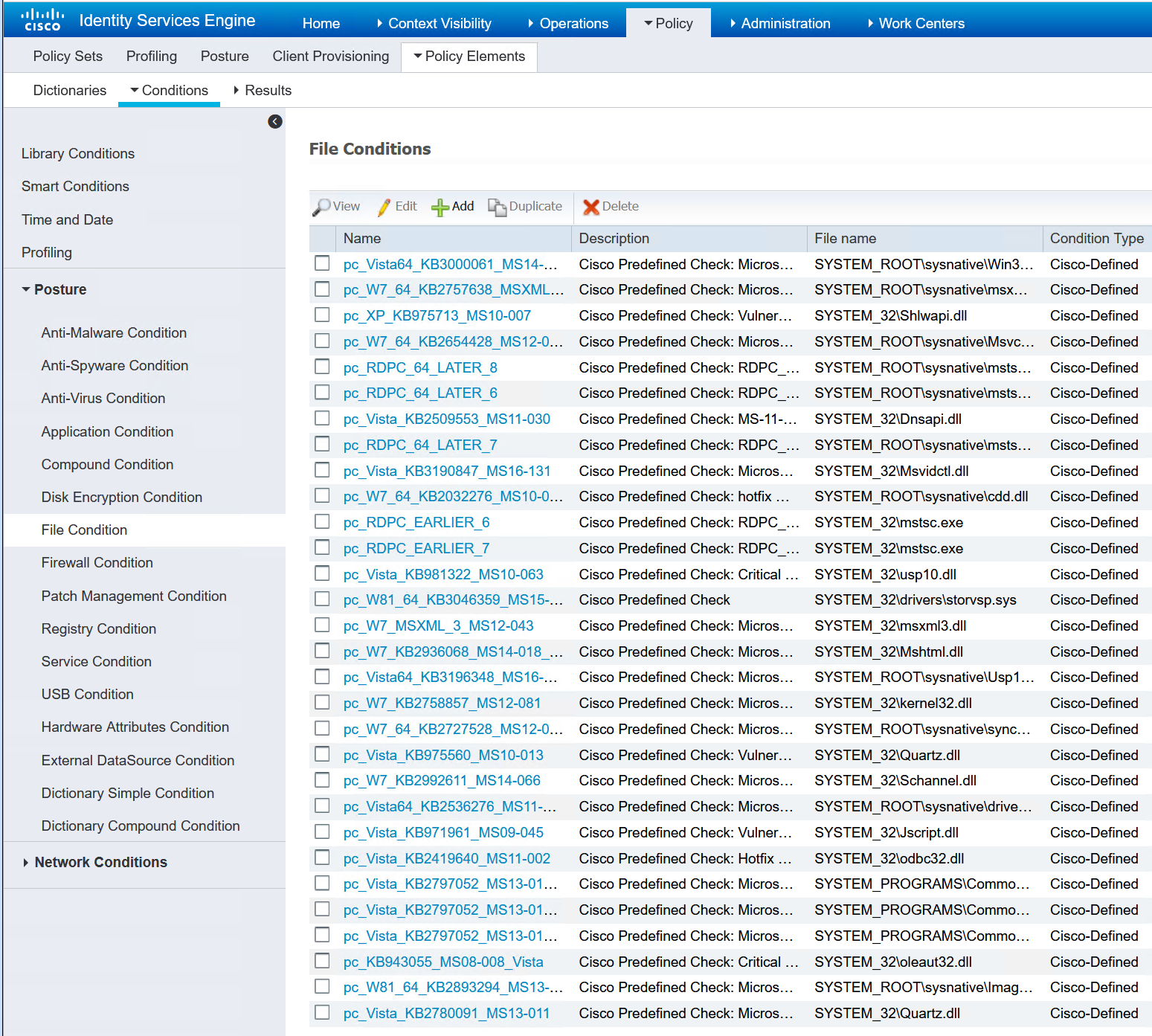
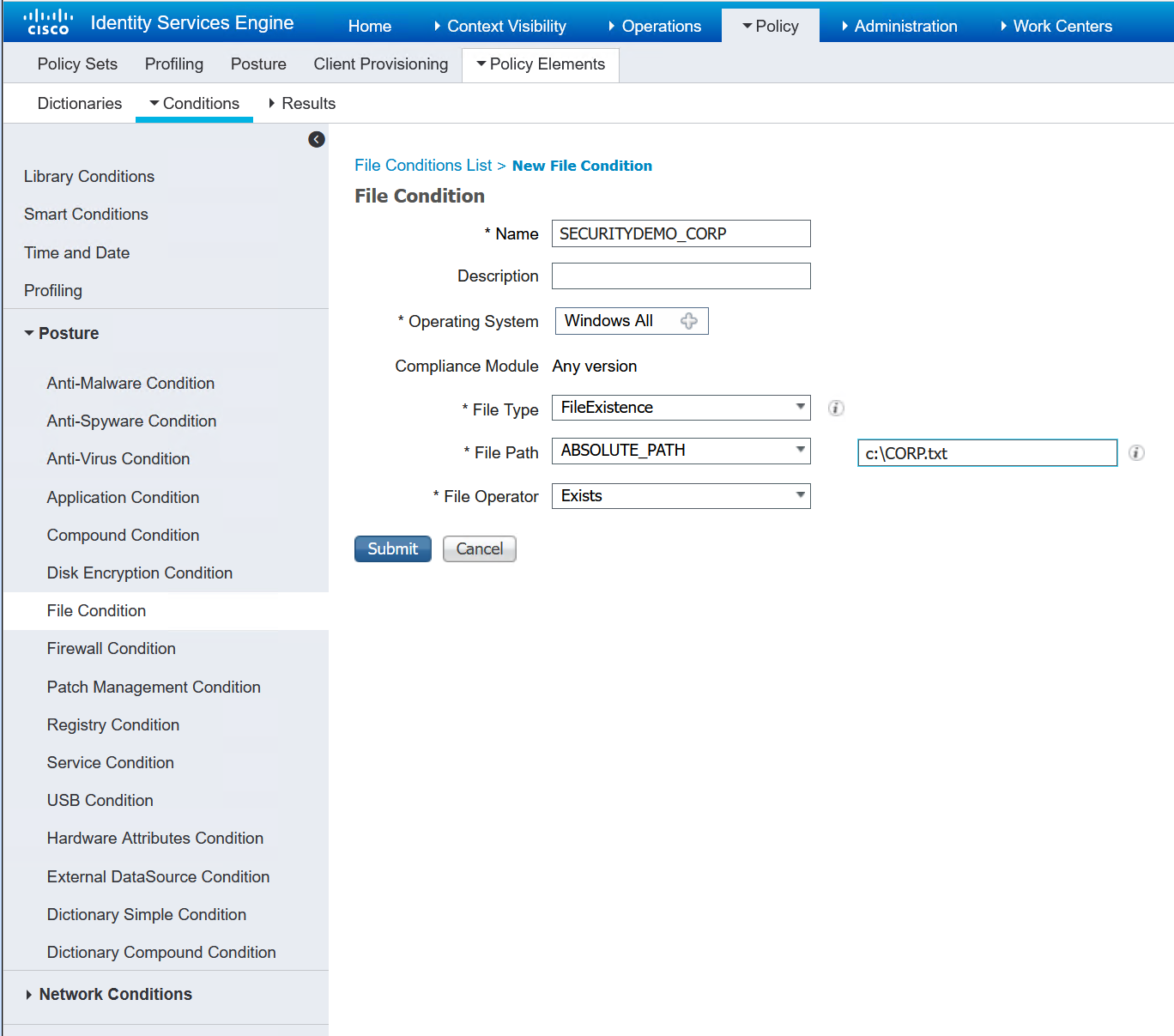
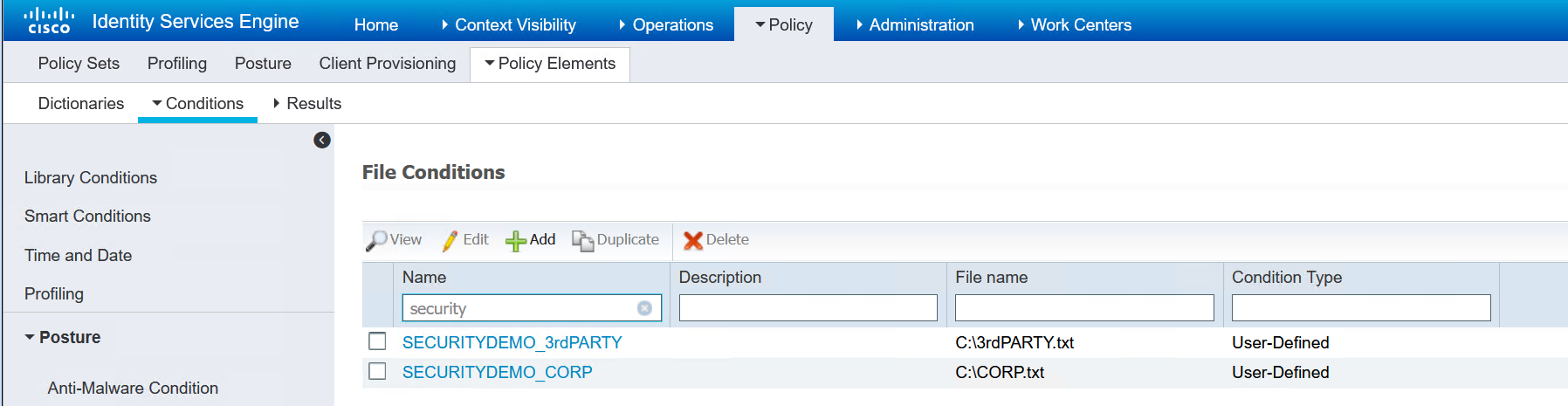
Now that I have my very basic file conditions created, the requirement can be set.
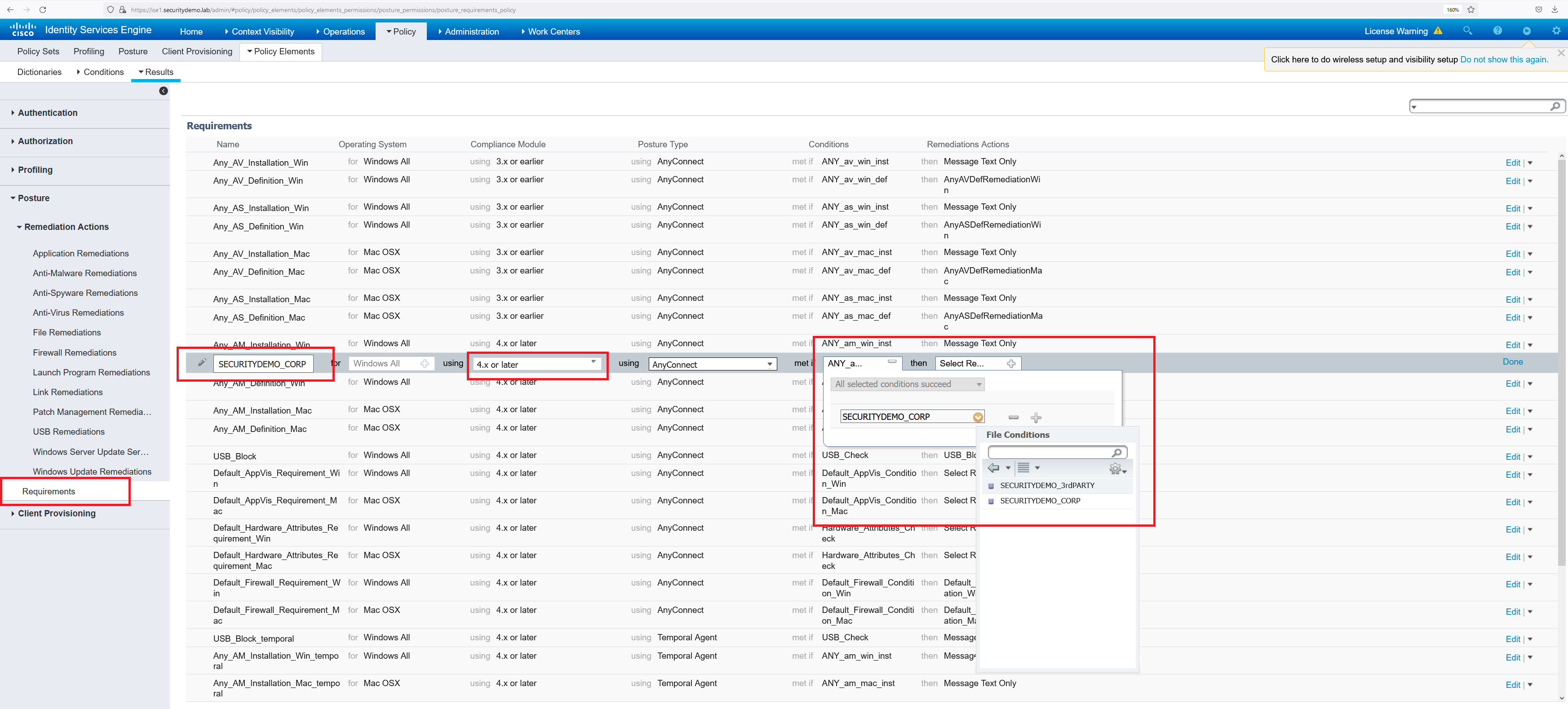


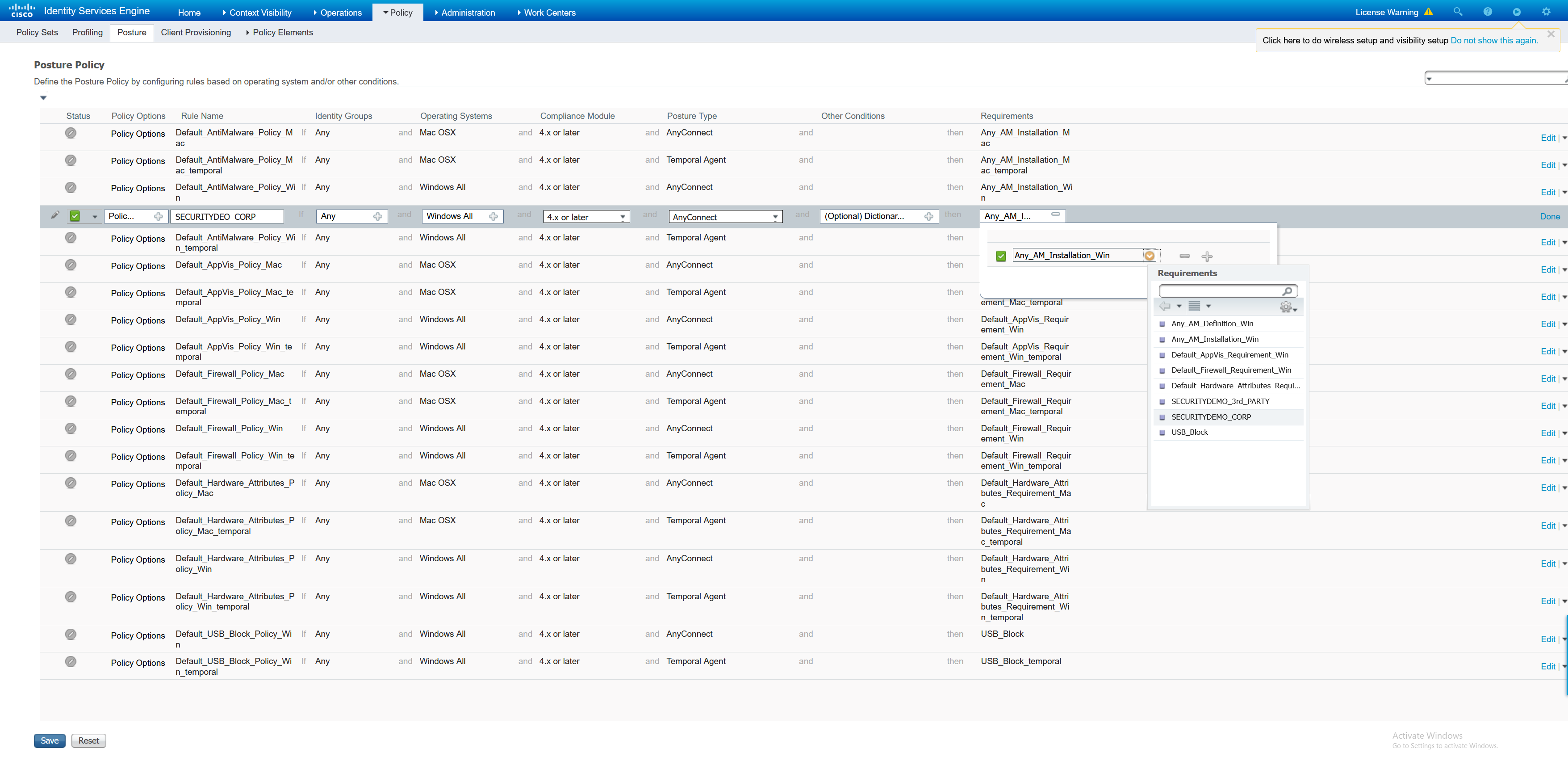
Until now, the file condition has been created and a posture requirement set. Still, this is not enough for ISE to run the posture scan against a connecting client. To enforce the posture, a posture policy must be created.
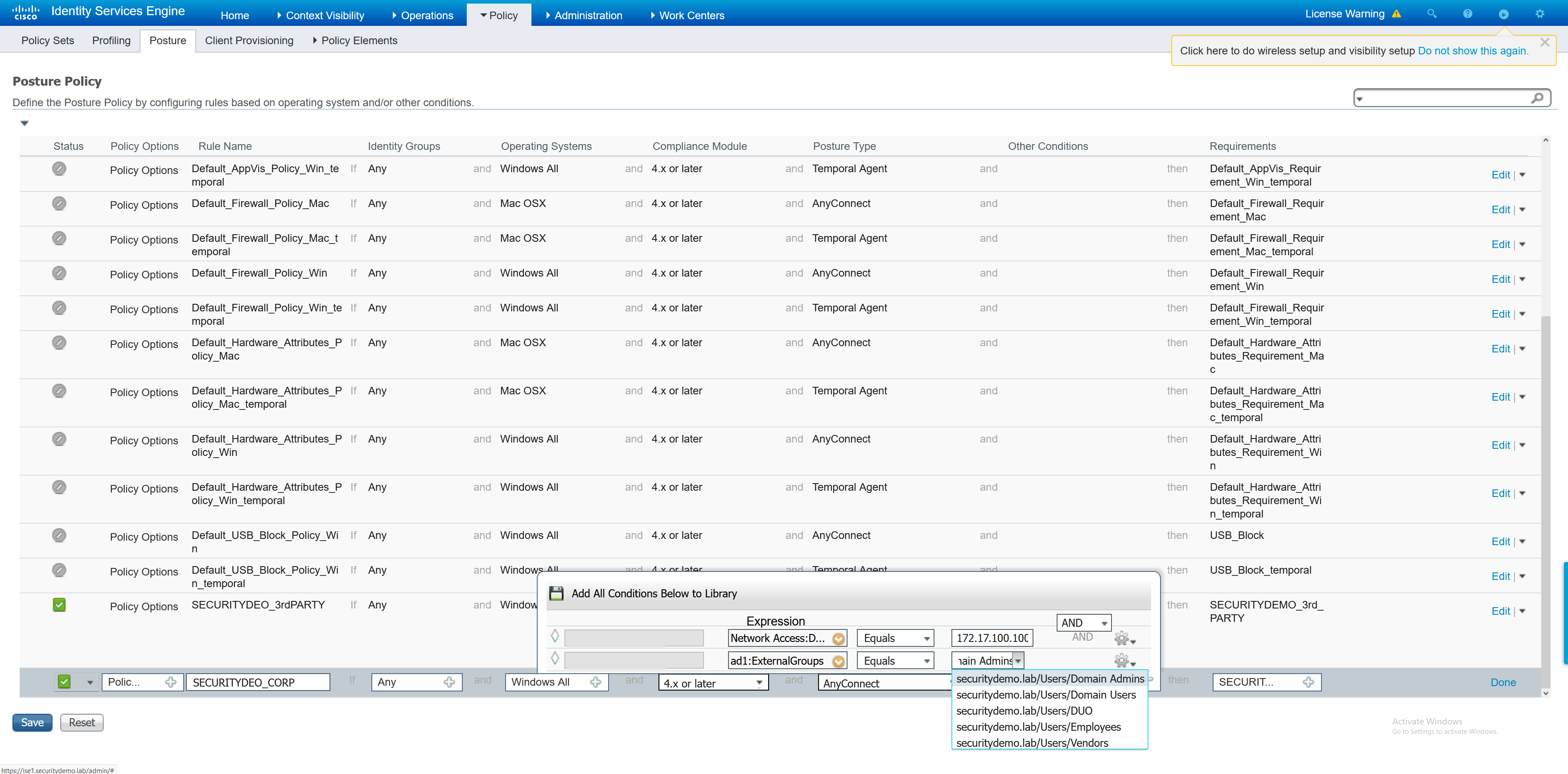

VPN Policy Set
The policy set is what will start to combine all these elements together. Inside the policy set, the compliance state is checked and a redirect to the Client Provisioning Portal is performed to enforce the posture state.
As always with ISE there are more building blocks that are required before the configuration of the policy set can take place.
– Create Authorisation policiy for Client Provisioning Portal Redirect
– Create VPN user groups for non compliant and compliant
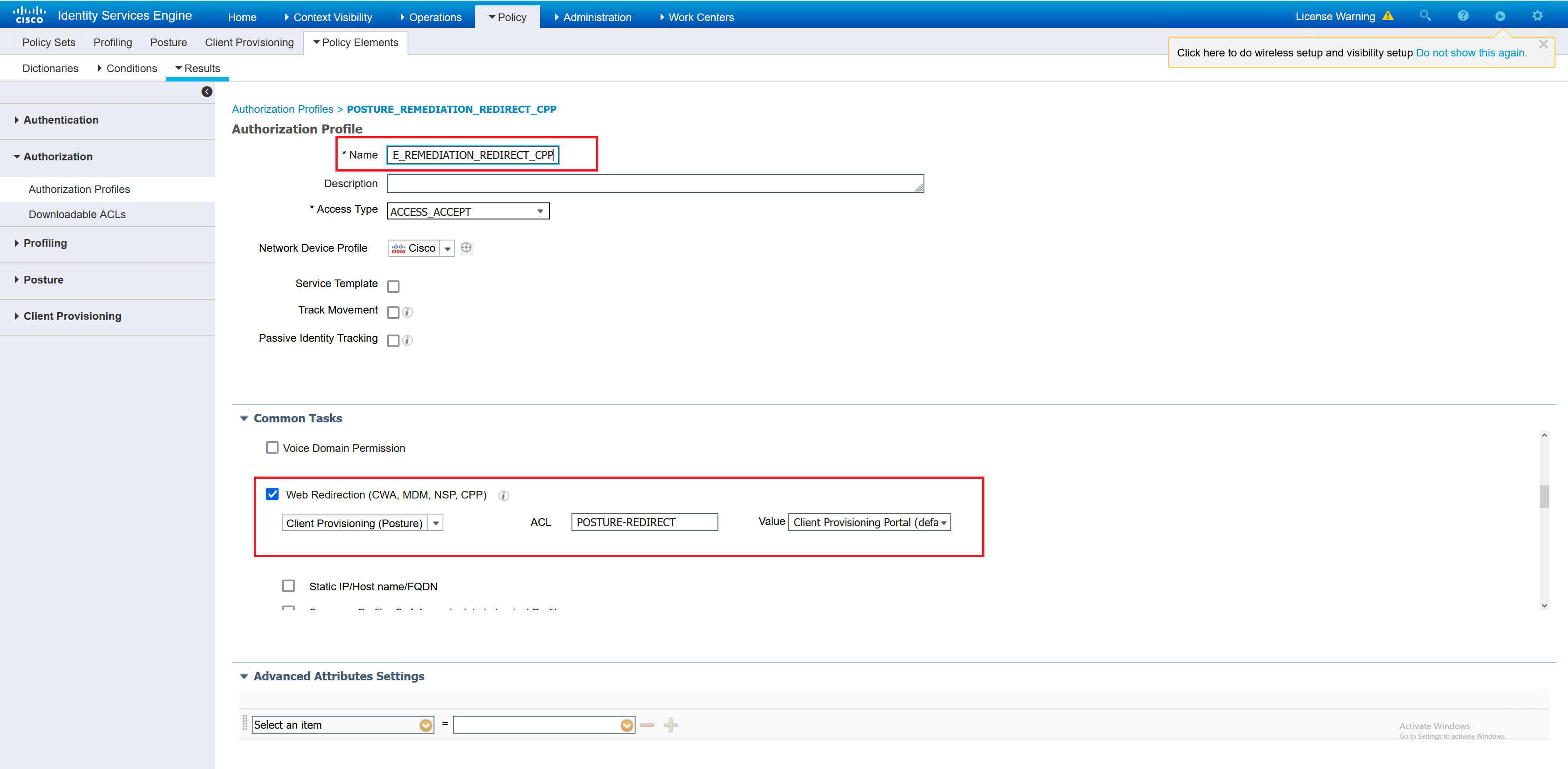
Creating an authorisation policy for Client Provisioning Portal Redirect is referencing the ACL that is on the network access device. In this case it is a firewall, but it can be a switch.
access-list POSTURE-REDIRECT extended deny udp any any eq domain
access-list POSTURE-REDIRECT extended deny tcp any any eq domain
access-list POSTURE-REDIRECT extended deny tcp any host 172.17.5.101 eq 8443
access-list POSTURE-REDIRECT extended deny tcp any host 172.17.5.101 eq 8905
access-list POSTURE-REDIRECT extended deny udp any host 172.17.5.101 eq 8905
access-list POSTURE-REDIRECT extended deny tcp any host 2.2.1.101 eq 8443
access-list POSTURE-REDIRECT extended deny tcp any host 2.2.1.101 eq 8905
access-list POSTURE-REDIRECT extended deny udp any host 2.2.1.101 eq 8905
access-list POSTURE-REDIRECT extended permit tcp any any eq www
access-list POSTURE-REDIRECT extended permit tcp any any eq https
access-list POSTURE-REDIRECT extended deny ip any any
The next step is to create three authorisation policies; compliant, non compliant and unknown posture status.
Compliant – I have chosen for a basic permit IP any any ACL to be applied along with the required VPN group policy for the admin users.
Non compliant – I have defined an ACL which is to deny all traffic, and the correct group policy for the user. This ACL will the downloaded by the ASA and applied to the user that is non compliant.
If the user is not compliant then they will have 4 minutes to fix the problem before their status changes to non compliant and in my example a deny any any ACL applied.
Unknown – This gets an ACL to allow traffic similar to the POSTURE-REDIRECT ACL
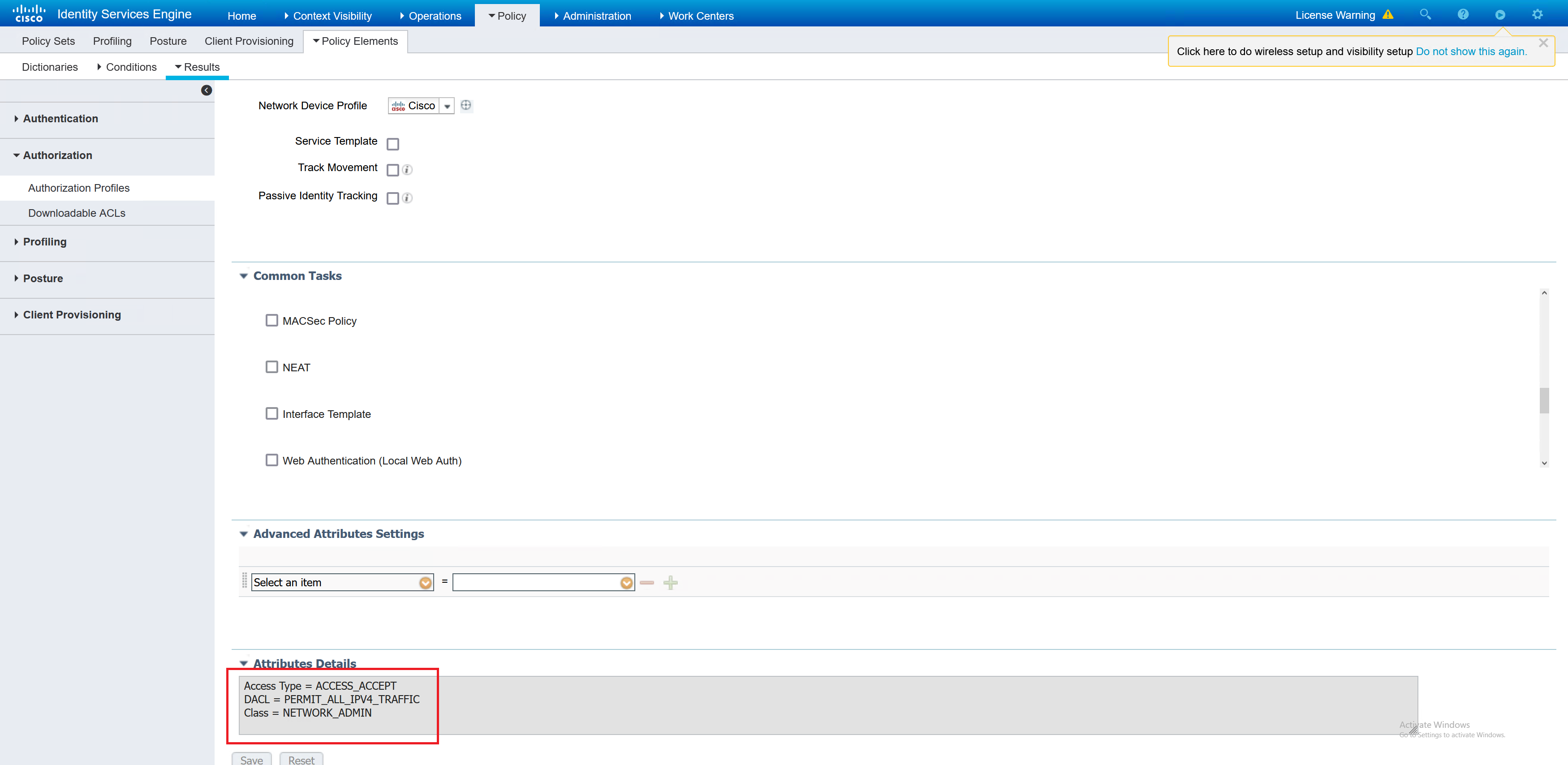
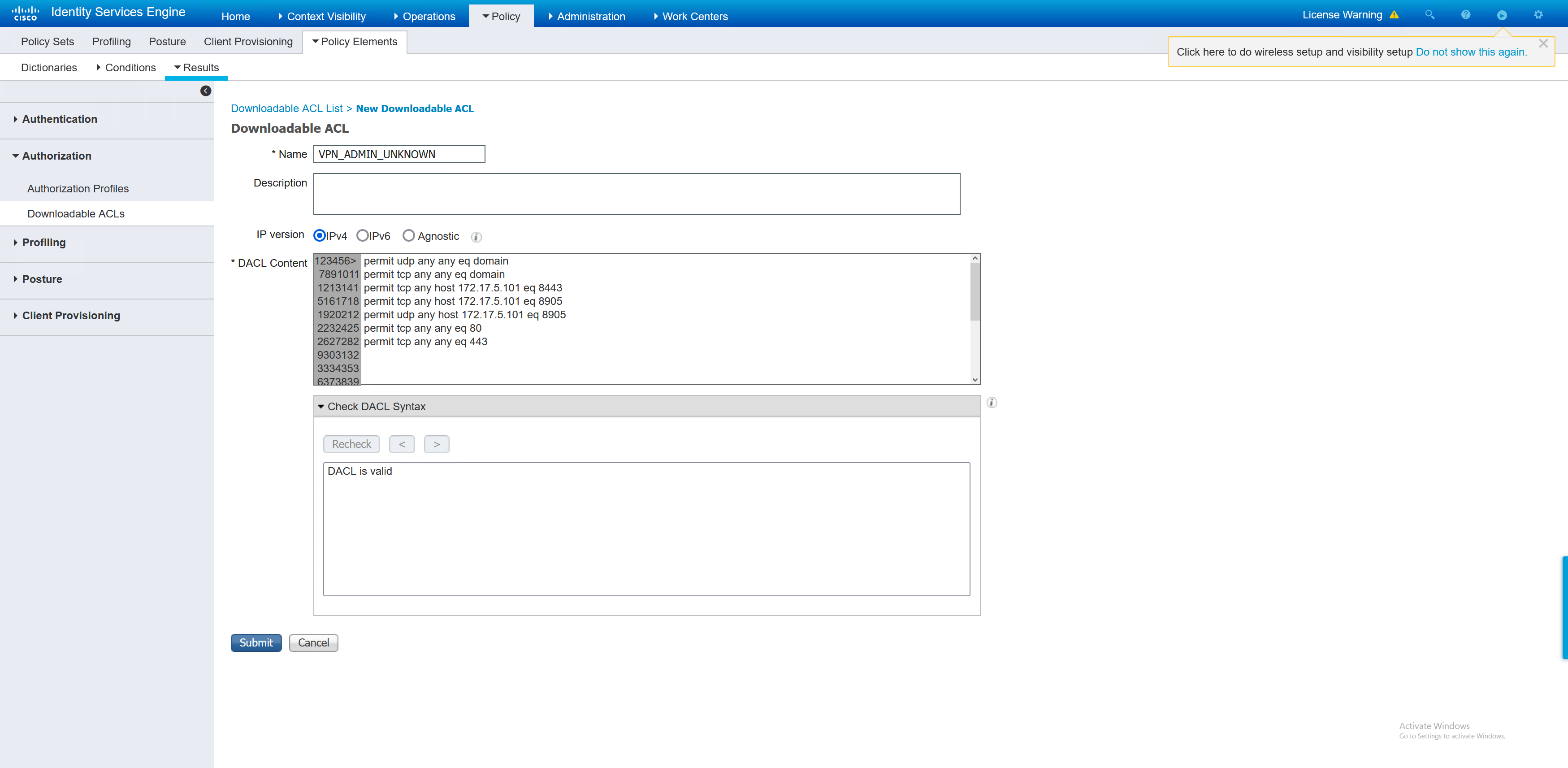
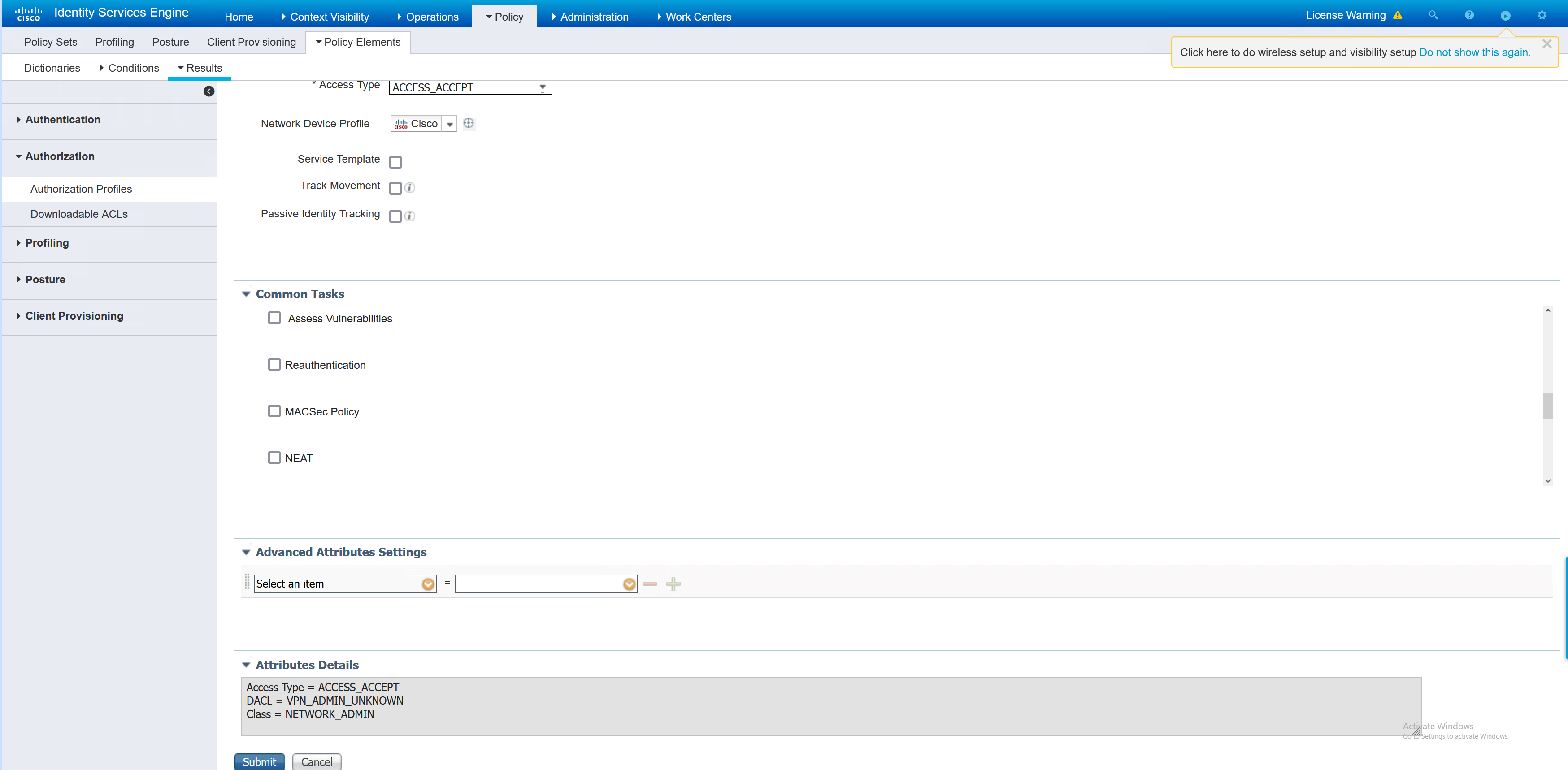
Now that those elements have been created, the policy set can be created. I will reuse the one that was created in the earlier part about policy sets.
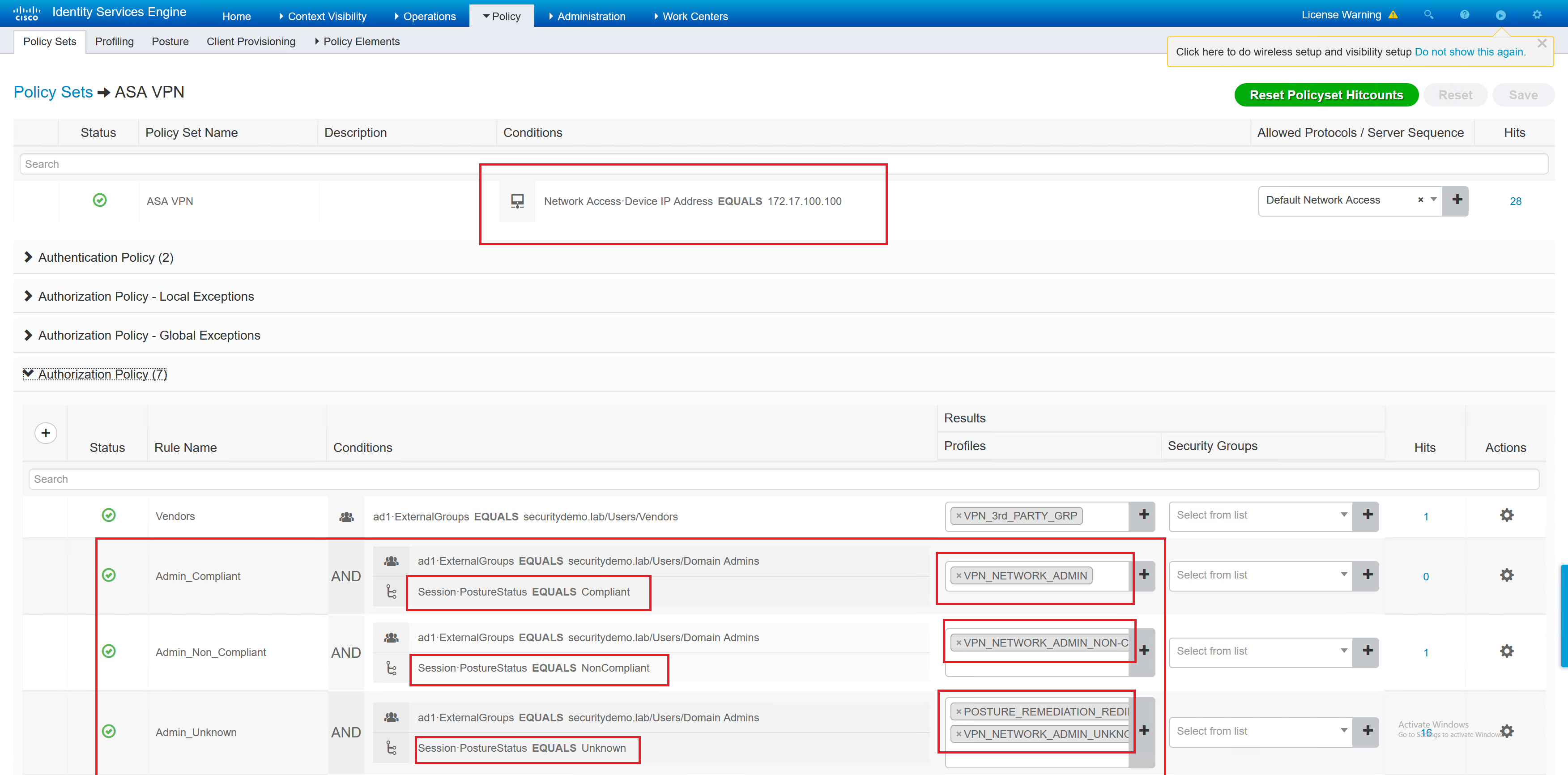
This policy set has three entries that relate to the posture. In the screenshot below, there are several things going on.
– RADIUS request comes from the ASA
– Compliance status for each type; compliant, non compliant and unknown
– The different authorisation profile results based on the status
Testing – Local User
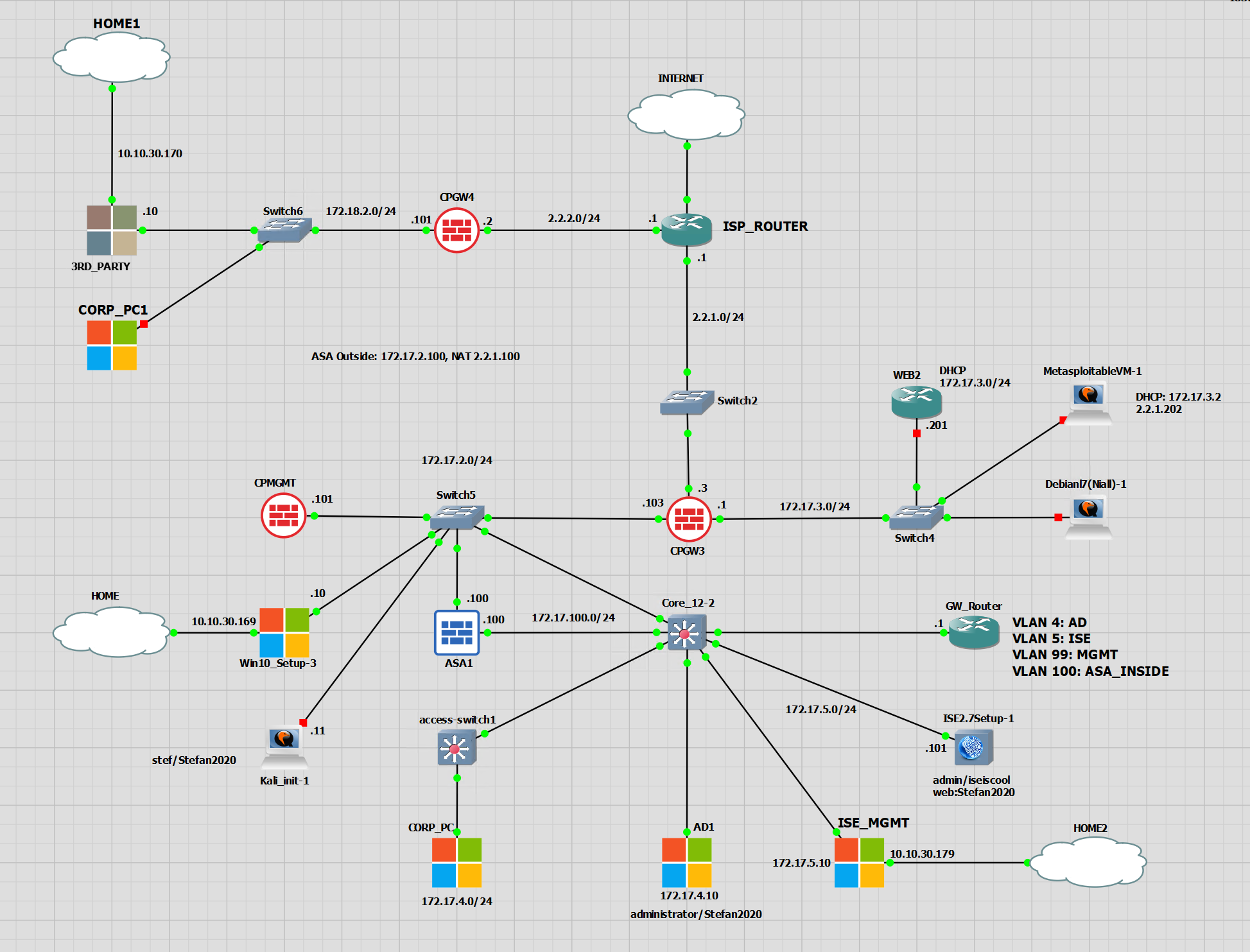
Now that all the configuration has been applied to ISE the config can be tested. These sets of tests are from the CORP_PC. This is inside the network and is using the DNS server of AD1. Which means that it knows all about securitydemo.lab and the A record for ise1.securitdemo.lab. This is important for a PC off the network being able to find the policy server.
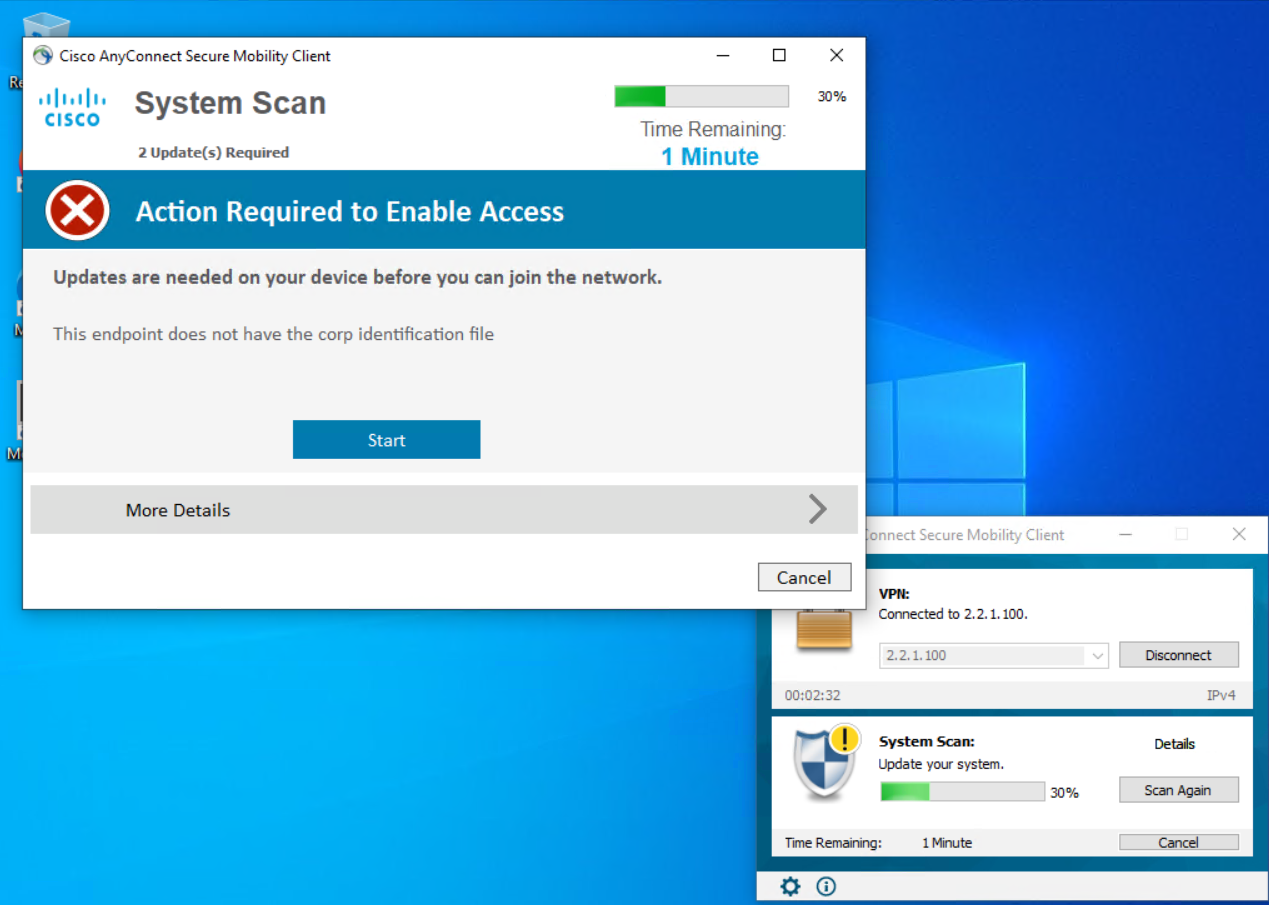
The PC is missing the CORP.txt file from the c:\ drive. The message that was added in an earlier step has been shown, and there is a timer running down. The current posture is unknown. Once the timer runs out, the client will be non compliant.
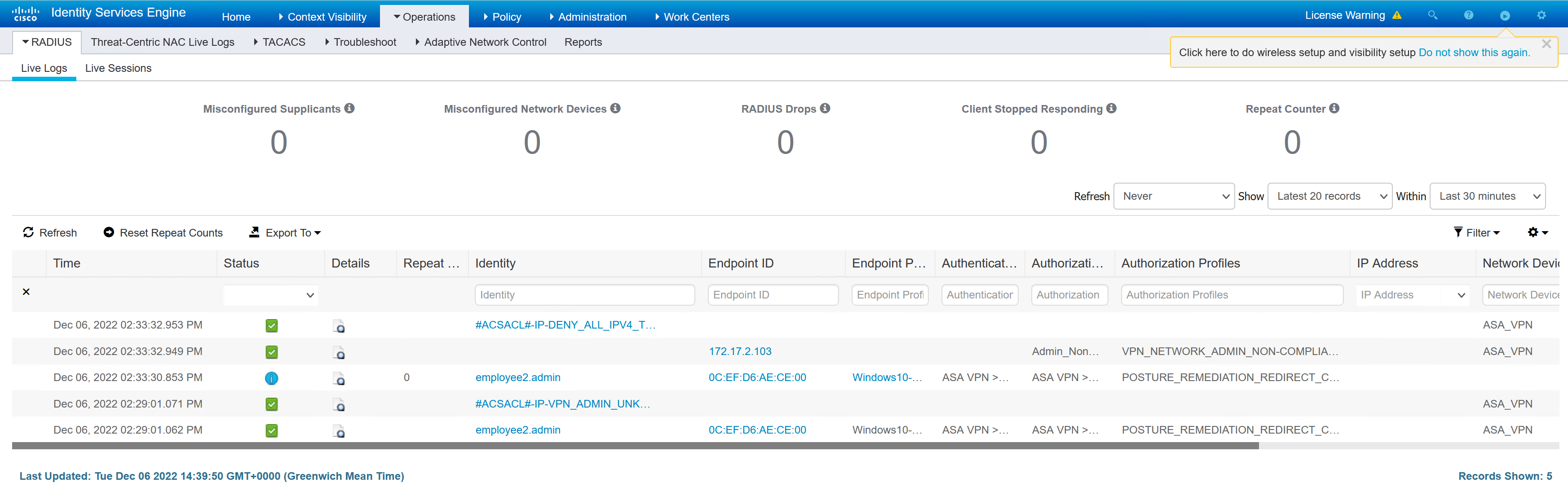
The details in the ASA show the posture redirect and the dACL that has been passed to the ASA.
ASA1# sh vpn-sessiondb detail anyconnect

Session Type: AnyConnect Detailed

Username     : employee2.admin        Index        : 35
Assigned IP  : 172.20.171.2           Public IP    : 172.17.2.103
Protocol     : AnyConnect-Parent SSL-Tunnel DTLS-Tunnel
License      : AnyConnect Premium
Encryption   : AnyConnect-Parent: (1)none  SSL-Tunnel: (1)AES-GCM-256  DTLS-Tunnel: (1)AES256
Hashing      : AnyConnect-Parent: (1)none  SSL-Tunnel: (1)SHA384  DTLS-Tunnel: (1)SHA1
Bytes Tx     : 61136                  Bytes Rx     : 20370
Pkts Tx      : 147                    Pkts Rx      : 158
Pkts Tx Drop : 0                      Pkts Rx Drop : 0
Group Policy : NETWORK_ADMIN          Tunnel Group : DefaultWEBVPNGroup
Login Time   : 14:29:00 UTC Tue Dec 6 2022
Duration     : 0h:02m:13s
Inactivity   : 0h:00m:00s
VLAN Mapping : N/A                    VLAN         : none
Audt Sess ID : ac11026400023000638f51ac
Security Grp : none

AnyConnect-Parent Tunnels: 1
SSL-Tunnel Tunnels: 1
DTLS-Tunnel Tunnels: 1

AnyConnect-Parent:
  Tunnel ID    : 35.1
  Public IP    : 172.17.2.103
  Encryption   : none                   Hashing      : none
  TCP Src Port : 17162                  TCP Dst Port : 443
  Auth Mode    : userPassword
  Idle Time Out: 30 Minutes             Idle TO Left : 27 Minutes
  Client OS    : win
  Client OS Ver: 10.0.19045
  Client Type  : AnyConnect
  Client Ver   : Cisco AnyConnect VPN Agent for Windows 4.7.04056
  Bytes Tx     : 7995                   Bytes Rx     : 0
  Pkts Tx      : 6                      Pkts Rx      : 0
  Pkts Tx Drop : 0                      Pkts Rx Drop : 0

SSL-Tunnel:
  Tunnel ID    : 35.2
  Assigned IP  : 172.20.171.2           Public IP    : 172.17.2.103
  Encryption   : AES-GCM-256            Hashing      : SHA384
  Ciphersuite  : ECDHE-ECDSA-AES256-GCM-SHA384
  Encapsulation: TLSv1.2                TCP Src Port : 42148
  TCP Dst Port : 443                    Auth Mode    : userPassword
  Idle Time Out: 30 Minutes             Idle TO Left : 27 Minutes
  Client OS    : Windows
  Client Type  : SSL VPN Client
  Client Ver   : Cisco AnyConnect VPN Agent for Windows 4.7.04056
  Bytes Tx     : 7995                   Bytes Rx     : 368
  Pkts Tx      : 6                      Pkts Rx      : 4
  Pkts Tx Drop : 0                      Pkts Rx Drop : 0
  Filter Name  : #ACSACL#-IP-VPN_ADMIN_UNKNOWN-638f4ff7

DTLS-Tunnel:
  Tunnel ID    : 35.3
  Assigned IP  : 172.20.171.2           Public IP    : 172.17.2.103
  Encryption   : AES256                 Hashing      : SHA1
  Ciphersuite  : DHE-RSA-AES256-SHA
  Encapsulation: DTLSv1.0               UDP Src Port : 35006
  UDP Dst Port : 443                    Auth Mode    : userPassword
  Idle Time Out: 30 Minutes             Idle TO Left : 29 Minutes
  Client OS    : Windows
  Client Type  : DTLS VPN Client
  Client Ver   : Cisco AnyConnect VPN Agent for Windows 4.7.04056
  Bytes Tx     : 45146                  Bytes Rx     : 20002
  Pkts Tx      : 135                    Pkts Rx      : 154
  Pkts Tx Drop : 0                      Pkts Rx Drop : 0
  Filter Name  : #ACSACL#-IP-VPN_ADMIN_UNKNOWN-638f4ff7

ISE Posture:
  Redirect URL : https://ise1.securitydemo.lab:8443/portal/gateway?sessionId=ac11026400023000638f51ac&portal=44fd6796-4...
  Redirect ACL : POSTURE-REDIRECT
If the machine is left, it becomes non compliant and will have an updated dACL that denies all traffic.
ASA1# sh vpn-sessiondb detail anyconnect

Session Type: AnyConnect Detailed

Username     : employee2.admin        Index        : 35
Assigned IP  : 172.20.171.2           Public IP    : 172.17.2.103
Protocol     : AnyConnect-Parent SSL-Tunnel DTLS-Tunnel
License      : AnyConnect Premium
Encryption   : AnyConnect-Parent: (1)none  SSL-Tunnel: (1)AES-GCM-256  DTLS-Tunnel: (1)AES256
Hashing      : AnyConnect-Parent: (1)none  SSL-Tunnel: (1)SHA384  DTLS-Tunnel: (1)SHA1
Bytes Tx     : 65658                  Bytes Rx     : 33056
Pkts Tx      : 163                    Pkts Rx      : 258
Pkts Tx Drop : 0                      Pkts Rx Drop : 0
Group Policy : NETWORK_ADMIN          Tunnel Group : DefaultWEBVPNGroup
Login Time   : 14:29:00 UTC Tue Dec 6 2022
Duration     : 0h:09m:21s
Inactivity   : 0h:00m:00s
VLAN Mapping : N/A                    VLAN         : none
Audt Sess ID : ac11026400023000638f51ac
Security Grp : none

AnyConnect-Parent Tunnels: 1
SSL-Tunnel Tunnels: 1
DTLS-Tunnel Tunnels: 1

AnyConnect-Parent:
  Tunnel ID    : 35.1
  Public IP    : 172.17.2.103
  Encryption   : none                   Hashing      : none
  TCP Src Port : 17162                  TCP Dst Port : 443
  Auth Mode    : userPassword
  Idle Time Out: 30 Minutes             Idle TO Left : 20 Minutes
  Client OS    : win
  Client OS Ver: 10.0.19045
  Client Type  : AnyConnect
  Client Ver   : Cisco AnyConnect VPN Agent for Windows 4.7.04056
  Bytes Tx     : 7995                   Bytes Rx     : 0
  Pkts Tx      : 6                      Pkts Rx      : 0
  Pkts Tx Drop : 0                      Pkts Rx Drop : 0

SSL-Tunnel:
  Tunnel ID    : 35.2
  Assigned IP  : 172.20.171.2           Public IP    : 172.17.2.103
  Encryption   : AES-GCM-256            Hashing      : SHA384
  Ciphersuite  : ECDHE-ECDSA-AES256-GCM-SHA384
  Encapsulation: TLSv1.2                TCP Src Port : 42148
  TCP Dst Port : 443                    Auth Mode    : userPassword
  Idle Time Out: 30 Minutes             Idle TO Left : 20 Minutes
  Client OS    : Windows
  Client Type  : SSL VPN Client
  Client Ver   : Cisco AnyConnect VPN Agent for Windows 4.7.04056
  Bytes Tx     : 7995                   Bytes Rx     : 368
  Pkts Tx      : 6                      Pkts Rx      : 4
  Pkts Tx Drop : 0                      Pkts Rx Drop : 0
  Filter Name  : #ACSACL#-IP-DENY_ALL_IPV4_TRAFFIC-57f6b0d3

DTLS-Tunnel:
  Tunnel ID    : 35.3
  Assigned IP  : 172.20.171.2           Public IP    : 172.17.2.103
  Encryption   : AES256                 Hashing      : SHA1
  Ciphersuite  : DHE-RSA-AES256-SHA
  Encapsulation: DTLSv1.0               UDP Src Port : 35006
  UDP Dst Port : 443                    Auth Mode    : userPassword
  Idle Time Out: 30 Minutes             Idle TO Left : 29 Minutes
  Client OS    : Windows
  Client Type  : DTLS VPN Client
  Client Ver   : Cisco AnyConnect VPN Agent for Windows 4.7.04056
  Bytes Tx     : 49668                  Bytes Rx     : 32688
  Pkts Tx      : 151                    Pkts Rx      : 254
  Pkts Tx Drop : 0                      Pkts Rx Drop : 0
  Filter Name  : #ACSACL#-IP-DENY_ALL_IPV4_TRAFFIC-57f6b0d3
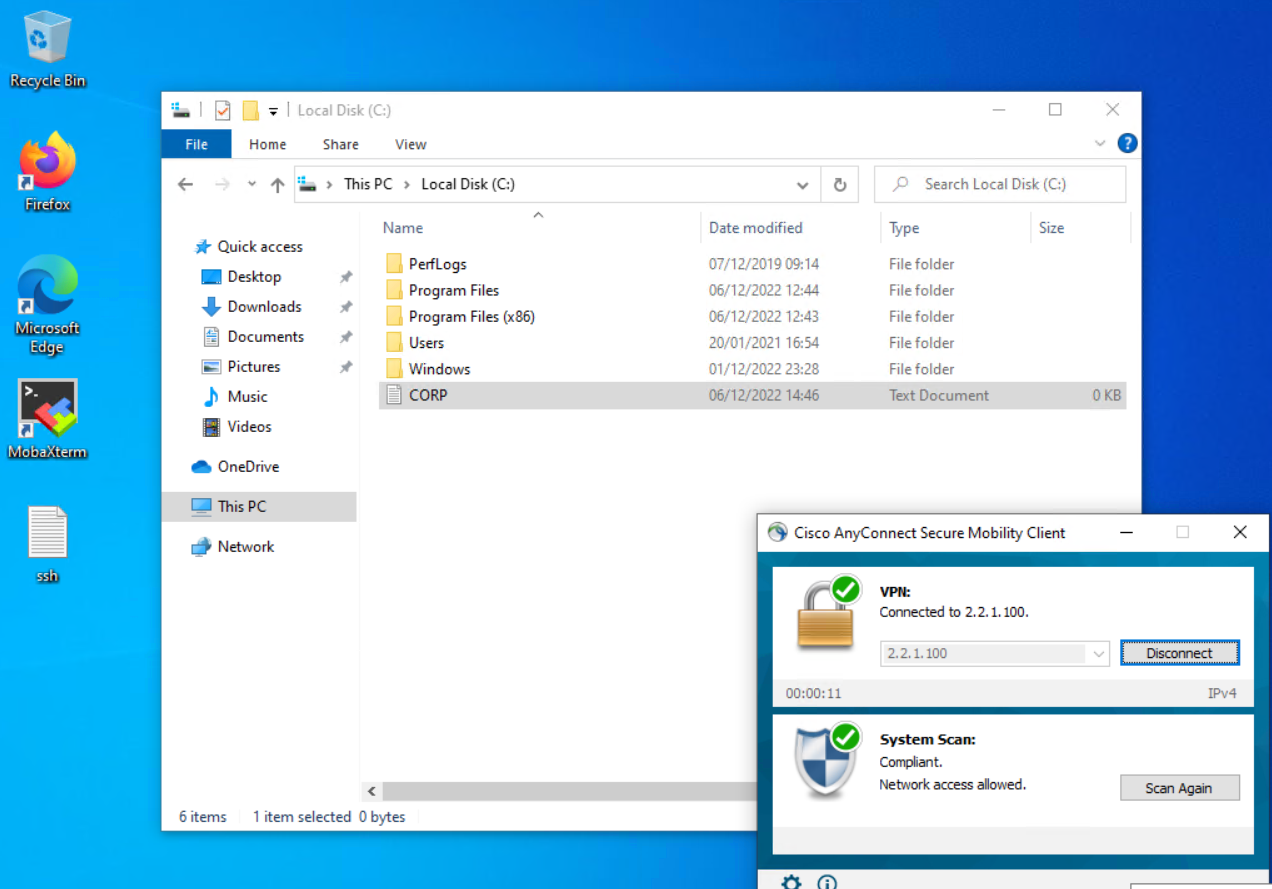
When the CORP.txt file is added to compliance check passes
ASA1# sh vpn-sessiondb detail anyconnect

Session Type: AnyConnect Detailed

Username     : employee2.admin        Index        : 36
Assigned IP  : 172.20.171.2           Public IP    : 172.17.2.103
Protocol     : AnyConnect-Parent SSL-Tunnel DTLS-Tunnel
License      : AnyConnect Premium
Encryption   : AnyConnect-Parent: (1)none  SSL-Tunnel: (1)AES-GCM-256  DTLS-Tunnel: (1)AES256
Hashing      : AnyConnect-Parent: (1)none  SSL-Tunnel: (1)SHA384  DTLS-Tunnel: (1)SHA1
Bytes Tx     : 64960                  Bytes Rx     : 23369
Pkts Tx      : 149                    Pkts Rx      : 151
Pkts Tx Drop : 0                      Pkts Rx Drop : 0
Group Policy : NETWORK_ADMIN          Tunnel Group : DefaultWEBVPNGroup
Login Time   : 15:00:20 UTC Tue Dec 6 2022
Duration     : 0h:06m:28s
Inactivity   : 0h:00m:00s
VLAN Mapping : N/A                    VLAN         : none
Audt Sess ID : ac11026400024000638f5904
Security Grp : none

AnyConnect-Parent Tunnels: 1
SSL-Tunnel Tunnels: 1
DTLS-Tunnel Tunnels: 1

AnyConnect-Parent:
  Tunnel ID    : 36.1
  Public IP    : 172.17.2.103
  Encryption   : none                   Hashing      : none
  TCP Src Port : 17164                  TCP Dst Port : 443
  Auth Mode    : userPassword
  Idle Time Out: 30 Minutes             Idle TO Left : 23 Minutes
  Client OS    : win
  Client OS Ver: 10.0.19045
  Client Type  : AnyConnect
  Client Ver   : Cisco AnyConnect VPN Agent for Windows 4.7.04056
  Bytes Tx     : 7995                   Bytes Rx     : 0
  Pkts Tx      : 6                      Pkts Rx      : 0
  Pkts Tx Drop : 0                      Pkts Rx Drop : 0

SSL-Tunnel:
  Tunnel ID    : 36.2
  Assigned IP  : 172.20.171.2           Public IP    : 172.17.2.103
  Encryption   : AES-GCM-256            Hashing      : SHA384
  Ciphersuite  : ECDHE-ECDSA-AES256-GCM-SHA384
  Encapsulation: TLSv1.2                TCP Src Port : 42150
  TCP Dst Port : 443                    Auth Mode    : userPassword
  Idle Time Out: 30 Minutes             Idle TO Left : 23 Minutes
  Client OS    : Windows
  Client Type  : SSL VPN Client
  Client Ver   : Cisco AnyConnect VPN Agent for Windows 4.7.04056
  Bytes Tx     : 8262                   Bytes Rx     : 650
  Pkts Tx      : 7                      Pkts Rx      : 6
  Pkts Tx Drop : 0                      Pkts Rx Drop : 0
  Filter Name  : #ACSACL#-IP-PERMIT_ALL_IPV4_TRAFFIC-57f6b0d3

DTLS-Tunnel:
  Tunnel ID    : 36.3
  Assigned IP  : 172.20.171.2           Public IP    : 172.17.2.103
  Encryption   : AES256                 Hashing      : SHA1
  Ciphersuite  : DHE-RSA-AES256-SHA
  Encapsulation: DTLSv1.0               UDP Src Port : 10007
  UDP Dst Port : 443                    Auth Mode    : userPassword
  Idle Time Out: 30 Minutes             Idle TO Left : 25 Minutes
  Client OS    : Windows
  Client Type  : DTLS VPN Client
  Client Ver   : Cisco AnyConnect VPN Agent for Windows 4.7.04056
  Bytes Tx     : 48703                  Bytes Rx     : 22719
  Pkts Tx      : 136                    Pkts Rx      : 145
  Pkts Tx Drop : 0                      Pkts Rx Drop : 0
  Filter Name  : #ACSACL#-IP-PERMIT_ALL_IPV4_TRAFFIC-57f6b0d3
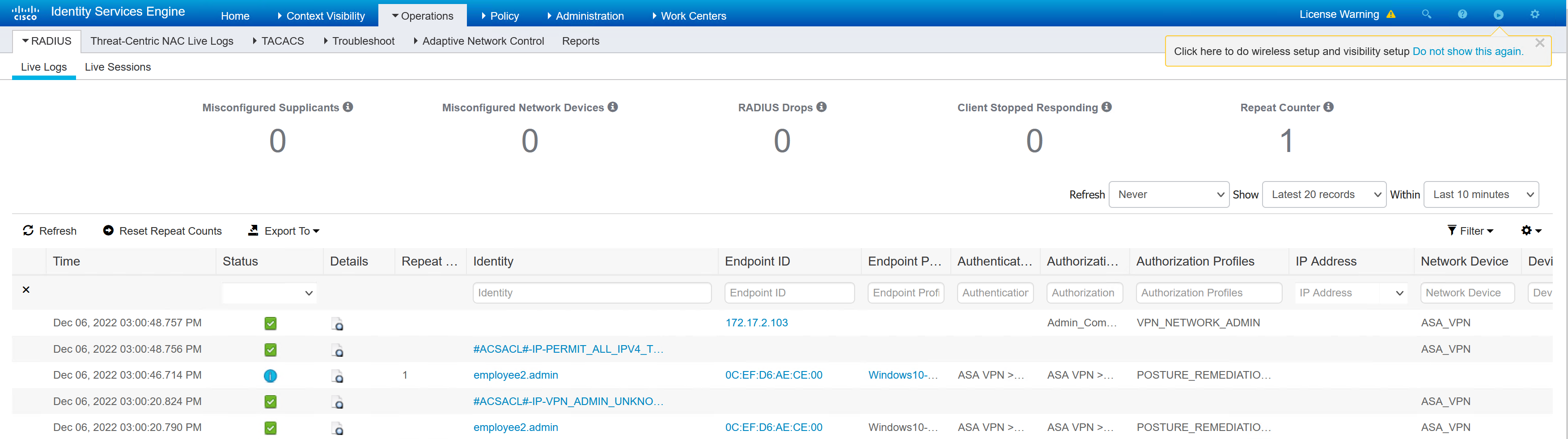
Testing – Remote User
Testing from a location that does not have the DNS server set to the AD1. This causes problems as the AnyConnect client needs to find the policy server from DNS queries, it then needs the appropriate permissions to connect to the ISE server through the firewall rules in place.
This investigation will find out why the CORP_PC1 that is outside the corporate network cannot access the ISE server for posture.
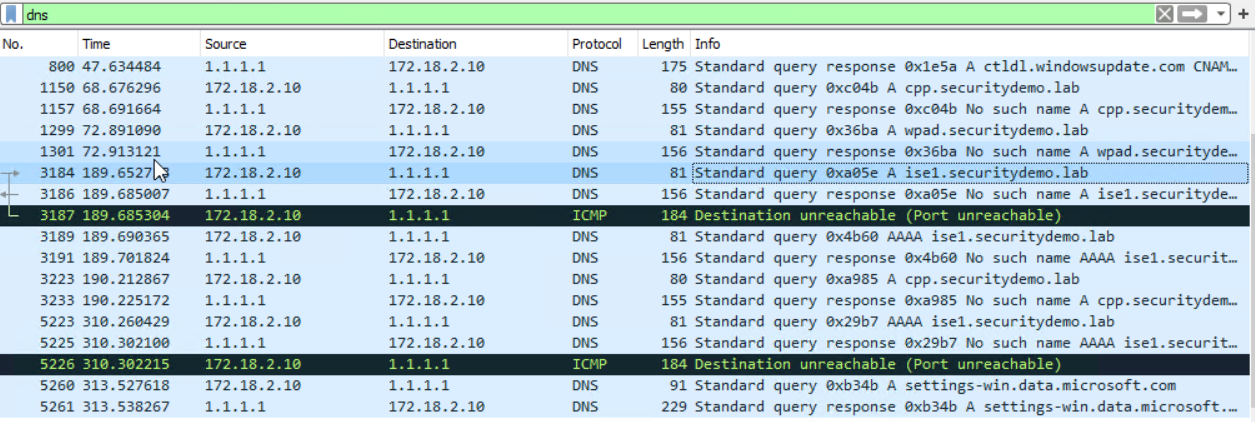
In the background with a Wireshark capture, the client is looking for DNS records to the public DNS.
ise1.securitydemo.lab, cpp.securitydemo.lab and wpad.securitydemo.lab can all be seen. This is expected behaviour and this should ideally be sent to the AD1 server and not to public DNS.
I have seen companies use public DNS for cpp.exampleorganisation.com and permit clients to talk to ISE through a NAT to a public IP.
I can use hosts file to mimic this type of behaviour, there just won’t be a DNS query in Wireshark.
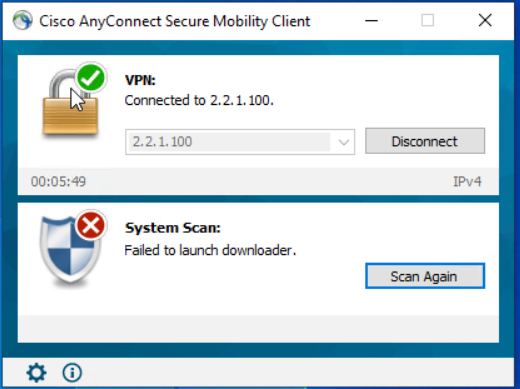
After further investigation I have discovered that if the client is able to download and update the AnyConnect posture module before connecting to the VPN the connection works as expected. There seems to be a problem initiating the download for the posture module update. I can’t see that this is on any different ports. When the download is attempting, there is plenty of traffic between the ISE server and the AnyConnect client.
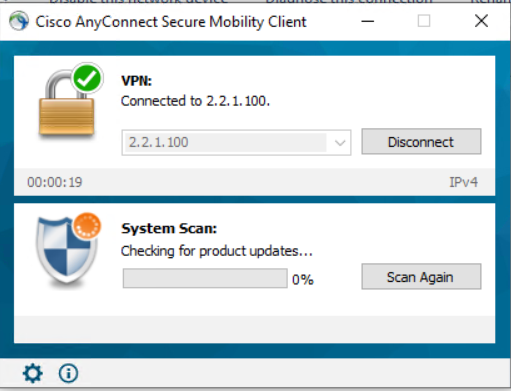
A client that can connect has previously connected to the ISE posture policy server, and is then able to connect and run a successful scan over the VPN. The check for ISE module updates is run, and the next steps are performed as expected.
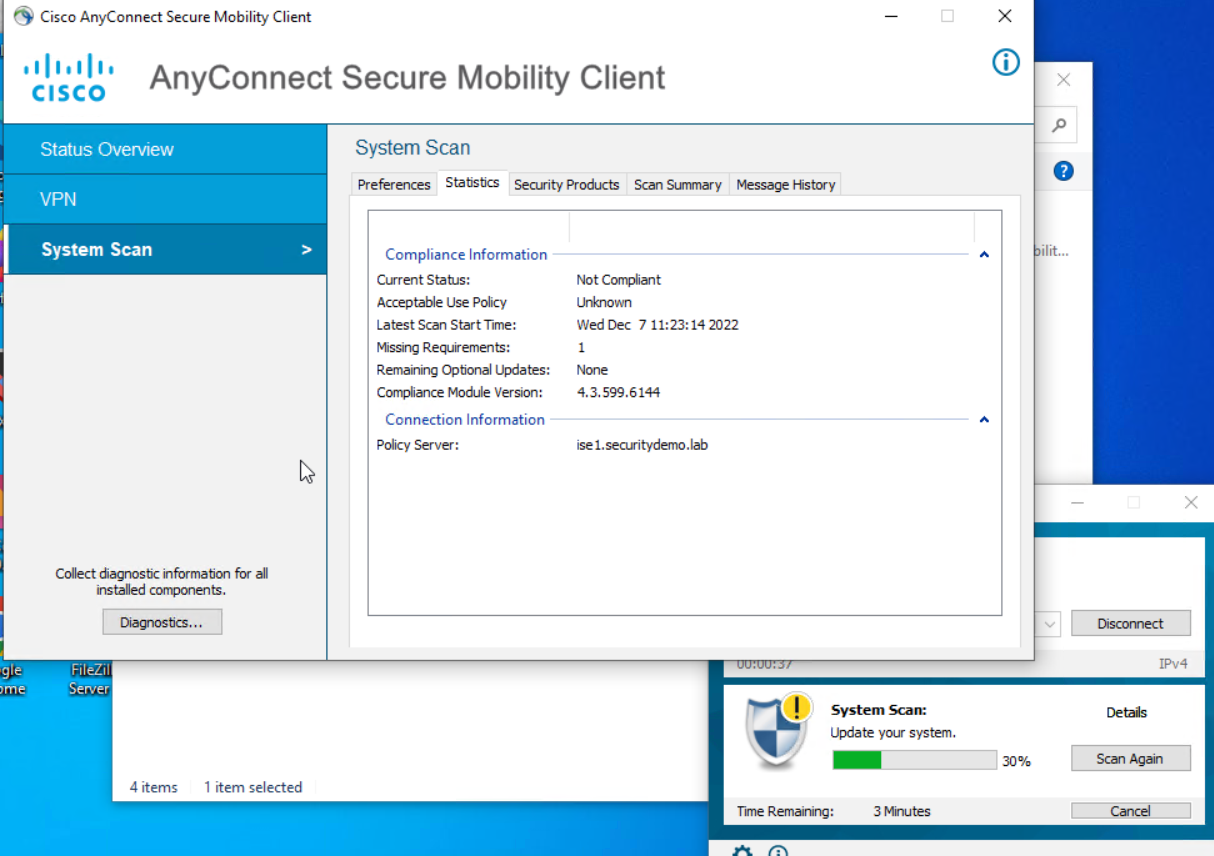
There are no differences between the versions.
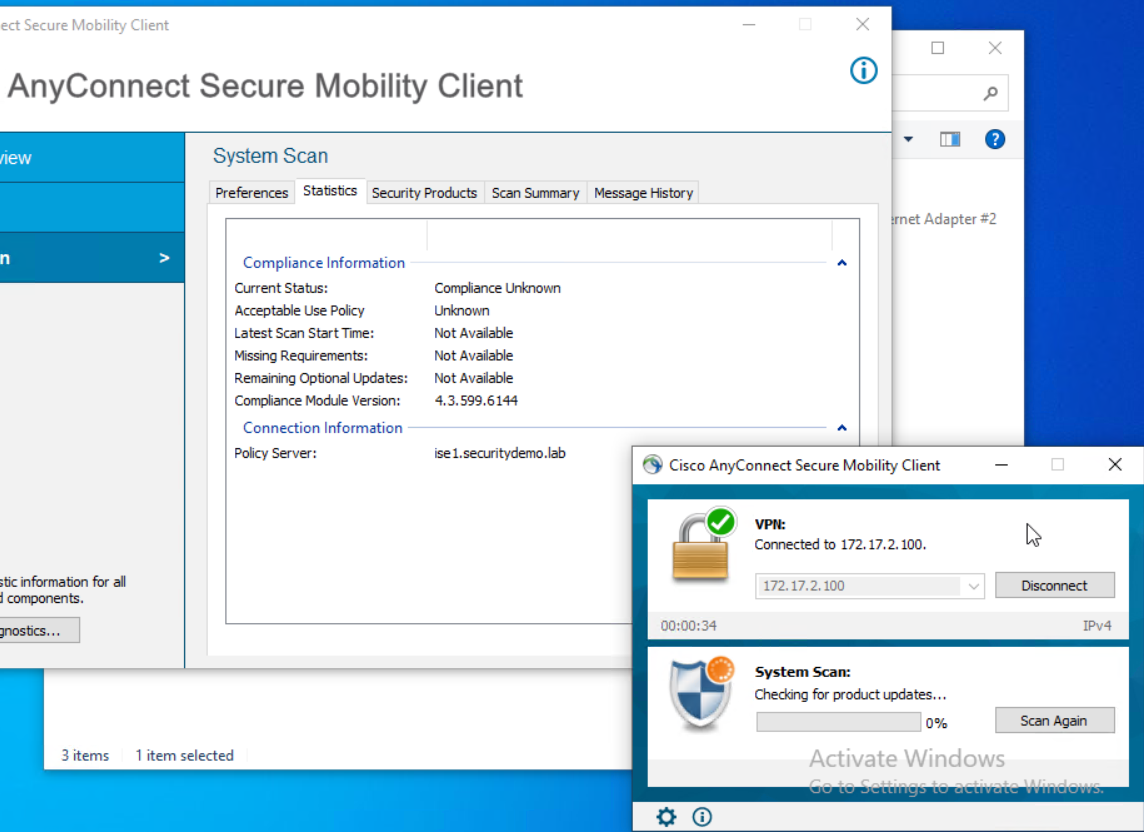
As the versions look to be correct on the client that can connect via the ASA and the one that cannot. I removed the ISE compliance module from the both clients, forcing AnyConnect to download the compliance module.
On the client that previously connected to the VPN and could reach the policy server successfully, it had no problem downloading the compliance module. The client that hadn’t ever connected got stuck in the update and failed to reach the policy server for compliance checks.
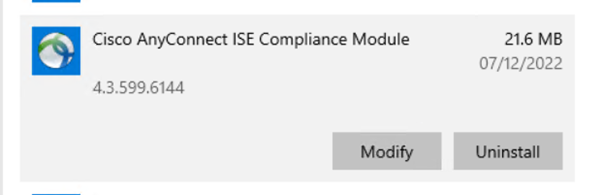
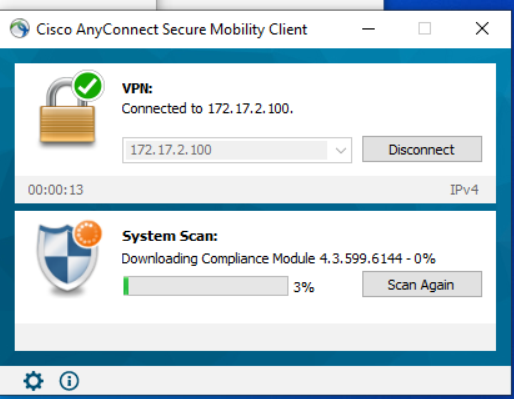
The solution to this is a work around and one that is not unreasonable. When the machine is built, it needs to connect to the local network to reach the policy server before it can use the VPN. This is already done in an organisation for joining AD and downloading software. Whether this would cause update problems for ISE in the future for clients that away from the LAN would be something to be aware of.
For a lab environment to look at posture, this isn’t a concern for me.