
Inventory & Group Vars
The Ansible inventory file can be specified or a default location can be configured in the /etc/ansible/ansible.cfg file by adding the following lines.
[defaults]
inventory	= /home/stef/Ansible/inventory/router_switch_inv.ini
The group variables are a way of assigning groups inside the inventory file variables. The inventory can be either a single group of all devices, or split into whatever groups you like. In the inventory file below I have three groups; all device group, router group and a switch group in that order.
stef@stef-VirtualBox:~/Ansible$ cat inventory/router_switch_inv.ini
[all_devices]
172.16.1.104
172.16.1.102
172.16.1.103
172.16.1.124

[lab_core]
172.16.1.104

[lab_access]
172.16.1.102
172.16.1.103
172.16.1.124
The group name and group_vars file need to match as show in the diagram below.
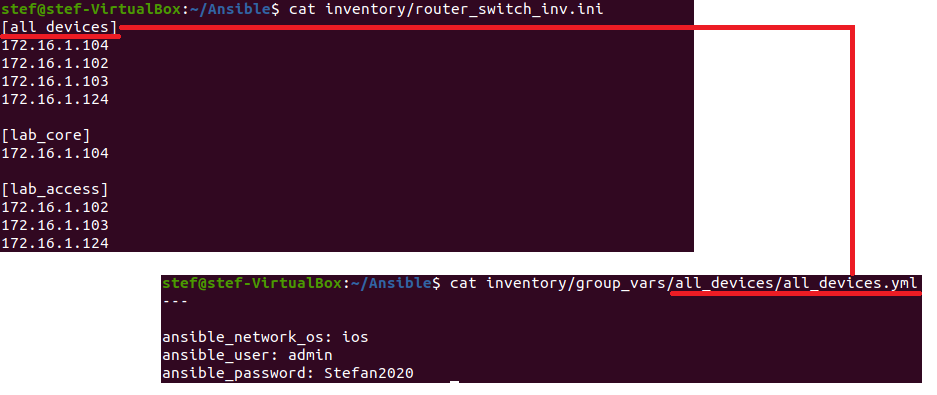
Inside the group_vars file can be device type usernames/passwords among other variables. The in the file below there are credentials for the Cisco devices along with the device type of ios.
stef@stef-VirtualBox:~/Ansible$ cat inventory/group_vars/all_devices/all_devices.yml
---

ansible_network_os: ios
ansible_user: admin
ansible_password: Stefan2020
ansible_become_password: cisco
When the vault file is created the credentials will be able to be changed for the vault variable name so they are not in plain text. More on this below.
Ansible Valut
Ansible vault is a way or storing passwords safely of the devices that Ansible will connect to. Each time a playbook is run the there will be a request for the vault password.
Create Vault
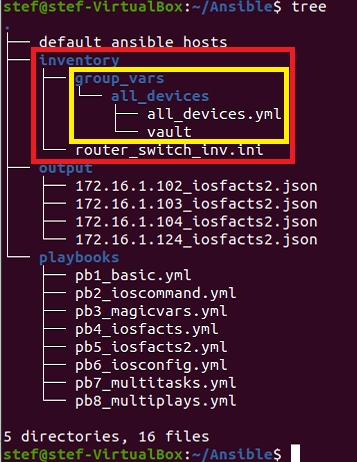
The vault file needs to be in the same directory as the group_vars file.
stef@stef-VirtualBox:~/Ansible$ pwd
/home/stef/Ansible

stef@stef-VirtualBox:~/Ansible$ cd inventory/

stef@stef-VirtualBox:~/Ansible/inventory$ ansible-vault create group_vars/all_devices/vault
New Vault password:
Confirm New Vault password:
Next you are presented with a text editor, paste in the Ansbile password variable. This is similar to the variables made in the group_vars directory.
!! Paste the below to the text editor !!
---

vault_ansible_password: wrong_password
View the Vault
Now the vault has been created, it is located in the same directory as the group_vars file and is named “vault” in this case.
stef@stef-VirtualBox:~/Ansible/inventory$ ls group_vars/all_devices/
all_devices.yml  vault
The vault is encrypted and cannot be viewed with cat or similar.
stef@stef-VirtualBox:~/Ansible/inventory$ cat group_vars/all_devices/vault
$ANSIBLE_VAULT;1.1;AES256
66333465616635643264646631353863666234643232653935333935393333343536303433663134
6434343763626161366438396365643866336564363263610a353466366430336366383565633933
32376565356261633061303634316636313262633435336633363761663962363462666630333637
6536623836663963330a656538623266656236326531333164666433316233333931626263326562
65393466653435393133623538303964383533653839643766326437313866383261663237353838
3964663864333364643662393735663137613838373938613935
To view the file the command “ansible-vault view vault” must be used.
stef@stef-VirtualBox:~/Ansible/inventory$ ansible-vault view group_vars/all_devices/vault
Vault password:
---

vault_ansible_password: wrong_password
In the example the wrong password has been entered. A new one must be entered. Now there are two options.
To either remove the vault file and start again, or to edit it.
To edit the file the command “ansible-vault edit vault” is used.
The correct password can then be entered.
stef@stef-VirtualBox:~/Ansible/inventory$ ansible-vault edit group_vars/all_devices/vault
Vault password:
---

vault_ansible_password: Stefan2020
And confirmation that it has changed.
stef@stef-VirtualBox:~/Ansible/inventory$ ansible-vault view inventory/group_vars/all_devices/vault
Vault password:
---

vault_ansible_password: Stefan2020
Testing the Vault
Now the vault is created for the password it can be tested. The password from the group_vars file has been removed and replaced with the vault variable.
stef@stef-VirtualBox:~/Ansible$ cat inventory/group_vars/all_devices/all_devices.yml
---

ansible_network_os: ios
ansible_user: admin
ansible_password: "{{ vault_ansible_password }}"
ansible_become_password: cisco
The playbook to be run will configure OSPF of the router and create VLANs on the switches. I have made one change the the playbook in Git which is to remove the device 172.16.1.103. There issues getting this switch running.
---
- name: Play1 - Manage GNS3 devices
  hosts: 172.16.1.104
  gather_facts: false
  connection: network_cli

  tasks:
    - name: enable ospf
      ios_config:
        parents: router ospf 1
        lines:
          - network 0.0.0.0 255.255.255.255 area 0
      become: yes
      become_method: enable

      register: print_output

    -  debug: var=print_output


- name: Play 2 - Switch specific config
  hosts: 172.16.1.124
  gather_facts: false
  connection: network_cli

  tasks:
    - name: Create VLANs
      ios_config:
        lines:
          - vlan 200
          - vlan 201
          - vlan 202
          - vlan 203
      become: yes
      become_method: enable

      register: print_output

    -  debug: var=print_output
The command to run the playbook needs to have an additional argument so it will ask for the vault password. This is the password set when creating the vault.
ansible-playbook -c paramiko playbooks/pb8_multiplays.yml --ask-vault-passstef@stef-VirtualBox:~/Ansible$ ansible-playbook -c paramiko playbooks/pb8_multiplays.yml --ask-vault-pass
Vault password:
PLAY [Play1 - Manage GNS3 devices] ***********************************************************************************************************
TASK [enable ospf] ***************************************************************************************************************************
[WARNING]: ansible-pylibssh not installed, falling back to paramiko
ok: [172.16.1.104]
TASK [debug] *********************************************************************************************************************************
ok: [172.16.1.104] => {
"print_output": {
"changed": false,
"failed": false
}
}
PLAY [Play 2 - Switch specific config] *******************************************************************************************************
TASK [Create VLANs] **************************************************************************************************************************
[WARNING]: ansible-pylibssh not installed, falling back to paramiko
[WARNING]: To ensure idempotency and correct diff the input configuration lines should be similar to how they appear if present in the
running configuration on device
changed: [172.16.1.124]
TASK [debug] *********************************************************************************************************************************
ok: [172.16.1.124] => {
"print_output": {
"banners": {},
"changed": true,
"commands": [
"vlan 200",
"vlan 201",
"vlan 202",
"vlan 203"
],
"failed": false,
"updates": [
"vlan 200",
"vlan 201",
"vlan 202",
"vlan 203"
],
"warnings": [
"To ensure idempotency and correct diff the input configuration lines should be similar to how they appear if present in the running configuration on device"
]
}
}
PLAY RECAP ***********************************************************************************************************************************
172.16.1.104 : ok=2 changed=0 unreachable=0 failed=0 skipped=0 rescued=0 ignored=0
172.16.1.124 : ok=2 changed=1 unreachable=0 failed=0 skipped=0 rescued=0 ignored=0
The playbook works in exactly the same way as with the plain text variables. So no more variables can be added they are working.
I have added the enable password and the username.
The updated vault file
stef@stef-VirtualBox:~/Ansible/inventory$ ansible-vault view group_vars/all_devices/vault
Vault password:
---

vault_ansible_username: admin
vault_ansible_password: Stefan2020
vault_ansible_become_password: cisco
The updated group_vars file
stef@stef-VirtualBox:~/Ansible/inventory$ cat group_vars/all_devices/all_devices.yml
---

ansible_network_os: ios
ansible_user: "{{ vault_ansible_username }}"
ansible_password: "{{ vault_ansible_password }}"
ansible_become_password: "{{ vault_ansible_become_password }}"
Rerunning the same playbook results in the same output. Everything is working!
stef@stef-VirtualBox:~/Ansible$ ansible-playbook -c paramiko playbooks/pb8_multiplays.yml --ask-vault-pass