
As part of the ASA API Terraform Project, in this post I will be demonstrating the creation of ACLs using objects, object groups and standard IP addressing.
Lab
I’m going to set up a simple ASA lab using the previous post from the project.
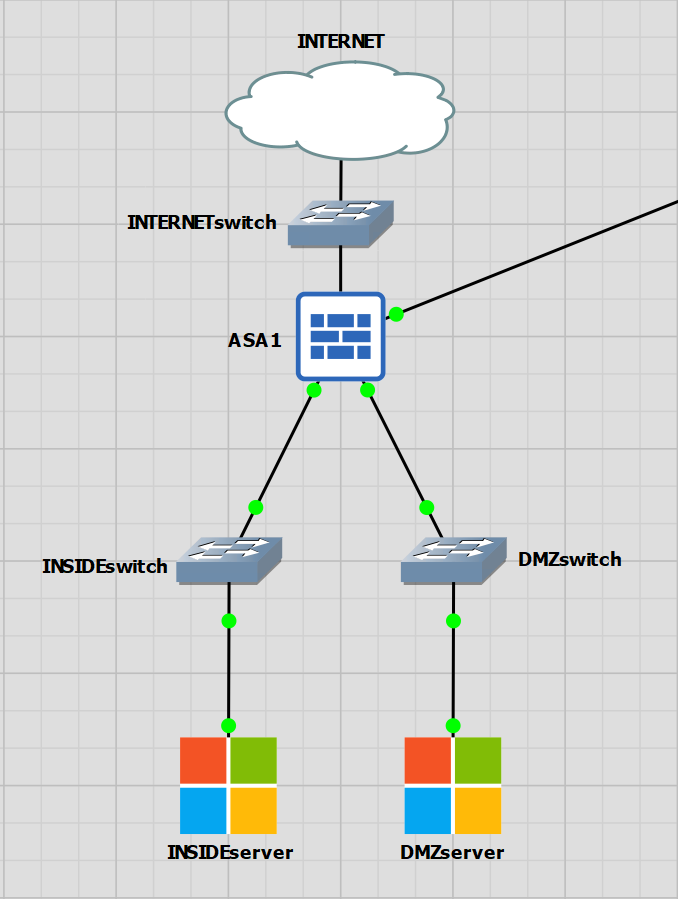
Creating Objects with Terraform
I have created a network object and an object group that references the object. The object is just for a single host that will act as my server in the DMZ.
resource "ciscoasa_interface_physical" "gig2_dmz" {
  name           = "DMZ"
  hardware_id    = "GigabitEthernet0/2"
  interface_desc = "DMZ_TERRAFORM_CREATED"
  ip_address {
    static {
      ip       = "192.168.2.1"
      net_mask = "255.255.255.0"
    }
  }
  security_level = 10
}


resource "ciscoasa_static_route" "mgmt_static_route" {
  interface = "MGMT"
  network   = "10.0.0.0/8"
  gateway   = "172.16.1.254"
}
ASA1# sh run object
object network DMZ_SERVER1
 host 192.168.2.5

ASA1# sh run object-group
object-group network ALL_DMZ_SERVERS
 network-object object DMZ_SERVER1
The next example is to create a service object and service object group for HTTP/S ports.
resource "ciscoasa_network_service" "tcp_80" {
  name  = "TCP_80"
  value = "tcp/80"
}

resource "ciscoasa_network_service" "tcp_443" {
  name  = "TCP_443"
  value = "tcp/443"
}

resource "ciscoasa_network_service_group" "web_ports" {
  name = "WEB_PORTS"

  members = [
    "${ciscoasa_network_service.tcp_80.name}",
    "${ciscoasa_network_service.tcp_443.name}",
  ]
}
ASA1# sh run object service
object service TCP_80
 service tcp destination eq www
object service TCP_443
 service tcp destination eq https

ASA1# sh run object-group id WEB_PORTS
object-group service WEB_PORTS
 service-object object TCP_443
 service-object object TCP_80
Creating ACLs with Terraform
Now the objects and groups have been created, the ACLs can be created. When creating the ACL, the ASA terraform provider will also create the binding of the ACL name to the interface.
The ACL will permit all traffic to the object-group ALL_DMZ_SERVERS using the service group WEB_PORTS.
resource "ciscoasa_access_in_rules" "all_dmz_servers_in_web_ports" {
  interface = "OUTSIDE"
  rule {
    source              = "0.0.0.0/0"
    destination         = "${ciscoasa_network_object_group.all_dmz_servers.name}"
    destination_service = "${ciscoasa_network_service_group.web_ports.name}"
  }
}
The ASA config will look like below…
ASA1# sh run | i access-list
access-list OUTSIDE_access_in extended permit object-group WEB_PORTS any4 object-group ALL_DMZ_SERVERS

ASA1# sh run | i OUTSIDE_access_in
access-list OUTSIDE_access_in extended permit object-group WEB_PORTS any4 object-group ALL_DMZ_SERVERS
access-group OUTSIDE_access_in in interface OUTSIDE

ASA1# sh access-list OUTSIDE_access_in
access-list OUTSIDE_access_in; 2 elements; name hash: 0x766b1b32
access-list OUTSIDE_access_in line 1 extended permit object-group WEB_PORTS any4 object-group ALL_DMZ_SERVERS (hitcnt=0) 0xd824c3a3
  access-list OUTSIDE_access_in line 1 extended permit tcp any4 host 192.168.2.5 eq https (hitcnt=0) 0x663e4b81
  access-list OUTSIDE_access_in line 1 extended permit tcp any4 host 192.168.2.5 eq www (hitcnt=0) 0x7eaf807f
Testing with Packet Tracer
The ACL on the ASA is working as confirmed with the packet-tracer command. I have omitted some of the output, as it’s not really necessary.
ASA1# packet-tracer input ouTSIDE tcp 1.1.1.1 5 192.168.2.5 443

Phase: 2
Type: ACCESS-LIST
Subtype: log
Result: ALLOW
Config:
access-group OUTSIDE_access_in in interface OUTSIDE
access-list OUTSIDE_access_in extended permit object-group WEB_PORTS any4 object-group ALL_DMZ_SERVERS
object-group service WEB_PORTS
 service-object object TCP_443
 service-object object TCP_80
object-group network ALL_DMZ_SERVERS
 network-object object DMZ_SERVER1
Additional Information:

Result:
input-interface: OUTSIDE
input-status: up
input-line-status: up
output-interface: DMZ
output-status: up
output-line-status: up
Action: allow
INSIDE to DMZ ACL
I’ll quickly create one more ACL that will permit traffic from the INSIDE to the DMZ segment. For this, I will use object-groups only, but with hard set ports and addresses in them. The ACL itself will also contain a hard set ACL.
This ACL permits port 22 from the INSIDE host 192.168.1.5 to the DMZ group ALL_DMZ_SERVERS, which currently contains a single host of 192.168.2.5.
Terraform created the access-group and the object group for SSH_PORT
resource "ciscoasa_network_object_group" "all_inside_servers" {
  name = "ALL_INSIDE_SERVERS"

  members = [
    "192.168.1.5",
  ]
}


resource "ciscoasa_network_service_group" "ssh_port" {
  name = "SSH_PORT"

  members = [
    "tcp/22",
  ]
}

resource "ciscoasa_access_in_rules" "inside_dmz_ssh" {
  interface = "INSIDE"
  rule {
    source              = "192.168.1.5"
    destination         = "${ciscoasa_network_object_group.all_dmz_servers.name}"
    destination_service = "${ciscoasa_network_service_group.ssh_port.name}"
  }
}
ASA1# sh run access-group | i INSIDE
access-group INSIDE_access_in in interface INSIDE

ASA1# sh run access-list INSIDE_access_in
access-list INSIDE_access_in extended permit object-group SSH_PORT host 192.168.1.5 object-group ALL_DMZ_SERVERS

ASA1# sh run object-group id SSH_PORT
object-group service SSH_PORT
 service-object tcp destination eq ssh

ASA1# sh run object-group id ALL_DMZ_SERVERS
object-group network ALL_DMZ_SERVERS
 network-object object DMZ_SERVER1

ASA1# sh run object id DMZ_SERVER1
object network DMZ_SERVER1
 host 192.168.2.5
ASA1# packet-tracer input INSIDE tcp 192.168.1.5 5 192.168.2.5 22

Phase: 2
Type: ACCESS-LIST
Subtype: log
Result: ALLOW
Config:
access-group INSIDE_access_in in interface INSIDE
access-list INSIDE_access_in extended permit object-group SSH_PORT host 192.168.1.5 object-gr                                                    oup ALL_DMZ_SERVERS
object-group service SSH_PORT
 service-object tcp destination eq ssh
object-group network ALL_DMZ_SERVERS
 network-object object DMZ_SERVER1
Additional Information:

Result:
input-interface: INSIDE
input-status: up
input-line-status: up
output-interface: DMZ
output-status: up
output-line-status: up
Action: allow