
This is a post that takes the previous Nexus EVPN VXLAN Fabric post, and uses Ansible to build the topology. This is based off this Cisco developer document.
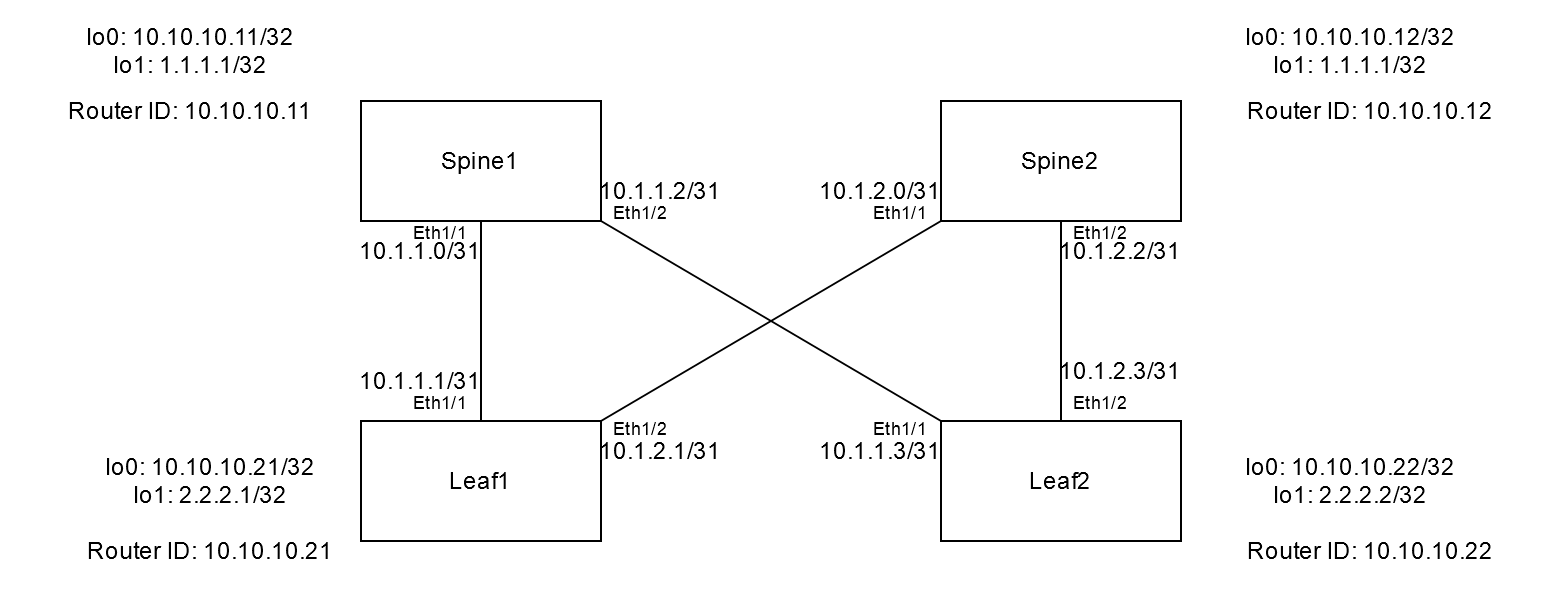
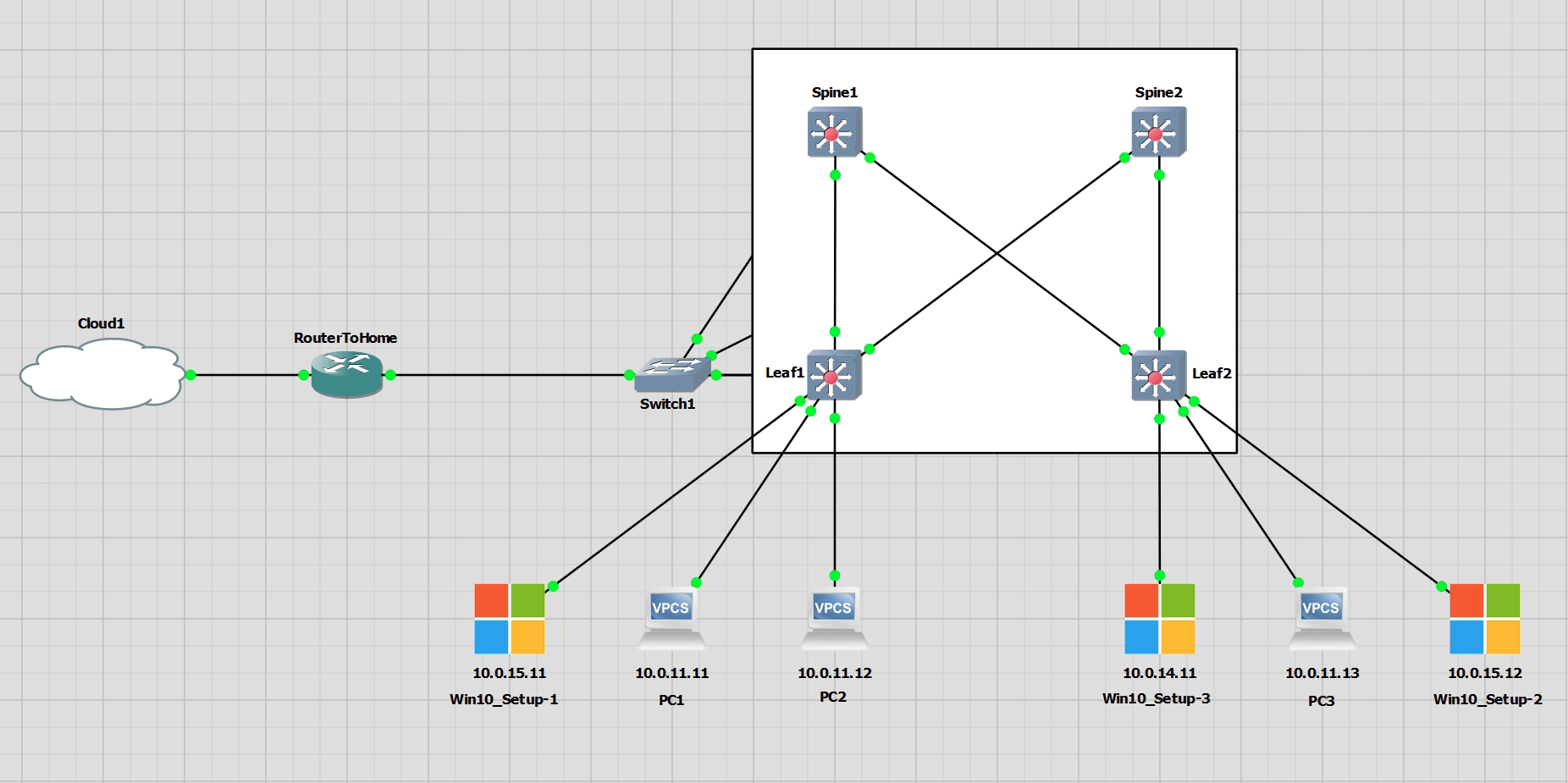
General Info
This project is located in my GitLab. In order to run the Ansible playbook navigate to the nexus_evpn, and run ansible-playbook -i inventory/DC_inv.ini site.yml
Setup
I have used a Python virtual environment and installed Ansible inside the virtual environment.
python3.9 -m venv myenv
source myenv/bin/activate

python -m pip install ansible
(myenv) stefankelly@Stefans-MacBook-Pro nexusansible % ansible --version
ansible [core 2.15.1]
  config file = None
  configured module search path = ['/Users/stefankelly/.ansible/plugins/modules', '/usr/share/ansible/plugins/modules']
  ansible python module location = /Users/stefankelly/Scripts/myenv/lib/python3.9/site-packages/ansible
  ansible collection location = /Users/stefankelly/.ansible/collections:/usr/share/ansible/collections
  executable location = /Users/stefankelly/Scripts/myenv/bin/ansible
  python version = 3.9.17 (main, Jun 15 2023, 07:48:58) [Clang 14.0.0 (clang-1400.0.29.202)] (/Users/stefankelly/Scripts/myenv/bin/python)
  jinja version = 3.1.2
  libyaml = True
I have created a directory for this project named nexus_evpn.
mkdir nexus_evpn
cd nexus_evpn
I have created two more directories that are for; group_vars, host_vars and roles
mkdir group_vars
mkdir host_vars
mkdir roles
According to the Cisco document, Ansible Galaxy can be used to create the spine and leaf directories inside the roles directory. This isn’t exactly needed as it creates a lot of extra files that are not required for this lab, but it faster than creating the structure manually.
The only important directories and files in this are the tasks, vars directories, and the main.yml inside each of these. The rest of these directories/files inside the tree output is not used.
cd roles
ansible-galaxy init spine
ansible-galaxy init leaf
(myenv) stefankelly@Stefans-MacBook-Pro roles % tree
.
├── leaf
│   ├── README.md
│   ├── defaults
│   │   └── main.yml
│   ├── files
│   ├── handlers
│   │   └── main.yml
│   ├── meta
│   │   └── main.yml
│   ├── tasks
│   │   └── main.yml
│   ├── templates
│   ├── tests
│   │   ├── inventory
│   │   └── test.yml
│   └── vars
│       └── main.yml
└── spine
    ├── README.md
    ├── defaults
    │   └── main.yml
    ├── files
    ├── handlers
    │   └── main.yml
    ├── meta
    │   └── main.yml
    ├── tasks
    │   └── main.yml
    ├── templates
    ├── tests
    │   ├── inventory
    │   └── test.yml
    └── vars
        └── main.yml
Ansible Configuration
First, the configuration of Ansible needs to be taken care of. Without this, the playbook may not run at all. Below is the output for the complete structure of this project. There is a .ansible.cfg file that contains important parameters for Ansible when running the playbook.
# add to the bottom of the /etc/ansible/ansible.cfg file

[defaults]
inventory	= /home/stef/ansible_projects/inventory/DC_inv.ini
stdout_callback=debug
stderr_callback=debug
host_key_checking = False

[ssh_connection]
ssh_args = -oKexAlgorithms=diffie-hellman-group-exchange-sha1,diffie-hellman-group14-sha1,diffie-hellman-group1-sha1

[paramiko_connection]
host_key_auto_add = True
The inventory file is also important and referenced in the .ansible.cfg file. This example is a .ini file, this is just for simplicity. If the inventory file was a .yml there is more flexibility.
[spine]
172.16.1.101
172.16.1.102

[leaf]
172.16.1.103
172.16.1.104
(myenv) stefankelly@Stefans-MacBook-Pro nexus_evpn % tree -a
.
├── .ansible.cfg
├── group_vars
│   └── all.yml
├── host_vars
│   ├── 172.16.1.101.yml
│   ├── 172.16.1.102.yml
│   ├── 172.16.1.103.yml
│   └── 172.16.1.104.yml
├── inventory
│   └── DC_inv.ini
├── roles
│   ├── leaf
│   │   ├── README.md
│   │   ├── defaults
│   │   │   └── main.yml
│   │   ├── files
│   │   ├── handlers
│   │   │   └── main.yml
│   │   ├── meta
│   │   │   └── main.yml
│   │   ├── tasks
│   │   │   └── main.yml
│   │   ├── templates
│   │   ├── tests
│   │   │   ├── inventory
│   │   │   └── test.yml
│   │   └── vars
│   │       └── main.yml
│   └── spine
│       ├── README.md
│       ├── defaults
│       │   └── main.yml
│       ├── files
│       ├── handlers
│       │   └── main.yml
│       ├── meta
│       │   └── main.yml
│       ├── tasks
│       │   └── main.yml
│       ├── templates
│       ├── tests
│       │   ├── inventory
│       │   └── test.yml
│       └── vars
│           └── main.yml
└── site.yml
Group and Host Vars
The files inside these directories are for all the hosts or the individual hosts (switches). If it is not clear, anything in the group_vars/all.yml file contains variable for all the hosts, and anything in host_vars/ are for the hosts defined in the inventory. These file names reference the names in the inventory file.
For all the files, please see the GitLab project.
group_vars/all.yml
ansible_connection: httpapi
ansible_httpapi_use_ssl: yes
ansible_httpapi_validate_certs: no
ansible_network_os: nxos
ansible_user: admin
ansible_httpapi_pass: 123abc
host_vars/172.16.1.101.yml
---
# vars file for DC1

router_id: 10.10.10.11

loopbacks:
  - { interface: loopback0, addr: 10.10.10.11, mask: 32 }
  - { interface: loopback1, addr: 1.1.1.1, mask: 32 }

l3_interfaces:
  - { interface: ethernet1/1, addr: 10.1.1.0, mask: 31 }
  - { interface: Ethernet1/2, addr: 10.1.1.2, mask: 31 }
Roles
Inside the roles directory are the spine/leaf vars and tasks directories. The files nexusansible/nexus_evpn/roles/spine/vars/main.yml and nexusansible/nexus_evpn/roles/leaf/vars/main.yml contain all the variables that are shared for the switch type.
Spine Vars
---
# vars file for spine

features:
  - { feature: bgp }
  - { feature: pim }
  - { feature: ospf }

ospf_process_id: UNDERLAY

ospf_area: 0

asn: 65001

address_families:
  - { afi: l2vpn, safi: evpn }

bgp_neighbors:
  - { remote_as: 65001, neighbor: 10.10.10.21, update_source: Loopback0 }
  - { remote_as: 65001, neighbor: 10.10.10.22, update_source: Loopback0 }

rp_address: 1.1.1.1
Leaf Vars
---
# vars file for leaf

features:
  - { feature: bgp }
  - { feature: interface-vlan }
  - { feature: ospf }
  - { feature: pim }
  - { feature: vnseg_vlan }

ospf_process_id: UNDERLAY

ospf_area: 0

asn: 65001

address_families:
  - { afi: l2vpn, safi: evpn }
  - { afi: ipv4, safi: unicast }

bgp_neighbors:
  - { remote_as: 65001, neighbor: 10.10.10.11, update_source: Loopback0 }

rp_address: 1.1.1.1

vlans_l2vni:
  - { vlan_id: 11, vni_id: 10011, addr: 10.0.11.1, mask: 24, mcast_grp: 239.0.0.11, vrf: Tenant-1 }
  - { vlan_id: 12, vni_id: 10012, addr: 10.0.12.1, mask: 24, mcast_grp: 239.0.0.12, vrf: Tenant-1 }
  - { vlan_id: 13, vni_id: 10013, addr: 10.0.13.1, mask: 24, mcast_grp: 239.0.0.13, vrf: Tenant-1 }
  - { vlan_id: 14, vni_id: 10014, addr: 10.0.14.1, mask: 24, mcast_grp: 239.0.0.14, vrf: Tenant-1 }
  - { vlan_id: 15, vni_id: 10015, addr: 10.0.15.1, mask: 24, mcast_grp: 239.0.1.2, vrf: Tenant-1 }

vlans_l3vni:
  - { vlan_id: 10, vni_id: 10000, vrf: Tenant-1 }

vrfs:
  - { vrf: Tenant-1, vni_id: 10000, afi: ipv4, safi: unicast }
The tasks files define the tasks that will be in each play of the playbook. There are two plays, one is the spine and the other is the leaf.nexusansible/nexus_evpn/roles/spine/tasks/main.ymlnexusansible/nexus_evpn/roles/leaf/tasks/main.yml
Spine Tasks
---
# tasks file for spine

-   name: ENABLE FEATURES
    cisco.nxos.nxos_feature:
        feature: "{{item.feature }}"
    loop: "{{ features }}"

-   name: ENABLE FEATURES
    cisco.nxos.nxos_config:
        lines: "feature nv overlay"

-   name: CONFIGURE LOOPBACK INTERFACES
    cisco.nxos.nxos_interfaces:
        config:
        -   name: "{{ item.interface }}"
            enabled: true
    loop: "{{ loopbacks }}"

-   name: CONFIGURE INTERFACE AS ROUTED & MTU
    cisco.nxos.nxos_interfaces:
      config:
      - name: "{{ item.interface }}"
        mode: "layer3"
        enabled: true
        mtu: 9216
    loop: "{{ l3_interfaces }}"


-   name: CONFIGURE INTERFACE IP ADDR
    cisco.nxos.nxos_l3_interfaces:
        config:
        -   name: "{{ item.interface }}"
            ipv4:
            -   address: "{{ item.addr }}/{{ item.mask }}"
    loop: "{{ loopbacks + l3_interfaces }}"


-   name: ENABLE OSPF
    cisco.nxos.nxos_ospfv2:
        config:
          processes:
          -   process_id: "{{ ospf_process_id }}"
              router_id: "{{ router_id }}"


-   name: ASSOCIATE INTERFACES WITH OSPF PROCESS
    cisco.nxos.nxos_ospf_interfaces:
        config:
        -   name: "{{ item.interface }}"
            address_family:
            -   afi: ipv4
                processes:
                -   process_id: "{{ ospf_process_id }}"
                    area:
                        area_id: "{{ ospf_area }}"
    loop: "{{ loopbacks + l3_interfaces }}"


-   name: CONFIGURE PIM INTERFACES
    cisco.nxos.nxos_pim_interface:
        interface: "{{ item.interface }}"
        sparse: true
    loop: "{{ loopbacks + l3_interfaces }}"

-   name: CONFIGURE SSM_RANGE, DISABLE BFD
    cisco.nxos.nxos_pim:
        bfd: disable
        ssm_range: 224.0.0.0/8

-   name: PIM RP
    cisco.nxos.nxos_config:
        lines:
            - "ip pim rp-address 1.1.1.1 group-list 224.0.0.0/4"


-   name: ENABLE NV OVERLAY EVPN
    cisco.nxos.nxos_evpn_global:
        nv_overlay_evpn: true

-   name: CONFIGURE BGP ASN AND ROUTER ID
    cisco.nxos.nxos_bgp_global:
        config:
            as_number: "{{ asn }}"
            router_id: "{{ router_id }}"
            neighbors:
            -   neighbor_address: "{{ item.neighbor }}"
                remote_as: "{{ item.remote_as }}"
                update_source: "{{ item.update_source }}"
        state: merged
    loop: "{{ bgp_neighbors }}"

-   name: CONFIGURE BGP NEIGHBORS
    cisco.nxos.nxos_bgp_neighbor_address_family:
        config:
            as_number: "{{ asn }}"
            neighbors:
            -   neighbor_address: "{{ item.neighbor }}"
                address_family:
                -   afi: l2vpn
                    safi: evpn
                    send_community:
                        both: true
                    route_reflector_client: true
    loop: "{{ bgp_neighbors }}"

# -   name: SAVE RUN CONFIG TO STARTUP CONFIG
#     cisco.nxos.nxos_config:
#         save_when: always
Leaf Tasks
---
# tasks file for leaf

-   name: ENABLE FEATURES
    cisco.nxos.nxos_feature:
        feature: "{{item.feature }}"
    loop: "{{ features }}"

-   name: ENABLE FEATURES
    cisco.nxos.nxos_config:
        lines: "feature nv overlay"

-   name: CONFIGURE LOOPBACK INTERFACES
    cisco.nxos.nxos_interfaces:
        config:
        -   name: "{{ item.interface }}"
            enabled: true
    loop: "{{ loopbacks }}"

-   name: CONFIGURE INTERFACE AS ROUTED & MTU
    cisco.nxos.nxos_interfaces:
      config:
      - name: "{{ item.interface }}"
        mode: "layer3"
        enabled: true
        mtu: 9216
    loop: "{{ l3_interfaces }}"

-   name: CONFIGURE INTERFACE IP ADDR
    cisco.nxos.nxos_l3_interfaces:
        config:
        -   name: "{{ item.interface }}"
            ipv4:
            -   address: "{{ item.addr }}/{{ item.mask }}"
    loop: "{{ loopbacks + l3_interfaces }}"

-   name: ENABLE OSPF
    cisco.nxos.nxos_ospfv2:
        config:
          processes:
          -   process_id: "{{ ospf_process_id }}"
              router_id: "{{ router_id }}"

-   name: ASSOCIATE INTERFACES WITH OSPF PROCESS
    cisco.nxos.nxos_ospf_interfaces:
        config:
        -   name: "{{ item.interface }}"
            address_family:
            -   afi: ipv4
                processes:
                -   process_id: "{{ ospf_process_id }}"
                    area:
                        area_id: "{{ ospf_area }}"
    loop: "{{ loopbacks + l3_interfaces }}"


-   name: CONFIGURE PIM INTERFACES
    cisco.nxos.nxos_pim_interface:
        interface: "{{ item.interface }}"
        sparse: true
    loop: "{{ loopbacks + l3_interfaces }}"

-   name: CONFIGURE SSM_RANGE, DISABLE BFD
    cisco.nxos.nxos_pim:
        bfd: disable
        ssm_range: 224.0.0.0/8

-   name: PIM RP
    cisco.nxos.nxos_config:
        lines:
            - "ip pim rp-address 1.1.1.1 group-list 224.0.0.0/4"

-   name: ENABLE NV OVERLAY EVPN
    cisco.nxos.nxos_evpn_global:
        nv_overlay_evpn: true

-   name: CONFIGURE BGP ASN, ROUTER ID, AND NEIGHBORS
    cisco.nxos.nxos_bgp_global:
        config:
            as_number: "{{ asn }}"
            router_id: "{{ router_id }}"
            neighbors:
            -   neighbor_address: "{{ item.neighbor }}"
                remote_as: "{{ item.remote_as }}"
                update_source: "{{ item.update_source }}"
        state: merged
    loop: "{{ bgp_neighbors }}"

-   name: CONFIGURE BGP NEIGHBOR AFI, SAFI, COMMUNITY, and RR
    cisco.nxos.nxos_bgp_neighbor_address_family:
        config:
            as_number: "{{ asn }}"
            neighbors:
            -   neighbor_address: "{{ item.neighbor }}"
                address_family:
                -   afi: l2vpn
                    safi: evpn
                    send_community:
                        both: true
                    route_reflector_client: true
    loop: "{{ bgp_neighbors }}"


-   name: CONFIGURE VXLAN VTEP NVE INTERFACE
    cisco.nxos.nxos_interfaces:
        config:
        -   name: nve1
            enabled: true
        state: merged

-   name: CONFIGURE VXLAN VTEP NVE INTERFACE FOR EVPN CONTROL PLANE
    cisco.nxos.nxos_vxlan_vtep:
        interface: nve1
        host_reachability: true
        source_interface: Loopback1
        state: present

-   name: CONFIGURE VLAN TO VNI MAPPING
    cisco.nxos.nxos_vlans:
        config:
        -   vlan_id: "{{ item.vlan_id }}"
            mapped_vni: "{{ item.vni_id }}"
    with_items:
    - "{{ vlans_l2vni }}"
    - "{{ vlans_l3vni }}"

-   name: CONFIGURE TENANT VRFs
    cisco.nxos.nxos_vrf:
        vrf: "{{ item.vrf }}"
        vni: "{{ item.vni_id }}"
        rd: auto
        state: present
    loop: "{{ vrfs }}"

-   name: CONFIGURE TENANT VRFs (cont'd)
    cisco.nxos.nxos_vrf_af:
        vrf: "{{ item.vrf }}"
        afi: ipv4
        route_target_both_auto_evpn: true
        state: present
    loop: "{{ vrfs }}"


-   name: CONFIGURE VXLAN VTEP NVE INTERFACE L2VNI MAPPING
    cisco.nxos.nxos_vxlan_vtep_vni:
        interface: nve1
        vni: "{{ item.vni_id }}"
        #ingress_replication: bgp
        multicast_group: "{{ item.mcast_grp }}"
        #suppress_arp: true
    loop: "{{ vlans_l2vni }}"

-   name: CONFIGURE VXLAN VTEP NVE INTERFACE L3VNI MAPPING
    cisco.nxos.nxos_vxlan_vtep_vni:
        interface: nve1
        vni: "{{ item.vni_id }}"
        assoc_vrf: true
    loop: "{{ vlans_l3vni }}"

-   name: CONFIGURE L2 EVPN VRFs
    cisco.nxos.nxos_evpn_vni:
        vni: "{{ item.vni_id }}"
        route_distinguisher: auto
        route_target_both: auto
    loop: "{{ vlans_l2vni }}"

-   name: CONFIGURE TENANT VRFs UNDER BGP PROCESS
    cisco.nxos.nxos_bgp_address_family:
        config:
            as_number: "{{ asn }}"
            address_family:
            -   afi: "{{ item.afi }}"
                safi: "{{ item.safi }}"
                vrf: "{{ item.vrf }}"
                advertise_l2vpn_evpn: true
    loop: "{{ vrfs }}"

-   name: CONFIGURE ANYCAST GW MAC
    cisco.nxos.nxos_overlay_global:
        anycast_gateway_mac: "1234.5678.9000"

-   name: CONFIGURE SVIs THAT ARE MAPPED TO VNIs
    cisco.nxos.nxos_interfaces:
        config:
        -   name: "Vlan{{ item.vlan_id }}"
            enabled: true
    with_items:
    - "{{ vlans_l2vni }}"
    - "{{ vlans_l3vni }}"

-   name: ASSOCIATE INTERFACES TO TENANT VRF
    cisco.nxos.nxos_vrf_interface:
        vrf: "{{ item.vrf }}"
        interface: "vlan{{ item.vlan_id }}"
    with_items:
    - "{{ vlans_l2vni }}"
    - "{{ vlans_l3vni }}"

-   name: ENABLE ANYCAST GW UNDER L2VNI SVI
    cisco.nxos.nxos_interfaces:
        config:
        -   name: "Vlan{{ item.vlan_id }}"
            fabric_forwarding_anycast_gateway: true
    loop: "{{ vlans_l2vni }}"

-   name: CONFIGURE IP FORWARD UNDER L3VNI SVI
    cisco.nxos.nxos_interfaces:
        config:
        -   name: "vlan{{ item.vlan_id }}"
            ip_forward: true
    loop: "{{ vlans_l3vni }}"

-   name: CONFIGURE IP ADDRESS TO L2VNI SVI
    cisco.nxos.nxos_l3_interfaces:
        config:
        -   name: "Vlan{{ item.vlan_id }}"
            ipv4:
            -   address: "{{ item.addr }}/{{ item.mask }}"
    loop: "{{ vlans_l2vni }}"


-   name: CONFIGURE ACCESS INTERFACES
    cisco.nxos.nxos_l2_interfaces:
        config:
        -   name: "{{ item.interface}}"
            access:
                vlan: "{{ item.vlan }}"
    loop: "{{ access_interfaces }}"


# -   name: SAVE RUN CONFIG TO STARTUP CONFIG
#     cisco.nxos.nxos_config:
#         save_when: always
Playbook – site.yml
This file is the main playbook file. It will call the role tasks which intern call all the variables from the various files.
---
# main playbook

- hosts: spine
  roles:
    - role: spine

- hosts: leaf
  roles:
    - role: leaf
Verification – Show Commands
These show commands are all lifted from the show commands from the previous post
Show Commands
As there are multiple stages to this configuration, there are lots of show commands. Some of them overlap by showing the same information.
show int status

sh ip ospf neighbors
show ip route ospf-UNDERLAY

show ip pim interface brief
show ip pim neighbor
show ip pim rp

show vrf Tenant-1 detail
show run vrf tenant-1

show interface nve 1
show nve vrf
show nve vni
show nve peers
show vxlan
show l2route evpn mac all
show l2route evpn mac-ip all
show bgp l2vpn evpn
show bgp l2vpn evpn summary

show system internal l2fwder mac
OSPF
OSPF is configured as point to point networks between each physical interface. All Ethernet and loopback interfaces are taking part in OSPF.
Spine1
sh ip ospf neighbors
 OSPF Process ID UNDERLAY VRF default
 Total number of neighbors: 2
 Neighbor ID     Pri State            Up Time  Address         Interface
 10.10.10.21       1 FULL/BDR         18:04:18 10.1.1.1        Eth1/1
 10.10.10.22       1 FULL/BDR         18:04:17 10.1.1.3        Eth1/2
show ip route ospf-UNDERLAY
IP Route Table for VRF "default"
'*' denotes best ucast next-hop
'**' denotes best mcast next-hop
'[x/y]' denotes [preference/metric]
'%<string>' in via output denotes VRF <string>

2.2.2.1/32, ubest/mbest: 1/0
    *via 10.1.1.1, Eth1/1, [110/41], 18:04:31, ospf-UNDERLAY, intra
2.2.2.2/32, ubest/mbest: 1/0
    *via 10.1.1.3, Eth1/2, [110/41], 18:04:31, ospf-UNDERLAY, intra
10.1.2.0/31, ubest/mbest: 1/0
    *via 10.1.1.1, Eth1/1, [110/80], 18:04:31, ospf-UNDERLAY, intra
10.1.2.2/31, ubest/mbest: 1/0
    *via 10.1.1.3, Eth1/2, [110/80], 18:04:31, ospf-UNDERLAY, intra
10.10.10.12/32, ubest/mbest: 2/0
    *via 10.1.1.1, Eth1/1, [110/81], 18:04:25, ospf-UNDERLAY, intra
    *via 10.1.1.3, Eth1/2, [110/81], 18:04:29, ospf-UNDERLAY, intra
10.10.10.21/32, ubest/mbest: 1/0
    *via 10.1.1.1, Eth1/1, [110/41], 18:04:31, ospf-UNDERLAY, intra
10.10.10.22/32, ubest/mbest: 1/0
    *via 10.1.1.3, Eth1/2, [110/41], 18:04:31, ospf-UNDERLAY, intra
Leaf1
sh ip ospf neighbors
 OSPF Process ID UNDERLAY VRF default
 Total number of neighbors: 2
 Neighbor ID     Pri State            Up Time  Address         Interface
 10.10.10.11       1 FULL/DR          18:05:26 10.1.1.0        Eth1/1
 10.10.10.12       1 FULL/DR          18:05:21 10.1.2.0        Eth1/2
show ip route ospf-UNDERLAY
IP Route Table for VRF "default"
'*' denotes best ucast next-hop
'**' denotes best mcast next-hop
'[x/y]' denotes [preference/metric]
'%<string>' in via output denotes VRF <string>

1.1.1.1/32, ubest/mbest: 2/0
    *via 10.1.1.0, Eth1/1, [110/41], 18:05:46, ospf-UNDERLAY, intra
    *via 10.1.2.0, Eth1/2, [110/41], 18:05:43, ospf-UNDERLAY, intra
2.2.2.2/32, ubest/mbest: 2/0
    *via 10.1.1.0, Eth1/1, [110/81], 18:05:46, ospf-UNDERLAY, intra
    *via 10.1.2.0, Eth1/2, [110/81], 18:05:43, ospf-UNDERLAY, intra
10.1.1.2/31, ubest/mbest: 1/0
    *via 10.1.1.0, Eth1/1, [110/80], 18:05:46, ospf-UNDERLAY, intra
10.1.2.2/31, ubest/mbest: 1/0
    *via 10.1.2.0, Eth1/2, [110/80], 18:05:43, ospf-UNDERLAY, intra
10.10.10.11/32, ubest/mbest: 1/0
    *via 10.1.1.0, Eth1/1, [110/41], 18:05:46, ospf-UNDERLAY, intra
10.10.10.12/32, ubest/mbest: 1/0
    *via 10.1.2.0, Eth1/2, [110/41], 18:05:43, ospf-UNDERLAY, intra
10.10.10.22/32, ubest/mbest: 2/0
    *via 10.1.1.0, Eth1/1, [110/81], 18:05:46, ospf-UNDERLAY, intra
    *via 10.1.2.0, Eth1/2, [110/81], 18:05:43, ospf-UNDERLAY, intra
PIM
PIM is active on all interfaces on the fabric, and each switch will have two PIM neighbours.
Spine1
sh ip pim interface brief
PIM Interface Status for VRF "default"
Interface            IP Address      PIM DR Address  Neighbor  Border
                                                     Count     Interface
Ethernet1/1          10.1.1.0        10.1.1.1        1         no
Ethernet1/2          10.1.1.2        10.1.1.3        1         no
loopback0            10.10.10.11     10.10.10.11     0         no
loopback1            1.1.1.1         1.1.1.1         0         no
sh ip pim neighbor
PIM Neighbor Status for VRF "default"
Neighbor        Interface            Uptime    Expires   DR       Bidir-  BFD    ECMP Redirect
                                                         Priority Capable State     Capable
10.1.1.1        Ethernet1/1          15:05:36  00:01:38  1        yes     n/a     no
10.1.1.3        Ethernet1/2          15:05:37  00:01:43  1        yes     n/a     no
show ip pim rp
PIM RP Status Information for VRF "default"
BSR disabled
Auto-RP disabled
BSR RP Candidate policy: None
BSR RP policy: None
Auto-RP Announce policy: None
Auto-RP Discovery policy: None

Anycast-RP 1.1.1.1 members:
  10.10.10.11*  10.10.10.12

RP: 1.1.1.1*, (0),
 uptime: 15:09:18   priority: 255,
 RP-source: (local),
 group ranges:
 224.0.0.0/4
Leaf1
show ip pim interface brief
PIM Interface Status for VRF "default"
Interface            IP Address      PIM DR Address  Neighbor  Border
                                                     Count     Interface
Ethernet1/1          10.1.1.1        10.1.1.1        1         no
Ethernet1/2          10.1.2.1        10.1.2.1        1         no
loopback0            10.10.10.21     10.10.10.21     0         no
loopback1            2.2.2.1         2.2.2.1         0         no
show ip pim neighbor
PIM Neighbor Status for VRF "default"
Neighbor        Interface            Uptime    Expires   DR       Bidir-  BFD    ECMP Redirect
                                                         Priority Capable State     Capable
10.1.1.0        Ethernet1/1          18:01:44  00:01:40  1        yes     n/a     no
10.1.2.0        Ethernet1/2          18:01:42  00:01:35  1        yes     n/a     no
show ip pim rp
PIM RP Status Information for VRF "default"
BSR disabled
Auto-RP disabled
BSR RP Candidate policy: None
BSR RP policy: None
Auto-RP Announce policy: None
Auto-RP Discovery policy: None

RP: 1.1.1.1, (0),
 uptime: 18:01:52   priority: 255,
 RP-source: (local),
 group ranges:
 224.0.0.0/4
Tenant
The tenant is the single business unit, organisation or customer that will reside in this single overlay. There can be multiple overlay networks for multiple tenants. All of them can have overlapping networks, but no communication between them.
The tenants will only be on the leaf switches.
Leaf1
show vrf Tenant-1 detail
VRF-Name: Tenant-1, VRF-ID: 3, State: Up
    VPNID: unknown
    RD: 10.10.10.21:3
    VNI: 10000
    Max Routes: 0  Mid-Threshold: 0
    Table-ID: 0x80000003, AF: IPv6, Fwd-ID: 0x80000003, State: Up
    Table-ID: 0x00000003, AF: IPv4, Fwd-ID: 0x00000003, State: Up
show run vrf tenant-1

interface Vlan10
  vrf member Tenant-1

interface Vlan11
  vrf member Tenant-1

interface Vlan12
  vrf member Tenant-1

interface Vlan13
  vrf member Tenant-1

interface Vlan14
  vrf member Tenant-1

interface Vlan15
  vrf member Tenant-1
vrf context Tenant-1
  vni 10000
  rd auto
  address-family ipv4 unicast
    route-target both auto evpn
router bgp 65001
  vrf Tenant-1
    address-family ipv4 unicast
      advertise l2vpn evpn
NVE
The NVE will only be on the leaf switches. It is the virtual interface that is responsible for the VXLAN encaps/decaps. The idea of BGP EVPN is that when the leaf switch that is connected to the endpoints learns of the client, it will forward that over to the other leaf switches, Leaf2 in this case.
show interface nve 1
nve1 is up
admin state is up,  Hardware: NVE
  MTU 9216 bytes
  Encapsulation VXLAN
  Auto-mdix is turned off
  RX
    ucast: 0 pkts, 0 bytes - mcast: 0 pkts, 0 bytes
  TX
    ucast: 0 pkts, 0 bytes - mcast: 0 pkts, 0 bytes
show nve vrf
VRF-Name     VNI        Interface Gateway-MAC
------------ ---------- --------- -----------------
Tenant-1     10000      nve1      0c02.30d4.9d07
show nve vni
Codes: CP - Control Plane        DP - Data Plane
       UC - Unconfigured         SA - Suppress ARP
       SU - Suppress Unknown Unicast
       Xconn - Crossconnect
       MS-IR - Multisite Ingress Replication

Interface VNI      Multicast-group   State Mode Type [BD/VRF]      Flags
--------- -------- ----------------- ----- ---- ------------------ -----
nve1      10000    n/a               Up    CP   L3 [Tenant-1]
nve1      10011    239.0.0.11        Up    CP   L2 [11]
nve1      10012    239.0.0.12        Up    CP   L2 [12]
nve1      10013    239.0.0.13        Up    CP   L2 [13]
nve1      10014    239.0.0.14        Up    CP   L2 [14]
nve1      10015    239.0.1.2         Up    CP   L2 [15]
show nve peers
Interface Peer-IP                                 State LearnType Uptime   Router-Mac
--------- --------------------------------------  ----- --------- -------- -----------------
nve1      2.2.2.2                                 Up    CP        18:12:45 0c02.3039.6b07
The output below shows the MAC addresses for the endpoint that have been learnt on the network. This will only work if traffic has been received by the leaf switch the endpoints are connected to.
show l2route evpn mac all

Flags -(Rmac):Router MAC (Stt):Static (L):Local (R):Remote (V):vPC link
(Dup):Duplicate (Spl):Split (Rcv):Recv (AD):Auto-Delete (D):Del Pending
(S):Stale (C):Clear, (Ps):Peer Sync (O):Re-Originated (Nho):NH-Override
(Pf):Permanently-Frozen, (Orp): Orphan

Topology    Mac Address    Prod   Flags         Seq No     Next-Hops
----------- -------------- ------ ------------- ---------- ---------------------------------------
10          0c02.3039.6b07 VXLAN  Rmac          0          2.2.2.2
11          0050.7966.6800 Local  L,            0          Eth1/7
11          0050.7966.6801 Local  L,            0          Eth1/6
11          0050.7966.6802 BGP    SplRcv        0          2.2.2.2
14          0c02.300c.4c00 BGP    SplRcv        0          2.2.2.2
15          0c02.3069.4500 BGP    SplRcv        0          2.2.2.2
15          0c02.30ad.7d00 Local  L,            0          Eth1/5
The next command is similar to the previous, but contains the IP and MAC of the endpoints.
show l2route evpn mac-ip all
Flags -(Rmac):Router MAC (Stt):Static (L):Local (R):Remote (V):vPC link
(Dup):Duplicate (Spl):Split (Rcv):Recv(D):Del Pending (S):Stale (C):Clear
(Ps):Peer Sync (Ro):Re-Originated (Orp):Orphan
Topology    Mac Address    Host IP                                 Prod   Flags         Seq No     Next-Hops
----------- -------------- --------------------------------------- ------ ---------- ---------- ---------------------------------------
11          0050.7966.6801 10.0.11.11                              HMM    L,            0         Local
11          0050.7966.6800 10.0.11.12                              HMM    L,            0         Local
11          0050.7966.6802 10.0.11.13                              BGP    --            0         2.2.2.2
14          0c02.300c.4c00 10.0.14.11                              BGP    --            0         2.2.2.2
15          0c02.30ad.7d00 10.0.15.11                              HMM    L,            0         Local
15          0c02.3069.4500 10.0.15.12                              BGP    --            0         2.2.2.2
show bgp l2vpn evpn
BGP routing table information for VRF default, address family L2VPN EVPN
BGP table version is 2198, Local Router ID is 10.10.10.21
Status: s-suppressed, x-deleted, S-stale, d-dampened, h-history, *-valid, >-best
Path type: i-internal, e-external, c-confed, l-local, a-aggregate, r-redist, I-injected
Origin codes: i - IGP, e - EGP, ? - incomplete, | - multipath, & - backup, 2 - best2

   Network            Next Hop            Metric     LocPrf     Weight Path
Route Distinguisher: 10.10.10.21:32778    (L2VNI 10011)
*>l[2]:[0]:[0]:[48]:[0050.7966.6800]:[0]:[0.0.0.0]/216
                      2.2.2.1                           100      32768 i
*>l[2]:[0]:[0]:[48]:[0050.7966.6801]:[0]:[0.0.0.0]/216
                      2.2.2.1                           100      32768 i
*>i[2]:[0]:[0]:[48]:[0050.7966.6802]:[0]:[0.0.0.0]/216
                      2.2.2.2                           100          0 i
*>l[2]:[0]:[0]:[48]:[0050.7966.6800]:[32]:[10.0.11.12]/272
                      2.2.2.1                           100      32768 i
*>l[2]:[0]:[0]:[48]:[0050.7966.6801]:[32]:[10.0.11.11]/272
                      2.2.2.1                           100      32768 i
*>i[2]:[0]:[0]:[48]:[0050.7966.6802]:[32]:[10.0.11.13]/272
                      2.2.2.2                           100          0 i

Route Distinguisher: 10.10.10.21:32781    (L2VNI 10014)
*>i[2]:[0]:[0]:[48]:[0c02.300c.4c00]:[0]:[0.0.0.0]/216
                      2.2.2.2                           100          0 i
*>i[2]:[0]:[0]:[48]:[0c02.300c.4c00]:[32]:[10.0.14.11]/272
                      2.2.2.2                           100          0 i

Route Distinguisher: 10.10.10.21:32782    (L2VNI 10015)
*>i[2]:[0]:[0]:[48]:[0c02.3069.4500]:[0]:[0.0.0.0]/216
                      2.2.2.2                           100          0 i
*>l[2]:[0]:[0]:[48]:[0c02.30ad.7d00]:[0]:[0.0.0.0]/216
                      2.2.2.1                           100      32768 i
*>i[2]:[0]:[0]:[48]:[0c02.3069.4500]:[32]:[10.0.15.12]/272
                      2.2.2.2                           100          0 i
*>l[2]:[0]:[0]:[48]:[0c02.30ad.7d00]:[32]:[10.0.15.11]/272
                      2.2.2.1                           100      32768 i

Route Distinguisher: 10.10.10.22:32778
*>i[2]:[0]:[0]:[48]:[0050.7966.6802]:[0]:[0.0.0.0]/216
                      2.2.2.2                           100          0 i
*>i[2]:[0]:[0]:[48]:[0050.7966.6802]:[32]:[10.0.11.13]/272
                      2.2.2.2                           100          0 i

Route Distinguisher: 10.10.10.22:32781
*>i[2]:[0]:[0]:[48]:[0c02.300c.4c00]:[0]:[0.0.0.0]/216
                      2.2.2.2                           100          0 i
*>i[2]:[0]:[0]:[48]:[0c02.300c.4c00]:[32]:[10.0.14.11]/272
                      2.2.2.2                           100          0 i

Route Distinguisher: 10.10.10.22:32782
*>i[2]:[0]:[0]:[48]:[0c02.3069.4500]:[0]:[0.0.0.0]/216
                      2.2.2.2                           100          0 i
*>i[2]:[0]:[0]:[48]:[0c02.3069.4500]:[32]:[10.0.15.12]/272
                      2.2.2.2                           100          0 i

Route Distinguisher: 10.10.10.21:3    (L3VNI 10000)
*>i[2]:[0]:[0]:[48]:[0050.7966.6802]:[32]:[10.0.11.13]/272
                      2.2.2.2                           100          0 i
*>i[2]:[0]:[0]:[48]:[0c02.300c.4c00]:[32]:[10.0.14.11]/272
                      2.2.2.2                           100          0 i
*>i[2]:[0]:[0]:[48]:[0c02.3069.4500]:[32]:[10.0.15.12]/272
                      2.2.2.2                           100          0 i
BGP
BGP or iBGP to be precise is the overlay network. It is responsible for the leaf switches to be able to form the VXLAN tunnels between one another, which allows the endpoints learnt on each leaf switch to be shared.
show bgp l2vpn evpn summary
BGP summary information for VRF default, address family L2VPN EVPN
BGP router identifier 10.10.10.21, local AS number 65001
BGP table version is 2198, L2VPN EVPN config peers 1, capable peers 1
21 network entries and 21 paths using 3960 bytes of memory
BGP attribute entries [19/3116], BGP AS path entries [0/0]
BGP community entries [0/0], BGP clusterlist entries [1/4]

Neighbor        V    AS MsgRcvd MsgSent   TblVer  InQ OutQ Up/Down  State/PfxRcd
10.10.10.11     4 65001    1991    1329     2198    0    0 18:32:14 6
show system internal l2fwder mac
Legend:
        * - primary entry, G - Gateway MAC, (R) - Routed MAC, O - Overlay MAC
        age - seconds since last seen,+ - primary entry using vPC Peer-Link,
        (T) - True, (F) - False, C - ControlPlane MAC
   VLAN     MAC Address      Type      age     Secure NTFY Ports
---------+-----------------+--------+---------+------+----+------------------
*    15    0c02.3069.4500    static   -          F     F  nve-peer1 2.2.2.2
*    11    0050.7966.6800   dynamic   00:07:39   F     F     Eth1/7
G    11    0c02.30d4.9d07    static   -          F     F   sup-eth1(R)
G    10    0c02.30d4.9d07    static   -          F     F   sup-eth1(R)
G    13    0c02.30d4.9d07    static   -          F     F   sup-eth1(R)
G    12    0c02.30d4.9d07    static   -          F     F   sup-eth1(R)
G    15    0c02.30d4.9d07    static   -          F     F   sup-eth1(R)
G    14    0c02.30d4.9d07    static   -          F     F   sup-eth1(R)
*    11    0050.7966.6801   dynamic   00:07:51   F     F     Eth1/6
*    11    0050.7966.6802    static   -          F     F  nve-peer1 2.2.2.2
*    15    0c02.30ad.7d00   dynamic   00:01:54   F     F     Eth1/5
*    14    0c02.300c.4c00    static   -          F     F  nve-peer1 2.2.2.2
    1           1         -12:34:56:78:90:00         -             1