
Zero Touch Provisioning is a way for Arista switches to get a configuration file via DHCP options and configure itself with no interaction from an admin. All there is to do is connect up the switch and IP/config will be applied to the switch.
ZTP will only run when there is no startup-config file, so first boot of new device, or deletion of the startup-config file.
DHCP Options
Arista ZTP uses DHCP options 66 and 67. I have used a Checkpoint firewall as the DHCP server. This configuration can be found in a previous post.
DHCP option 66 and 67 direct devices to download configuration.
– Option 66: provides a TFTP address. This would be the URL – tftp://10.10.10.10
– Option 67: provides the path to the file. This could be the URI – test.cfg
DHCP returned options create: tftp://10.10.10.10/test.cfg
Option 67 can also be alone to return a full path using FTP or HTTP. Instead of using just a file name, an entire path can be given such as HTTP://172.17.2.10/test.cfg or FTP://172.17.2.10/testing_configs/test.cfg
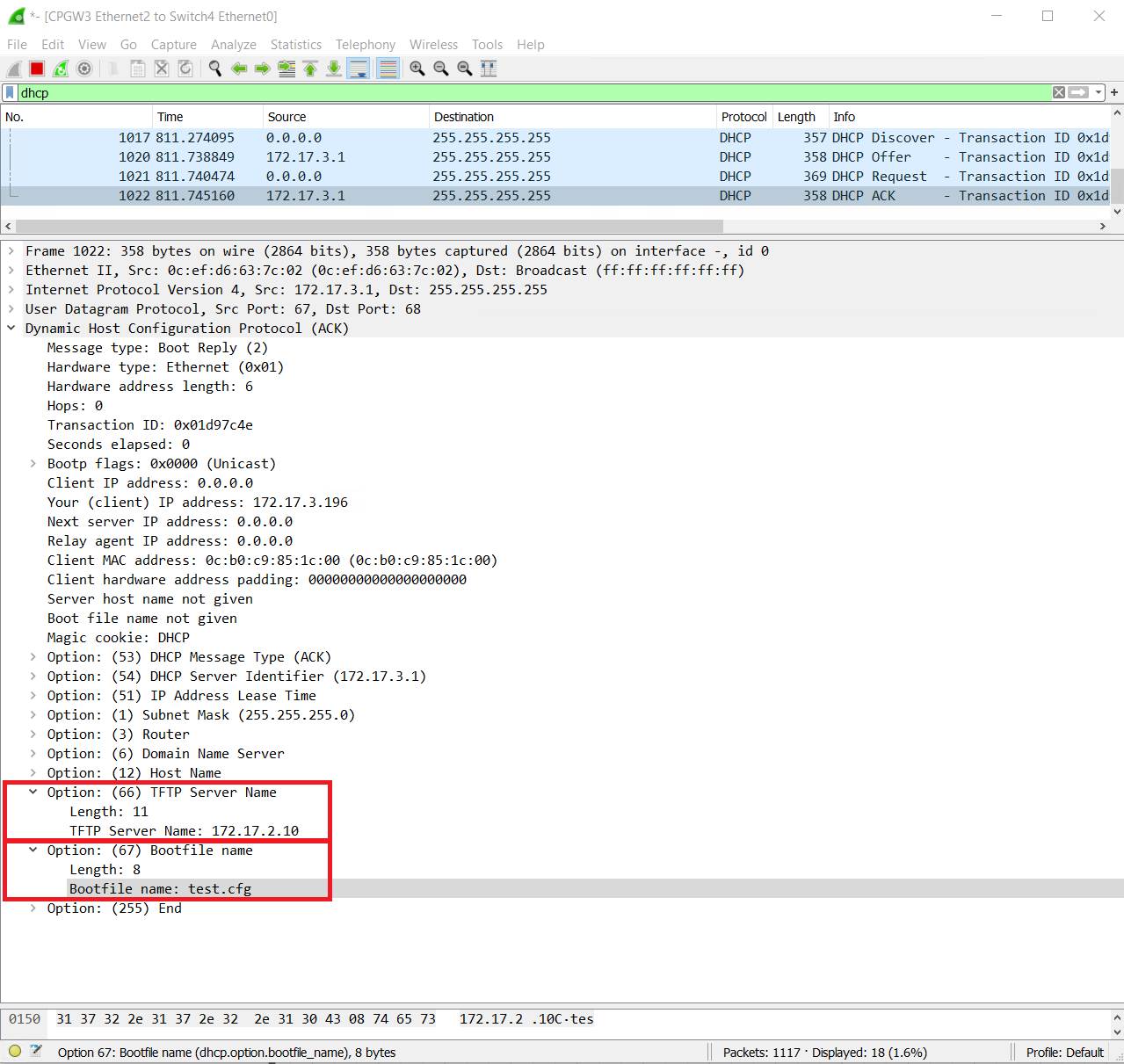
TFTP Server Configuration & ZTP Download
Without the TFTP configuration or if the Arista switch is unable to reach the TFTP server, it will display error messages in the console. The Arista switch will continue to try to reach the TFTP server.
Dec 12 13:01:57 dhcp-172-17-3-196 ZeroTouch: %ZTP-6-CONFIG_DOWNLOAD: Attempting to download the startup-config from tftp://172.17.2.10/test.cfg
Dec 12 13:02:57 dhcp-172-17-3-196 ZeroTouch: %ZTP-4-CONFIG_DOWNLOAD_FAIL: Failed to download the startup-config from tftp://172.17.2.10/test.cfg. Error: Timeout was reached
Dec 12 13:03:12 dhcp-172-17-3-196 ZeroTouch: %ZTP-6-CONFIG_DOWNLOAD: Attempting to download the startup-config from tftp://172.17.2.10/test.cfg
Dec 12 13:04:12 dhcp-172-17-3-196 ZeroTouch: %ZTP-4-CONFIG_DOWNLOAD_FAIL: Failed to download the startup-config from tftp://172.17.2.10/test.cfg. Error: Timeout was reached
Dec 12 13:04:42 dhcp-172-17-3-196 ZeroTouch: %ZTP-6-CONFIG_DOWNLOAD: Attempting to download the startup-config from tftp://172.17.2.10/test.cfg
Dec 12 13:05:42 dhcp-172-17-3-196 ZeroTouch: %ZTP-4-CONFIG_DOWNLOAD_FAIL: Failed to download the startup-config from tftp://172.17.2.10/test.cfg. Error: Timeout was reached
Dec 12 13:06:27 dhcp-172-17-3-196 ZeroTouch: %ZTP-6-CONFIG_DOWNLOAD: Attempting to download the startup-config from tftp://172.17.2.10/test.cfg
Dec 12 13:07:27 dhcp-172-17-3-196 ZeroTouch: %ZTP-4-CONFIG_DOWNLOAD_FAIL: Failed to download the startup-config from tftp://172.17.2.10/test.cfg. Error: Timeout was reached
Dec 12 13:07:27 dhcp-172-17-3-196 ZeroTouch: %ZTP-6-RETRY: Retrying Zero Touch Provisioning from the beginning (attempt 1)
Dec 12 13:07:42 dhcp-172-17-3-196 ZeroTouch: %ZTP-6-DHCPv4_QUERY: Sending DHCPv4 request on  [ Ethernet1, Ethernet2, Ethernet3, Ethernet4, Ethernet5, Ethernet6, Ethernet7, Ethernet8, Ethernet9, Ethernet10, Ethernet11, Ethernet12, Management1 ]
Dec 12 13:07:57 localhost ZeroTouch: %ZTP-4-DHCPv4_QUERY_FAIL: Failed to get a valid DHCPv4 response
With a TFTP server configured and a file named test.cfg. The Arista switch has downloaded the config and reboots
?!
hostname provision-me
ip name-server vrf default 8.8.8.8
!
!
username admin privilege 15 role network-admin secret Stefan2020
!
interface Management1
 ip address 172.17.3.11/24
!
ip access-list open
 10 permit ip any any
!
ip route 0.0.0.0/0 172.17.3.1
!
ip routing
!
management api http-commands
 no shutdown
!
! banner login
! Welcome to $(hostname)!
! This switch has been provisioned using the ZTPServer from Arista Networks
! Docs: http://ztpserver.readthedocs.org/
! Source Code: https://github.com/arista-eosplus/ztpserver
! EOF
!
Dec 12 15:59:02 dhcp-172-17-3-196 ZeroTouch: %ZTP-6-CONFIG_DOWNLOAD: Attempting to download the startup-config from tftp://172.17.2.10/test.cfg
Dec 12 15:59:02 dhcp-172-17-3-196 ZeroTouch: %ZTP-6-CONFIG_DOWNLOAD_SUCCESS: Successfully downloaded startup-config from tftp://172.17.2.10/test.cfg
Dec 12 15:59:03 dhcp-172-17-3-196 ZeroTouch: %ZTP-6-RELOAD: Rebooting the systemprovision-me#sh ip int brief
Address
Interface IP Address Status Protocol MTU Owner
--------------- ------------------- ----------- ------------- --------- -------
Management1 172.17.3.11/24 up up 1500
Multiple ZTP Switch Provisioning
The current ZTP config can only deal with a single Arista switch at a time due to the IP being hard set. There is another option for ZTP, which is to use a script over a configuration file.
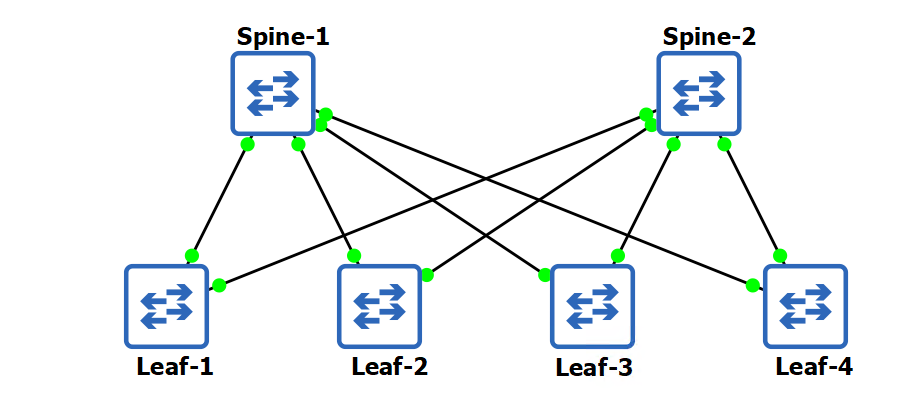
In theory, the Arista switch should be able to execute a python or bash script that it is provided. It does this based on the #! line at the top of the file. If there isn’t a #! line, then the file is treated as a startup config file.
In this example, I will demonstrate a python file being downloaded and providing basic IP and hostname assignment. The idea of the script is to determine if a switch is a spine or a leaf.
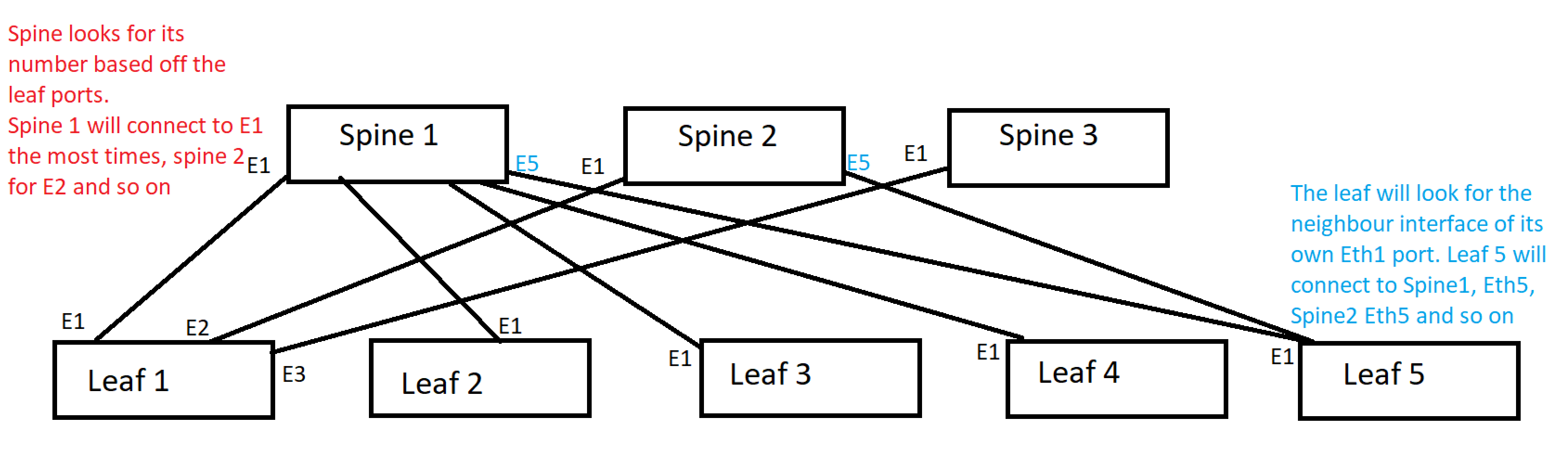
The logic for this is a spine will always see the LLDP neighbour ports as Eth1, Eth2, Eth3 or Eth4 depending on the spine number the Eth port will change.
The leaf number will always be connecting to Eth1, Eth2, Eth3, Eth4, – Eth40. These ports will be the same. So the script will look at LLDP of Eth1 neighbour for the destination port.
I had major issues getting this work successfully in a lab with Python. The script works as expected in the lab when run manually, but running the Python script in ZTP after it has downloaded results in a failure. I tried HTTP and TFTP, no difference.
I have corrected this by using a .cfg file and AEM to run the script after ZTP. The details can be found at the end of this post.
Dec 13 16:28:50 dhcp-172-17-3-197 ZeroTouch: %ZTP-6-DHCPv4_QUERY: Sending DHCPv4 request on  [ Ethernet1, Ethernet2, Ethernet3, Ethernet4, Ethernet5, Ethernet6, Ethernet7, Ethernet8, Ethernet9, Ethernet10, Ethernet11, Ethernet12, Management1 ]
Dec 13 16:28:50 dhcp-172-17-3-197 ZeroTouch: %ZTP-6-DHCPv4_SUCCESS: DHCPv4 response received on Management1  [ Ip Address: 172.17.3.197/24; Hostname: dhcp-172-17-3-197; Nameserver: 172.17.4.10; Gateway: 172.17.3.254; Boot File: http://172.17.2.10/bootstrap.py ]
Dec 13 16:28:55 dhcp-172-17-3-197 ZeroTouch: %ZTP-6-CONFIG_DOWNLOAD: Attempting to download the startup-config from http://172.17.2.10/bootstrap.py
Dec 13 16:28:55 dhcp-172-17-3-197 ZeroTouch: %ZTP-6-CONFIG_DOWNLOAD_SUCCESS: Successfully downloaded config script from http://172.17.2.10/bootstrap.py
Dec 13 16:28:55 dhcp-172-17-3-197 ZeroTouch: %ZTP-6-EXEC_SCRIPT: Executing the downloaded config script
Dec 13 16:28:55 dhcp-172-17-3-197 ZeroTouch: %ZTP-4-EXEC_SCRIPT_SIGNALED: Config script exited with an uncaught signal. Signal code: Aborted
Dec 13 16:28:55 dhcp-172-17-3-197 ZeroTouch: %ZTP-6-RETRY: Retrying Zero Touch Provisioning from the beginning (attempt 121)
The Script is below, and the results of the script when run manually are below the script.
#!/usr/bin/python

from collections import Counter
import subprocess
import sys

output = subprocess.Popen(["/usr/bin/FastCli", "-c", "show lldp neigh"], stdout=subprocess.PIPE).communicate()[0]
out2 = list(iter(output.split()))

# Count interfaces for spine
lookup = ["Ethernet1", "Ethernet2", "Ethernet3", "Ethernet4"]
all_counts = Counter(out2)
counts = {k: all_counts[k] for k in lookup}

# Determine if spine or leaf
for value in counts.values():
    if value >= 4:
        switch = "spine"
        break
    else:
        switch = "leaf"

# Determine spine number
for key, value in counts.items():
    if value >= 4:
        spine_num = key[8:]
        break

# Assign spine number hostname and IP
if switch == "spine":
    hostname = "spine{}".format(spine_num)
    ip_addr = "172.17.3.10{}".format(spine_num)

# Determine and assign leaf hostname and IP
if switch == "leaf":
    out3 = list(iter(output.splitlines()))
    intnum = out3[8].split()[2][8:]
    hostname = "leaf{}".format(intnum)
    ip_addr = "172.17.3.{}".format(intnum)


# Create startup-config file
f = open("/mnt/flash/startup-config", "w")
f.write("\nhostname {}".format(hostname))
f.write("\ninterface Management1\nip address {}/24".format(ip_addr))
f.write("\nip routing")
f.write("\nip route 0.0.0.0/0 172.17.3.254")
f.close()

sys.exit( 0 )
To run the script manually, I will copy the file to each Arista switch and run the script from the bash shell. ZTP will be cancelled in order for me to do this.
localhost login: admin
localhost>en
localhost#bash

Arista Networks EOS shell

[admin@localhost ~]$ vi /mnt/flash/script.py
[admin@localhost ~]$ tail /mnt/flash/script.py

# Create startup-config file
f = open("/mnt/flash/startup-config", "w")
f.write("\nhostname {}".format(hostname))
f.write("\ninterface Management1\nip address {}/24".format(ip_addr))
f.write("\nip routing")
f.write("\nip route 0.0.0.0/0 172.17.3.254")
f.close()

sys.exit( 0 )
[admin@localhost ~]$ python /mnt/flash/script.py
[admin@localhost ~]$ cat /mnt/flash/startup-config

hostname spine1
interface Management1
ip address 172.17.3.101/24
ip routing
ip route 0.0.0.0/0 172.17.3.254
[admin@localhost ~]$
[admin@localhost ~]$ exit
localhost#reload
! Image does not support next image compatibility checks. Running only checks from the current image.
System configuration has been modified. Save? [yes/no/cancel/diff]:no

spine1 login: admin
spine1>en
spine1#show ip int br
                                                                        Address
Interface       IP Address          Status      Protocol         MTU    Owner
--------------- ------------------- ----------- ------------- --------- -------
Management1     172.17.3.101/24     up          up              1500

spine1#sh ip route

VRF: default
Codes: C - connected, S - static, K - kernel,
       O - OSPF, IA - OSPF inter area, E1 - OSPF external type 1,
       E2 - OSPF external type 2, N1 - OSPF NSSA external type 1,
       N2 - OSPF NSSA external type2, B - BGP, B I - iBGP, B E - eBGP,
       R - RIP, I L1 - IS-IS level 1, I L2 - IS-IS level 2,
       O3 - OSPFv3, A B - BGP Aggregate, A O - OSPF Summary,
       NG - Nexthop Group Static Route, V - VXLAN Control Service,
       DH - DHCP client installed default route, M - Martian,
       DP - Dynamic Policy Route, L - VRF Leaked,
       G  - gRIBI, RC - Route Cache Route

Gateway of last resort:
 S        0.0.0.0/0 [1/0] via 172.17.3.254, Management1

 C        172.17.3.0/24 is directly connected, Management1

spine1#
spine2 login: admin
spine2>sh ip int br
Address
Interface IP Address Status Protocol MTU Owner
--------------- ------------------- ----------- ------------- --------- -------
Management1 172.17.3.102/24 up up 1500
leaf1 login: admin
leaf1>sh ip int br
Address
Interface IP Address Status Protocol MTU Owner
---------------- ------------------ ----------- ------------- --------- -------
Management1 172.17.3.1/24 up up 1500
leaf2>sh ip int br
Address
Interface IP Address Status Protocol MTU Owner
---------------- ------------------ ----------- ------------- --------- -------
Management1 172.17.3.2/24 up up 1500
leaf3 login: admin
sh ip int brsh ip int brleaf3>sh ip int br
Address
Interface IP Address Status Protocol MTU Owner
---------------- ------------------ ----------- ------------- --------- -------
Management1 172.17.3.3/24 up up 1500
leaf4 login: admin
leaf4>sh ip int br
Address
Interface IP Address Status Protocol MTU Owner
---------------- ------------------ ----------- ------------- --------- -------
Management1 172.17.3.4/24 up up 1500
Each switch has a startup-config file that was created. It contains the basic config, below is an example from leaf4.
leaf4#more startup-config

hostname leaf4
interface Management1
ip address 172.17.3.4/24
ip routing
ip route 0.0.0.0/0 172.17.3.254
ZTP Fix Using AEM
The ZTP python script did fail to run when it was executed through the ZTP provisioning. I have come up with a work-around using AEM. This method requires an extra reload of the switch and an extra file to be downloaded. The steps are;
- ZTP performs DHCP
- ZTP downloads config-ztp-fix.cfg
- ZTP performs reload
- AEM ZTP1 runs on startup; downloads ZTP1.py, runs ZTP1.py, and reloads after 1 minute wait
- After reboot, the switch has the correct hostname and IP set in the way that the ZTP python script.
I have used a .cfg file for ZTP as this will work correctly and place that config into the startup-config file. The full config-ztp-fix.cfg is below.
!
hostname provision-me
!
!
interface Management1
 description Provisioning-in-progress
 ip address dhcp

ip route 0.0.0.0/0 172.17.3.254
!
ip routing
event-handler ZTP1
 trigger on-startup-config
 action bash `FastCli -p 15 -c 'copy tftp:172.17.2.10/ZTP1.py flash:'`; python /mnt/flash/ZTP1.py; `FastCli -p 15 -c 'reload in 1 force reason ZTP1 provisioning'`
Now that the device has performed the ZTP configuration the next step of downloading and running the python script that will assign the correct hostname and IP address. the AEM to run the script is also removed to be sure that it does not keep running and overwrite the startup on each reload.
#!/usr/bin/python

from collections import Counter
import subprocess
import sys

output = subprocess.Popen(["/usr/bin/FastCli", "-c", "show lldp neigh"], stdout=subprocess.PIPE).communicate()[0]
out2 = list(iter(output.split()))

# Count interfaces for spine
lookup = ["Ethernet1", "Ethernet2", "Ethernet3", "Ethernet4"]
all_counts = Counter(out2)
counts = {k: all_counts[k] for k in lookup}

# Determine if spine or leaf
for value in counts.values():
    if value >= 4:
        switch = "spine"
        break
    else:
        switch = "leaf"

# Determine spine number
for key, value in counts.items():
    if value >= 4:
        spine_num = key[8:]
        break

# Assing spine number hostname and IP
if switch == "spine":
    hostname = "spine{}".format(spine_num)
    ip_addr = "172.17.3.10{}".format(spine_num)

# Determine and assign leaf hostname and IP
if switch == "leaf":
    out3 = list(iter(output.splitlines()))
    intnum = out3[8].split()[2][8:]
    hostname = "leaf{}".format(intnum)
    ip_addr = "172.17.3.{}".format(intnum)


# Create startup-config file
f = open("/mnt/flash/startup-config", "w")
f.write("\nhostname {}".format(hostname))
f.write("\ninterface Management1\nip address {}/24".format(ip_addr))
f.write("\nip routing")
f.write("\nip route 0.0.0.0/0 172.17.3.254")
# Remove AEM ZTP1
f.write("\nno event-handler ZTP1")
f.close()

sys.exit( 0 )