
This is to configure vPCs on Nexus 9000s in GNS3. For this lab I will repurpose my Nexus Multicast Lab.
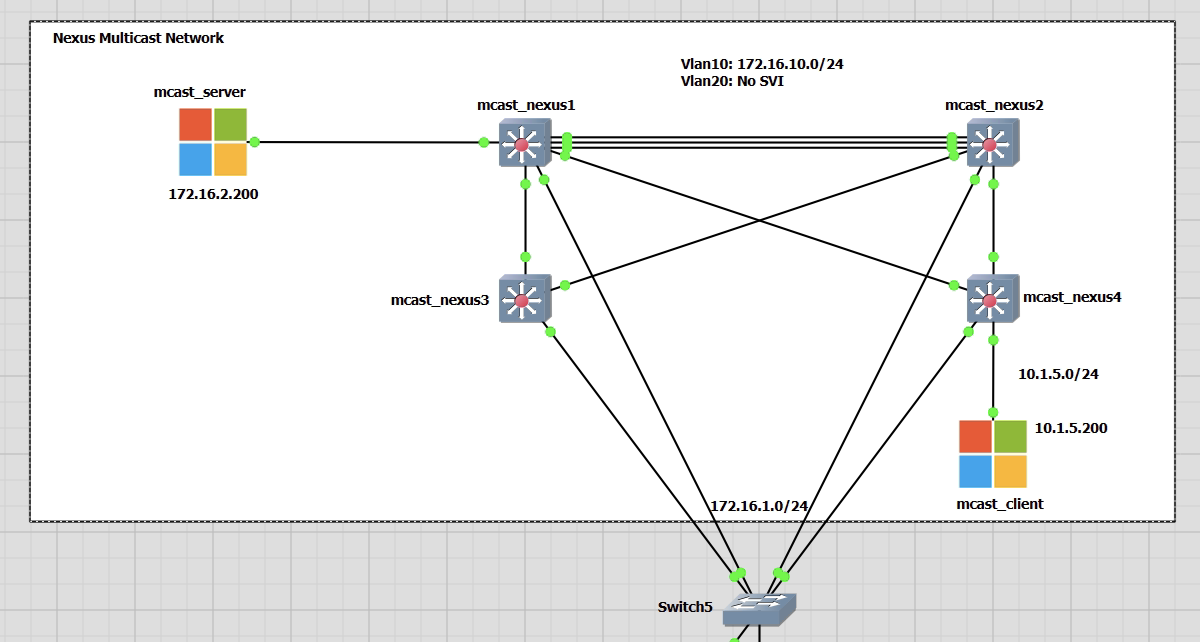
I will need to add some extra links between mcast_nexus1 and 2 switches to accommodate the port-channel vPC link and the vPC keepalive link.
My topology is going to be a basic topology of four Nexus switches that will follow the Cisco configuration guide.
Configuring the vPC
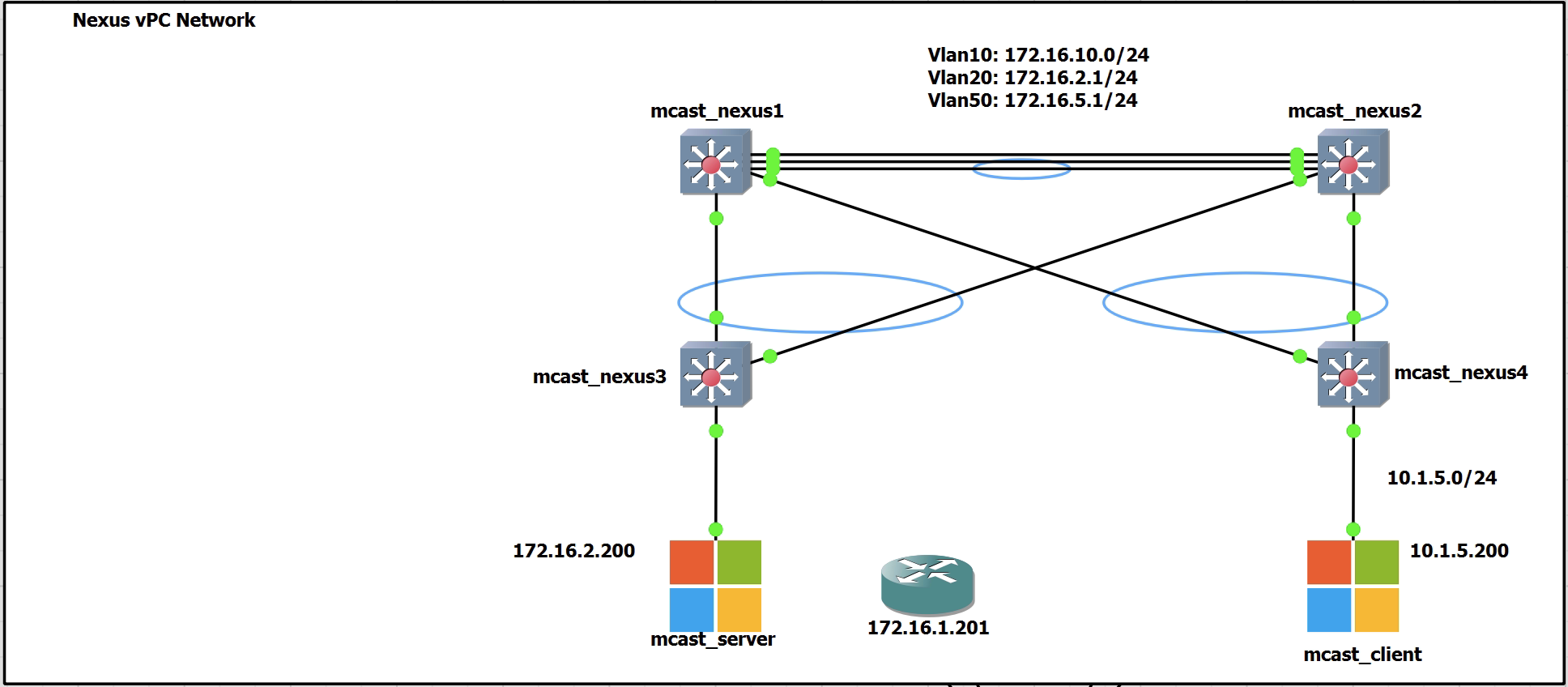
For the configuration of the vPC there will be three links between Nexus1 and Nexus2.
1 is for the keepalive link
2 are a port channel for the peer link
The other links between Nexus1 and 2 down to Nexus3 and 4 will be the vPC downstream links.
I also have a generic GNS3 switch that is used as my management and will not be any part of the VPC. This is for SSH connectivity only.
Keepalive Configuration
Configured on both Nexus1 and 2 switches
feature interface-vlan
vlan 10
name keepalive
vrf context keepalive

int vlan 10
vrf member keepalive
no shut
ip add 172.16.10.1/24 !(172.16.10.2/24)

int eth1/1
switchport
switchport mode access
switchport access vlan 10
no shut
Testing the new link from both Nexus1 and 2
ping 172.16.10.1 vrf keepalive
ping 172.16.10.2 vrf keepalive
Base vPC Configuration
To be applied on both Nexus1 and 2 switches
feature vpc
vpc domain 1
Next we can see the vPC role status. Currently nothing has been extablished as the peer links have not been configured. Below is output from Nexus1 to demonstrate the output.
mcast_nexus1(config-vpc-domain)# show vpc role
vPC Role status
----------------------------------------------------
vPC role                        : none established
Dual Active Detection Status    : 0
vPC system-mac                  : 00:00:00:00:00:00
vPC system-priority             : 32667
vPC local system-mac            : 0c:ec:31:00:cd:07
vPC local role-priority         : 0
vPC local config role-priority  : 32667
vPC peer system-mac             : 00:00:00:00:00:00
vPC peer role-priority          : 0
vPC peer config role-priority   : 0
Next apply the configuration to each switch, Nexus1 and 2 to create the vPC domain.
peer-keepalive destination 172.16.10.2 source 172.16.10.1 vrf keepalive
peer-keepalive destination 172.16.10.1 source 172.16.10.2 vrf keepalive
Now check the keepalive status. This brings up the first link that was configured. An example output is shown from Nexus1. Similar output will be on Nexus2
mcast_nexus1(config-vpc-domain)# show vpc peer-keepalive
vPC keep-alive status             : peer is alive
--Peer is alive for             : (58) seconds, (727) msec
--Send status                   : Success
--Last send at                  : 2022.11.10 15:25:14 223 ms
--Sent on interface             : Vlan10
--Receive status                : Success
--Last receive at               : 2022.11.10 15:25:14 296 ms
--Received on interface         : Vlan10
--Last update from peer         : (0) seconds, (681) msec

vPC Keep-alive parameters
--Destination                   : 172.16.10.2
--Keepalive interval            : 1000 msec
--Keepalive timeout             : 5 seconds
--Keepalive hold timeout        : 3 seconds
--Keepalive vrf                 : keepalive
--Keepalive udp port            : 3200
--Keepalive tos                 : 192
Peer Link Configuration
The peer link configuration is the port channel link between Nexus1 and 2. It creates the illusion of a single control plane between the two switches. This is interface is used for; vPC control traffic, orphaned port traffic and FHRP traffic. It is the single most important part of the vPC topology. There can be upto 32 active links and 8 in standby with LACP.
During my configuration in GNS3 I encountered an error when with either bringing up the vPC. If the interface speeds were left to auto, then the port channel wouldn’t fail to negotiate correctly and be in suspended mode.
If I hard set the interfaces to 100, 1000 or 10000 I would have an error such as the one below when configuring the port channel config on the physical ports.
mcast_nexus1(config-if)# interface ethernet 1/5-6
mcast_nexus1(config-if-range)# channel-group 20 mode active
command failed: port not compatible [speed]
** You can use force option to override the port's parameters
** (e.g. "channel-group X force")
** Use "show port-channel compatibility-parameters" to get more information on failure
To fix this I used the “force” command. This worked and allowed the configuration to be successfully applied. Seen below for my full configuration.
feature lacp
interface ethernet 1/5-6
speed 1000
duplex full

vlan 20
name peerlink

interface port-channel 20
switchport mode trunk
switchport trunk allowed vlan 20
vpc peer-link
spanning-tree port type network

interface ethernet 1/5-6
channel-group 20 force mode active
The output of show vpc now has has details!
mcast_nexus1#  show vpc
Legend: (*) - local vPC is down, forwarding via vPC peer-link

vPC domain id                     : 1
Peer status                       : peer adjacency formed ok
vPC keep-alive status             : peer is alive
Configuration consistency status  : success
Per-vlan consistency status       : success
Type-2 consistency status         : success
vPC role                          : primary
Number of vPCs configured         : 0
Peer Gateway                      : Disabled
Dual-active excluded VLANs        : -
Graceful Consistency Check        : Enabled
Auto-recovery status              : Disabled
Delay-restore status              : Timer is off.(timeout = 30s)
Delay-restore SVI status          : Timer is off.(timeout = 10s)
Operational Layer3 Peer-router    : Disabled
Virtual-peerlink mode             : Disabled

vPC Peer-link status
---------------------------------------------------------------------
id    Port   Status Active vlans
--    ----   ------ -------------------------------------------------
1     Po20   up     20
mcast_nexus2# show vpc
Legend: (*) - local vPC is down, forwarding via vPC peer-link
vPC domain id : 1
Peer status : peer adjacency formed ok
vPC keep-alive status : peer is alive
Configuration consistency status : success
Per-vlan consistency status : success
Type-2 consistency status : success
vPC role : secondary
Number of vPCs configured : 0
Peer Gateway : Disabled
Dual-active excluded VLANs : -
Graceful Consistency Check : Enabled
Auto-recovery status : Disabled
Delay-restore status : Timer is off.(timeout = 30s)
Delay-restore SVI status : Timer is off.(timeout = 10s)
Operational Layer3 Peer-router : Disabled
Virtual-peerlink mode : Disabled
vPC Peer-link status
---------------------------------------------------------------------
id Port Status Active vlans
-- ---- ------ -------------------------------------------------
1 Po20 up 20Downstream Configuration
This next part is to configure the Nexus1 and 2 switches to allow individual network devices (routers/switches) to connect to the Nexus1 and 2 switches as part of a vPC. The downstream devices are unaware they are part of a vPC.
In this example the ports are configured for the downstream switch of mcast_nexus3.
mcast_nexus1
int Eth1/2
switchport access vlan 20
speed 1000
channel-group 10

interface port-channel10
 switchport access vlan 20
 vpc 10
mcast_nexus2
int Eth1/4
switchport access vlan 20
speed 1000
channel-group 10

interface port-channel10
 switchport access vlan 20
 vpc 10
Once setup we should see the vPC up on both Nexus1 and 2. Below is the output from Nexus1. Nexus2 is in the same state.
mcast_nexus1(config-if)# show vpc | begin "vPC status"
vPC status
----------------------------------------------------------------------------
Id    Port          Status Consistency Reason                Active vlans
--    ------------  ------ ----------- ------                ---------------
10    Po10          up     success     success               20
mcast_nexus3 now needs to be configured.
int Eth1/2, Eth1/4
switchport access vlan 20
speed 1000
channel-group 2

interface port-channel2
 switchport access vlan 20
The port channel is now up for all three switches. There is no protocol on these port channels. The mode is just on.
Below is output from Nexus1. Nexus2 and 3 are similar.
mcast_nexus1# show port-channel summary interface port-channel 10
Flags:  D - Down        P - Up in port-channel (members)
        I - Individual  H - Hot-standby (LACP only)
        s - Suspended   r - Module-removed
        b - BFD Session Wait
        S - Switched    R - Routed
        U - Up (port-channel)
        p - Up in delay-lacp mode (member)
        M - Not in use. Min-links not met
--------------------------------------------------------------------------------
Group Port-       Type     Protocol  Member Ports
      Channel
--------------------------------------------------------------------------------
10    Po10(SU)    Eth      NONE      Eth1/2(P)
Enable Peer Gateway
The peer gateway is configured on both peer switches. Nexus1 and 2.
The feature optimises the peer link and avoid the loss of FHRP traffic in a failure situation and forces the vPC peers to act as a gateway for packets destined to the peer’s MAC address.
vpc domain 1
peer-gateway
Testing
For the testing I have moved mcast_server to be connected to Nexus3. There is also an SVI on VLAN 20 now that is configured on only Nexus1. No FHRPs are being used. The gateway is only on Nexus1 to begin with. I will run a series of tests that have mcast_server trying to reach the gateway in a working environment and in a failure environment.
No Port-channel Protocol – On
This example is not using LACP. The port channel is mode is “On”. There are no control message passing between the peer switches and Nexus3. Every switchport assumes that the port channel is up and functioning all of the time.
mcast_nexus1(config-if)# sh port-channel summary interface port-channel 10
Flags:  D - Down        P - Up in port-channel (members)
        I - Individual  H - Hot-standby (LACP only)
        s - Suspended   r - Module-removed
        b - BFD Session Wait
        S - Switched    R - Routed
        U - Up (port-channel)
        p - Up in delay-lacp mode (member)
        M - Not in use. Min-links not met
--------------------------------------------------------------------------------
Group Port-       Type     Protocol  Member Ports
      Channel
--------------------------------------------------------------------------------
10    Po10(SU)    Eth      NONE      Eth1/2(P)
mcast_nexus1(config-if)#


mcast_nexus2(config-if)# sh port-channel summary interface port-channel 10
--------------------------------------------------------------------------------
Group Port-       Type     Protocol  Member Ports
      Channel
--------------------------------------------------------------------------------
10    Po10(SU)    Eth      NONE      Eth1/4(P)


mcast_nexus3(config-if-range)# sh port-channel summary interface port-channel 2
--------------------------------------------------------------------------------
Group Port-       Type     Protocol  Member Ports
      Channel
--------------------------------------------------------------------------------
2     Po2(SU)     Eth      NONE      Eth1/2(P)    Eth1/4(P)
When all physical ports are in a working state there are no issues. mcast_server can reach the gateway all of the time via the link between Nexus3 and 1.
Shutting Down Nexus1 Eth1/2
This is the port that connect Nexus1 and Nexus3. It is the preferred path for the traffic going to the VLAN20 gateway.
With Eth1/2 on Nexus1 shutdown only, Nexus3 doesn’t see this from the port channel perspective as there is no negotiation protocol. There are no problems with the port channel.
This causes problem as I see it still sending frames down the link towards Nexus1.
What happens is;
- An ARP request goes out for 172.16.2.1 from the Windows mcast_server
- Nexus3 forwards this over to Nexus1, where nothing is heard back
- The ARP request is sometimes sent 2/3 more times towards Nexus1
- Nothing is returned as expected
- The link is physically down on Nexus1, but logically up for port channel on Nexus3
- The last ARP request is sent via Nexus2 on the functioning port channel link
- An ARP response form 172.16.2.1, the gateway on Nexus1 is received
- ICMP traffic then works.
- But only for a few seconds until another ARP request is sent, repeating the process
Below are screenshots to explain the above. Note the timestamps that confirms the order.
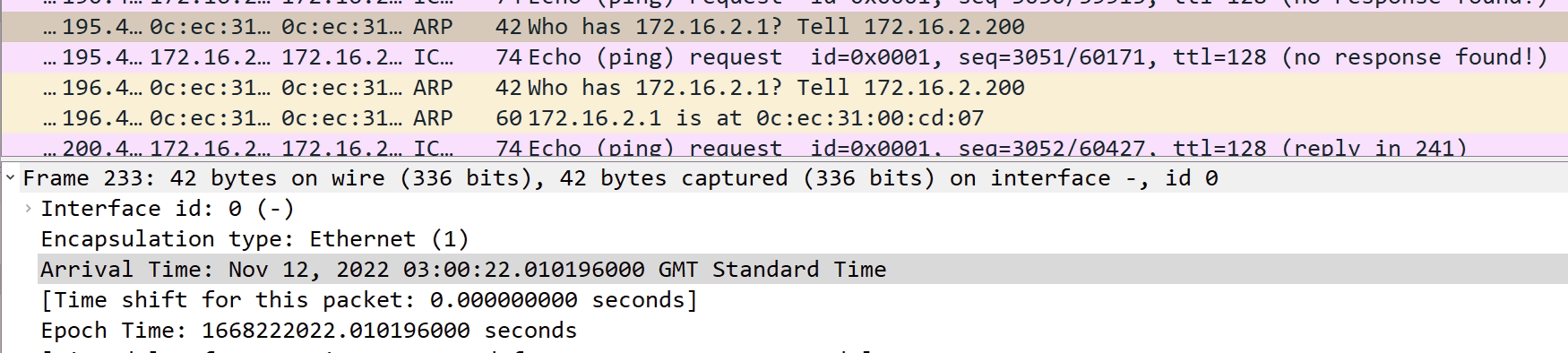


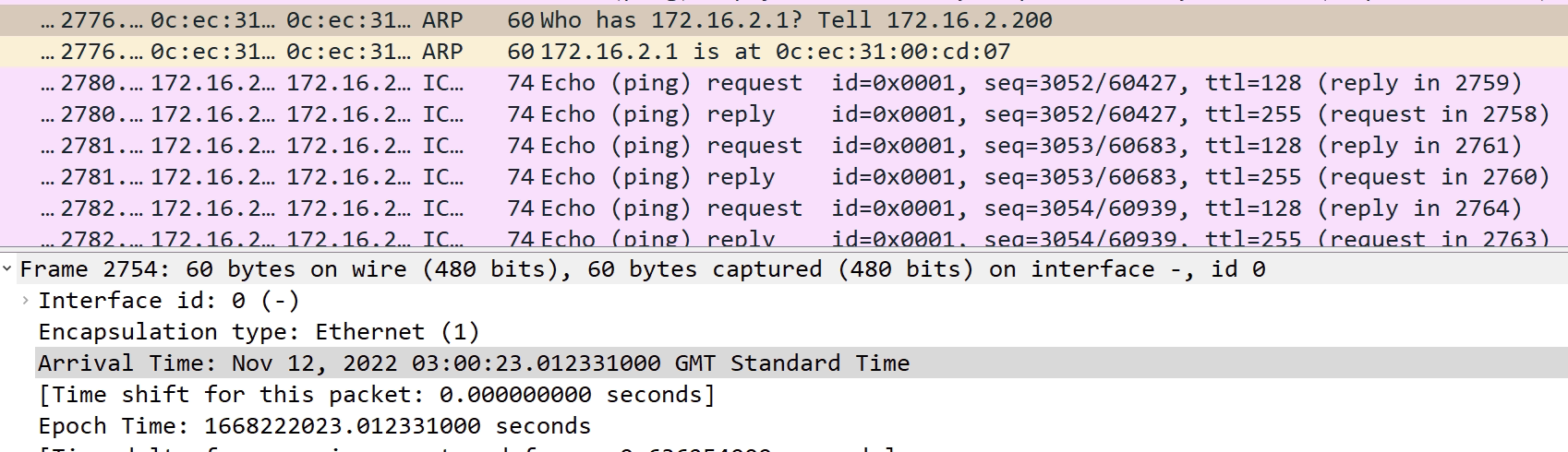
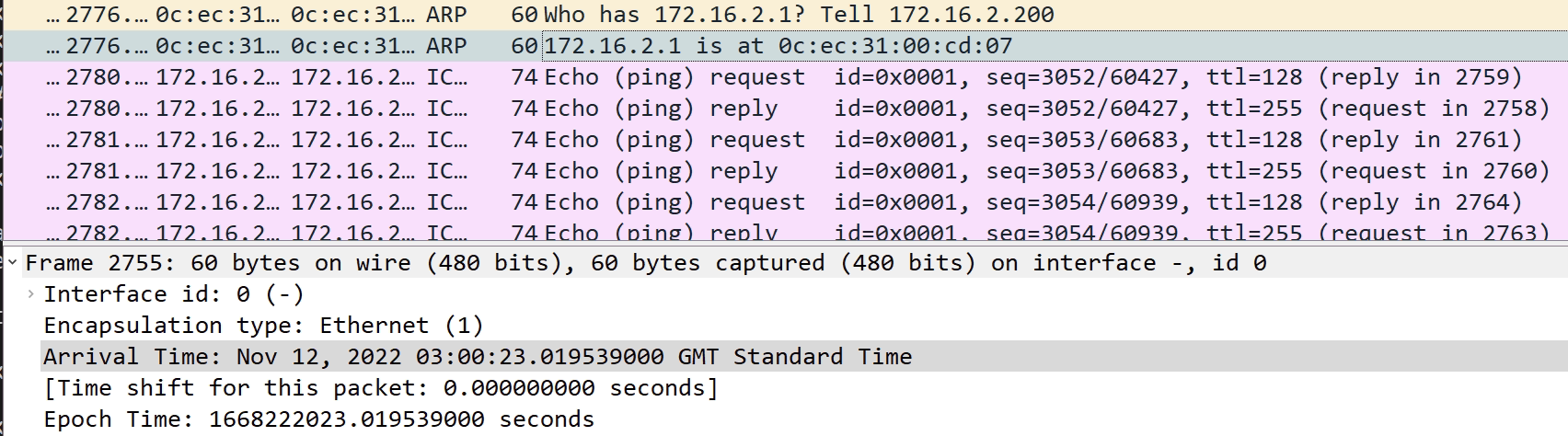
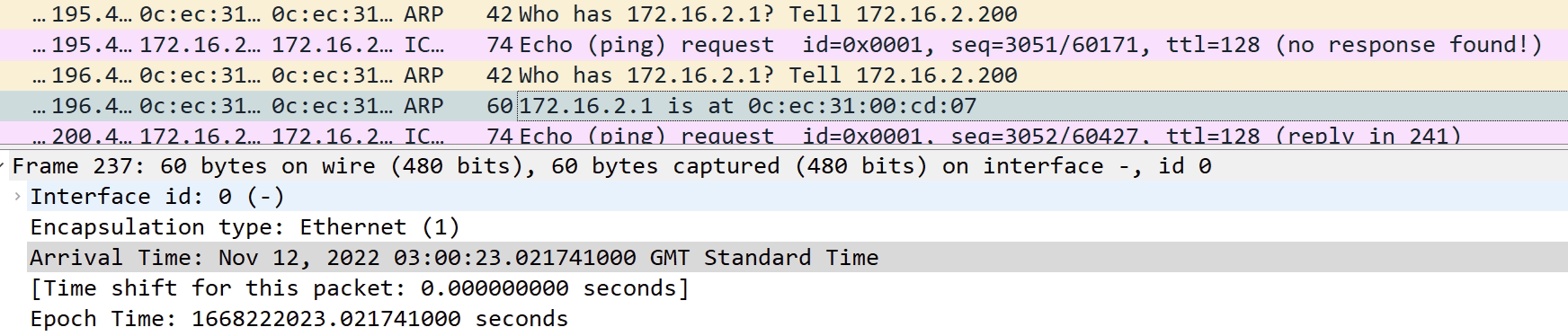
I’m not sure why Windows is asking for the MAC address of the gateway every few seconds. I checked my own laptop and this is not sending ARP requests for the gateway every minute.
I have tried the same with a Cisco router just acting as a client. I found similar behaviour in the fact that traffic was sent straight to Nexus1 about half the time. I didn’t see the same ARP requests.
I’m not looking into this any further as I know the fix is to use LACP.
Port-channel Protocol – LACP
As show in the previous section, not using a port channel negotiation protocol can cause all sorts of issues that aren’t worth troubleshooting.
Using LACP will resolve the problems described in the previous section.
New Config to be applied to each switch vPC
!!!mcast_Nexus1!!!
no int po 10

int Eth1/2
channel-group 10 mode active

interface port-channel10
 switchport access vlan 20
 vpc 10


!!!mcast_Nexus2!!!
no int po 10

int Eth1/4
channel-group 10 mode active

interface port-channel10
 switchport access vlan 20
 vpc 10


!!!mcast_Nexus3!!!
no interface port-channel2

int Eth1/2, Eth1/4
channel-group 2 mode active

interface port-channel2
 switchport access vlan 20
Now all port channels are reconfigured and are using LACP
mcast_nexus1# sh port-channel summary interface port-channel 10
Flags:  D - Down        P - Up in port-channel (members)
        I - Individual  H - Hot-standby (LACP only)
        s - Suspended   r - Module-removed
        b - BFD Session Wait
        S - Switched    R - Routed
        U - Up (port-channel)
        p - Up in delay-lacp mode (member)
        M - Not in use. Min-links not met
--------------------------------------------------------------------------------
Group Port-       Type     Protocol  Member Ports
      Channel
--------------------------------------------------------------------------------
10    Po10(SU)    Eth      LACP      Eth1/2(P)


mcast_nexus2(config-if)# sh port-channel summary interface port-channel 10
--------------------------------------------------------------------------------
Group Port-       Type     Protocol  Member Ports
      Channel
--------------------------------------------------------------------------------
10    Po10(SU)    Eth      LACP      Eth1/4(P)


mcast_nexus3# show port-channel summary interface port-channel 2
--------------------------------------------------------------------------------
Group Port-       Type     Protocol  Member Ports
      Channel
--------------------------------------------------------------------------------
2     Po2(SU)     Eth      LACP      Eth1/2(P)    Eth1/4(P)
The same ping test to the gateway will be performed. Then shutting down Eth1/2 on Nexus1 switch to simulate a failure. As LACP is configured there should be a failure detected and the port channel between Nexus1 and 3 should be down.
As expected all traffic is fine when all interfaces are up.
When I shutdown Eth1/2 there is some traffic loss as the port channel on Nexus3 took around 30 seconds to go down. Then traffic was passed via Nexus2 with no issues.
Re-enabling the port causing no loss of traffic and caused the traffic to go the shortest path straight to Nexus1.
The reason that the port channel took 30 seconds to go down and caused traffic loss was due to the LACP rate which by default is 30 seconds.
I have changed this setting from “normal” to “fast” which reduces this to 1 second on both Nexus1 and Nexus3 interfaces
mcast_nexus1(config-if)# lacp rate ?
  fast    Specifies that LACP control packets are transmitted at the fast rate,
          once every 1 second
  normal  Specifies that LACP control packets are transmitted at the normal
          rate, every 30 seconds after the link is bundled
There are now a lot more LACP frames in the Wireshark captures. However I only lost one ICMP frame on the switch and the port channel on Nexus3 was down immediately.
Complete Configuration
As the configuration has been split up in a step by step guide I have added a full config. In this I have used trunk mode on the port channels instead of access mode.
Nexus 1
feature interface-vlan
feature hsrp
feature lacp
feature vpc

vlan 1,10,20
vlan 10
  name keepalive
vlan 20
  name peerlink

spanning-tree vlan 1,10,20 priority 24576
spanning-tree vlan 2-9,11-19,21-3967 priority 0
vrf context keepalive


vpc domain 1
  role priority 100
  peer-keepalive destination 172.16.10.2 source 172.16.10.1 vrf keepalive
  peer-gateway


interface Vlan1
  no ip redirects
  no ipv6 redirects

interface Vlan10
  no shutdown
  vrf member keepalive
  no ip redirects
  ip address 172.16.10.1/24
  no ipv6 redirects

interface Vlan20
  no shutdown
  no ip redirects
  ip address 172.16.2.2/24
  no ipv6 redirects
  hsrp version 2
  hsrp 2
    preempt delay minimum 10
    priority 110
    ip 172.16.2.1

interface port-channel10
  switchport mode trunk
  switchport trunk allowed vlan 20
  speed 1000
  vpc 10

interface port-channel20
  switchport mode trunk
  switchport trunk allowed vlan 20
  spanning-tree port type network
  vpc peer-link

interface Ethernet1/1
  description Nexus2-Keepalive
  switchport access vlan 10

interface Ethernet1/2
  description Nexus3
  switchport mode trunk
  switchport trunk allowed vlan 20
  speed 1000
  channel-group 10 mode active

interface Ethernet1/3
  description mcast_server

interface Ethernet1/4
  description Nexus4

interface Ethernet1/5
  description Nexus2-PeerLink
  switchport mode trunk
  switchport trunk allowed vlan 20
  channel-group 20 mode active

interface Ethernet1/6
  description Nexus2-PeerLink
  switchport mode trunk
  switchport trunk allowed vlan 20
  channel-group 20 mode active
Nexus 2
feature interface-vlan
feature hsrp
feature lacp
feature vpc

vlan 1,10,20
vlan 10
  name keepalive
vlan 20
  name peerlink

spanning-tree vlan 1-3967 priority 28672
vrf context keepalive

vpc domain 1
  role priority 110
  peer-keepalive destination 172.16.10.1 source 172.16.10.2 vrf keepalive
  peer-gateway


interface Vlan1
  no ip redirects
  no ipv6 redirects

interface Vlan10
  no shutdown
  vrf member keepalive
  no ip redirects
  ip address 172.16.10.2/24
  no ipv6 redirects

interface Vlan20
  no shutdown
  no ip redirects
  ip address 172.16.2.3/24
  no ipv6 redirects
  hsrp version 2
  hsrp 2
    ip 172.16.2.1

interface port-channel10
  switchport mode trunk
  switchport trunk allowed vlan 20
  speed 1000
  vpc 10

interface port-channel20
  switchport mode trunk
  switchport trunk allowed vlan 20
  spanning-tree port type network
  vpc peer-link


interface Ethernet1/1
  description Nexus1-Keepalive
  switchport access vlan 10

interface Ethernet1/2
  description Nexus4

interface Ethernet1/3
  description mcast_client

interface Ethernet1/4
  description Nexus3
  switchport mode trunk
  switchport trunk allowed vlan 20
  speed 1000
  channel-group 10 mode active

interface Ethernet1/5
  description Nexus1-PeerLink
  switchport mode trunk
  switchport trunk allowed vlan 20
  channel-group 20 mode active

interface Ethernet1/6
  description Nexus1-PeerLink
  switchport mode trunk
  switchport trunk allowed vlan 20
  channel-group 20 mode active
Nexus 3
feature eigrp
feature interface-vlan
feature lacp

vlan 1,20

interface port-channel2
  switchport mode trunk
  switchport access vlan 20
  speed 1000

interface Ethernet1/2
  description Nexus1
  lacp rate fast
  switchport mode trunk
  switchport access vlan 20
  speed 1000
  channel-group 2 mode active
interface Ethernet1/4
  description Nexus2
  switchport mode trunk
  switchport access vlan 20
  speed 1000
  channel-group 2 mode active