
This lab is an extension of the IOS Multicast lab in some ways. This lab will explore the Nexus config and commands. The IOS lab explains the PIM modes and shows how PIM and IGMP work with packet captures.
The lab was created quickly using the base config template creator from my Scrapli and Flask project.
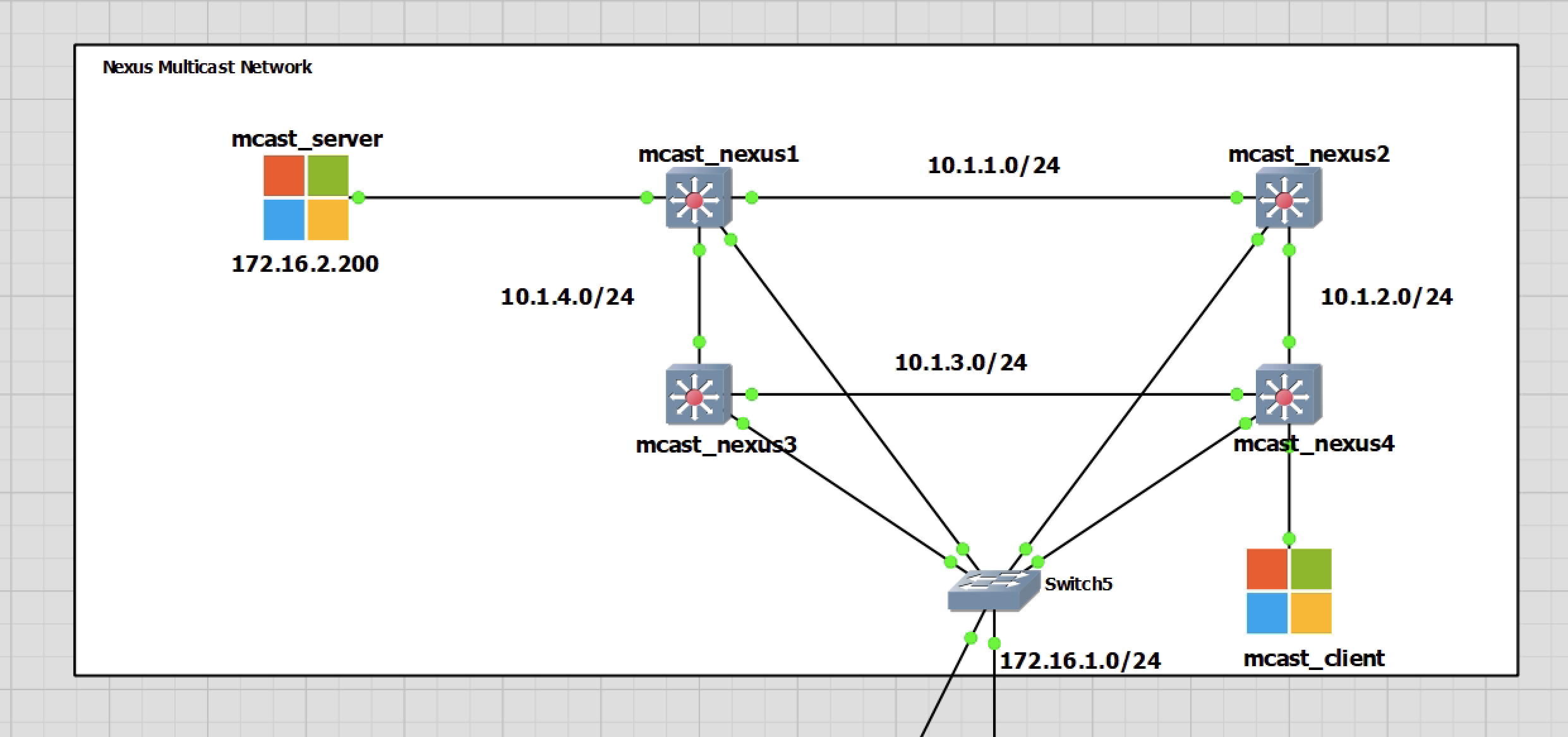
The lab is quite basic with four Nexus 9k switches running version 9.3 and two Windows 10 PCs. mcast_server will be the multicast server and mcast_client the client. The lab will allow me to see the multicast working using the Nexus commands.
All of my switchports are in routed mode to keep things as close to the IOS lab as possible.
The last test does cover VLANs for the two Windows PCs and the added link between mcast_nexus1 and 4.
Switch Configuration
The configuratiuon is quite basic and very similar for each switch. As Nexus switches only support PIM Sparse Mode switch mcast_nexus2 will be the rendezvous point.
You can find all the switch configs below
mcast_nexus1
hostname mcast_nexus1
vdc mcast_nexus1 id 1
  limit-resource vlan minimum 16 maximum 4094
  limit-resource vrf minimum 2 maximum 4096
  limit-resource port-channel minimum 0 maximum 511
  limit-resource u4route-mem minimum 248 maximum 248
  limit-resource u6route-mem minimum 96 maximum 96
  limit-resource m4route-mem minimum 58 maximum 58
  limit-resource m6route-mem minimum 8 maximum 8

feature pim
feature eigrp

no password strength-check
username admin password 5 $5$Hc4224BJ$IxPH5AyWbHAKGwWAa4U0JyyaUZnBgGTBiSD2WOkroU
6  role network-admin
ip domain-lookup
ip domain-name scrapli.lab
crypto key param rsa label mcast_nexus1.scrapli.lab modulus 1024
snmp-server user admin network-admin auth md5 0x6ee45ddea6c8ea85dd48009189c953b2
 priv 0x6ee45ddea6c8ea85dd48009189c953b2 localizedkey
rmon event 1 description FATAL(1) owner PMON@FATAL
rmon event 2 description CRITICAL(2) owner PMON@CRITICAL
rmon event 3 description ERROR(3) owner PMON@ERROR
rmon event 4 description WARNING(4) owner PMON@WARNING
rmon event 5 description INFORMATION(5) owner PMON@INFO

ip pim rp-address 10.1.10.1 group-list 224.0.0.0/4
ip pim ssm range 232.0.0.0/8
vlan 1

vrf context management
  ip route 0.0.0.0/0 172.16.1.1

interface Ethernet1/1
  no switchport
  ip address 10.1.1.1/24
  ip router eigrp 1
  ip pim sparse-mode
  no shutdown

interface Ethernet1/2
  no switchport
  ip address 10.1.4.1/24
  ip router eigrp 1
  ip pim sparse-mode
  no shutdown

interface Ethernet1/3
  no switchport
  ip address 172.16.2.1/24
  ip router eigrp 1
  ip pim sparse-mode
  no shutdown

interface mgmt0
  vrf member management
  ip address 172.16.1.115/24
line console
line vty
router eigrp 1
mcast_nexus2
hostname mcast_nexus2
vdc mcast_nexus2 id 1
  limit-resource vlan minimum 16 maximum 4094
  limit-resource vrf minimum 2 maximum 4096
  limit-resource port-channel minimum 0 maximum 511
  limit-resource u4route-mem minimum 248 maximum 248
  limit-resource u6route-mem minimum 96 maximum 96
  limit-resource m4route-mem minimum 58 maximum 58
  limit-resource m6route-mem minimum 8 maximum 8

feature pim
feature eigrp

username admin password 5 $5$.EunGd9H$Dhf7FVE.957Wp5Y0etvjhpAGO5tSYIX96karGIjriC
1  role network-admin
ip domain-lookup
ip domain-name scrapli.lab
crypto key param rsa label mcast_nexus2.scrapli.lab modulus 1024
snmp-server user admin network-admin auth md5 0xd9bea07050b32577a942db367440ea1f
 priv 0xd9bea07050b32577a942db367440ea1f localizedkey
rmon event 1 description FATAL(1) owner PMON@FATAL
rmon event 2 description CRITICAL(2) owner PMON@CRITICAL
rmon event 3 description ERROR(3) owner PMON@ERROR
rmon event 4 description WARNING(4) owner PMON@WARNING
rmon event 5 description INFORMATION(5) owner PMON@INFO

ip pim rp-address 10.1.10.1 group-list 224.0.0.0/4
ip pim ssm range 232.0.0.0/8
vlan 1

vrf context management
  ip route 0.0.0.0/0 172.16.1.1

interface Ethernet1/1
  no switchport
  ip address 10.1.1.2/24
  ip router eigrp 1
  ip pim sparse-mode
  no shutdown

interface Ethernet1/2
  no switchport
  ip address 10.1.2.1/24
  ip router eigrp 1
  ip pim sparse-mode
  no shutdown


interface mgmt0
  vrf member management
  ip address 172.16.1.116/24

interface loopback0
  ip address 10.1.10.1/24
  ip router eigrp 1
  ip pim sparse-mode
line console
line vty
router eigrp 1
mcast_nexus3
hostname mcast_nexus3
vdc mcast_nexus3 id 1
  limit-resource vlan minimum 16 maximum 4094
  limit-resource vrf minimum 2 maximum 4096
  limit-resource port-channel minimum 0 maximum 511
  limit-resource u4route-mem minimum 248 maximum 248
  limit-resource u6route-mem minimum 96 maximum 96
  limit-resource m4route-mem minimum 58 maximum 58
  limit-resource m6route-mem minimum 8 maximum 8

feature pim
feature eigrp

no password strength-check
username admin password 5 $5$vSanWsPk$D9Pbt9YPngtF.86fk7ziMvOBB55qsTKVkyUcQYjhrq
B  role network-admin
ip domain-lookup
ip domain-name scrapli.lab
crypto key param rsa label mcast_nexus3.scrapli.lab modulus 1024
snmp-server user admin network-admin auth md5 0x6277ca456beaed4ced934de603d2b10f
 priv 0x6277ca456beaed4ced934de603d2b10f localizedkey
rmon event 1 description FATAL(1) owner PMON@FATAL
rmon event 2 description CRITICAL(2) owner PMON@CRITICAL
rmon event 3 description ERROR(3) owner PMON@ERROR
rmon event 4 description WARNING(4) owner PMON@WARNING
rmon event 5 description INFORMATION(5) owner PMON@INFO

ip pim rp-address 10.1.10.1 group-list 224.0.0.0/4
ip pim ssm range 232.0.0.0/8
vlan 1

vrf context management
  ip route 0.0.0.0/0 172.16.1.1

interface Ethernet1/1
  no switchport
  ip address 10.1.3.1/24
  ip router eigrp 1
  ip pim sparse-mode
  no shutdown

interface Ethernet1/2
  no switchport
  ip address 10.1.4.2/24
  ip router eigrp 1
  ip pim sparse-mode
  no shutdown

interface mgmt0
  vrf member management
  ip address 172.16.1.117/24
line console
line vty
router eigrp 1
mcast_nexus4
hostname mcast_nexus4
vdc mcast_nexus4 id 1
  limit-resource vlan minimum 16 maximum 4094
  limit-resource vrf minimum 2 maximum 4096
  limit-resource port-channel minimum 0 maximum 511
  limit-resource u4route-mem minimum 248 maximum 248
  limit-resource u6route-mem minimum 96 maximum 96
  limit-resource m4route-mem minimum 58 maximum 58
  limit-resource m6route-mem minimum 8 maximum 8

feature pim
feature eigrp

no password strength-check
username admin password 5 $5$I0M6i8Do$V/g0u4OCrhVR7rAHZG7MRJ1N8x38sCVGTPNfAR19aj
8  role network-admin
ip domain-lookup
ip domain-name scrapli.lab
crypto key param rsa label mcast_nexus4.scrapli.lab modulus 1024
snmp-server user admin network-admin auth md5 0x5a69881844513d1cf03621b56d7b219c
 priv 0x5a69881844513d1cf03621b56d7b219c localizedkey
rmon event 1 description FATAL(1) owner PMON@FATAL
rmon event 2 description CRITICAL(2) owner PMON@CRITICAL
rmon event 3 description ERROR(3) owner PMON@ERROR
rmon event 4 description WARNING(4) owner PMON@WARNING
rmon event 5 description INFORMATION(5) owner PMON@INFO

ip pim rp-address 10.1.10.1 group-list 224.0.0.0/4
ip pim ssm range 232.0.0.0/8
vlan 1

vrf context management
  ip route 0.0.0.0/0 172.16.1.1

interface Ethernet1/1
  no switchport
  ip address 10.1.3.2/24
  ip router eigrp 1
  ip pim sparse-mode
  no shutdown

interface Ethernet1/2
  no switchport
  ip address 10.1.2.2/24
  ip router eigrp 1
  ip pim sparse-mode
  no shutdown

interface Ethernet1/3
  no switchport
  ip address 10.1.5.1/24
  ip router eigrp 1
  ip pim sparse-mode
  no shutdown

interface mgmt0
  vrf member management
  ip address 172.16.1.118/24
line console
line vty
router eigrp 1
Testing
This testing will follow five stages. Each stage will have the output commands relevant to see what is happening on the relevant switches. Switch mcast_nexus3 will not be used a great deal until the end of this lab where it will become the RP backup, and then primary when mcast_nexus2 is turned off to simulate a failure.
Commands that will be used are below…
show ip pim interface
show ip pim interface [interface] detail
show ip mroute
show ip pim tunnel
show ip pim neighbor [interface] detail
No Multicast Traffic
The Windows PCs create a multicast group for the IP 239.255.255.250/32. This is Simple Service Discovery Protocol (SSDP). Ignore this group.
PIM Neighbours
mcast_nexus1# sh ip pim neighbor
PIM Neighbor Status for VRF "default"
Neighbor        Interface            Uptime    Expires   DR       Bidir-  BFD    ECMP Redirect
                                                         Priority Capable State     Capable
10.1.1.2        Ethernet1/1          07:44:23  00:01:40  1        yes     n/a     no
10.1.4.2        Ethernet1/2          07:38:32  00:01:35  1        yes     n/a     no
mcast_nexus3# sh ip pim neighbor
PIM Neighbor Status for VRF "default"
Neighbor Interface Uptime Expires DR Bidir- BFD ECMP Redirect
Priority Capable State Capable
10.1.3.2 Ethernet1/1 07:38:51 00:01:32 1 yes n/a no
10.1.4.1 Ethernet1/2 07:39:23 00:01:39 1 yes n/a nomcast_nexus2# sh ip pim neighbor
PIM Neighbor Status for VRF "default"
Neighbor Interface Uptime Expires DR Bidir- BFD ECMP Redirect
Priority Capable State Capable
10.1.1.1 Ethernet1/1 07:44:44 00:01:17 1 yes n/a no
10.1.2.2 Ethernet1/2 07:38:18 00:01:42 1 yes n/a no
mcast_nexus4# sh ip pim neighbor
PIM Neighbor Status for VRF "default"
Neighbor        Interface            Uptime    Expires   DR       Bidir-  BFD    ECMP Redirect
                                                         Priority Capable State     Capable
10.1.3.1        Ethernet1/1          07:39:11  00:01:36  1        yes     n/a     no
10.1.2.1        Ethernet1/2          07:39:09  00:01:18  1        yes     n/a     no
Multicast Routing Table – mroute
mcast_nexus1# sh ip mroute
IP Multicast Routing Table for VRF "default"

(*, 232.0.0.0/8), uptime: 23:10:21, pim ip
  Incoming interface: Null, RPF nbr: 0.0.0.0
  Outgoing interface list: (count: 0)


(*, 239.255.255.250/32), uptime: 07:25:25, igmp ip pim
  Incoming interface: Ethernet1/1, RPF nbr: 10.1.1.2
  Outgoing interface list: (count: 1)
    Ethernet1/3, uptime: 07:25:25, igmp
mcast_nexus3# sh ip mroute
IP Multicast Routing Table for VRF "default"
(*, 232.0.0.0/8), uptime: 07:43:59, pim ip
Incoming interface: Null, RPF nbr: 0.0.0.0
Outgoing interface list: (count: 0)mcast_nexus2# sh ip mroute
IP Multicast Routing Table for VRF "default"
(*, 232.0.0.0/8), uptime: 22:20:22, pim ip
Incoming interface: Null, RPF nbr: 0.0.0.0
Outgoing interface list: (count: 0)
(*, 239.255.255.250/32), uptime: 07:25:46, pim ip
Incoming interface: loopback0, RPF nbr: 10.1.10.1
Outgoing interface list: (count: 2)
Ethernet1/2, uptime: 07:16:03, pim
Ethernet1/1, uptime: 07:25:46, pimmcast_nexus4# sh ip mroute
IP Multicast Routing Table for VRF "default"
(*, 232.0.0.0/8), uptime: 23:13:02, pim ip
Incoming interface: Null, RPF nbr: 0.0.0.0
Outgoing interface list: (count: 0)
(*, 239.255.255.250/32), uptime: 07:16:55, igmp ip pim
Incoming interface: Ethernet1/2, RPF nbr: 10.1.2.1
Outgoing interface list: (count: 1)
Ethernet1/3, uptime: 07:16:55, igmpServer transmitting Only
This example has the mcast_server only transmitting. The mroute tables will change for only mcast_nexus1 and 2 switches. The only switches won’t have any changes.
mcast_nexus1
mcast_nexus1# sh ip mroute
IP Multicast Routing Table for VRF "default"

(*, 232.0.0.0/8), uptime: 1d11h, pim ip
  Incoming interface: Null, RPF nbr: 0.0.0.0
  Outgoing interface list: (count: 0)


(172.16.2.200/32, 239.0.1.2/32), uptime: 00:00:02, ip pim
  Incoming interface: Ethernet1/3, RPF nbr: 172.16.2.200
  Outgoing interface list: (count: 0)


(*, 239.255.255.250/32), uptime: 19:52:53, igmp ip pim
  Incoming interface: Ethernet1/1, RPF nbr: 10.1.1.2
  Outgoing interface list: (count: 1)
    Ethernet1/3, uptime: 19:52:53, igmp
This switch now has the new group 239.0.0.1 for the server multicast traffic.
mcast_nexus2
mcast_nexus2# sh ip mroute
IP Multicast Routing Table for VRF "default"

(*, 232.0.0.0/8), uptime: 1d11h, pim ip
  Incoming interface: Null, RPF nbr: 0.0.0.0
  Outgoing interface list: (count: 0)


(172.16.2.200/32, 239.0.1.2/32), uptime: 00:17:06, pim ip
  Incoming interface: Ethernet1/1, RPF nbr: 10.1.1.1, internal
  Outgoing interface list: (count: 0)


(*, 239.255.255.250/32), uptime: 20:09:56, pim ip
  Incoming interface: loopback0, RPF nbr: 10.1.10.1
  Outgoing interface list: (count: 2)
    Ethernet1/2, uptime: 20:00:14, pim
    Ethernet1/1, uptime: 20:09:56, pim
This switch now has the new group 239.0.0.1 for the server multicast traffic. The group shows it can see traffic incoming, from mcast_nexus1 interface. But nothing out going. This is expected
Client Requesting Only
This next test will show what happens when the client is requesting multicast traffic, but the server is not sending. Before this test was started the multicast routing tables were cleared. So they are back to their original state of no multicast traffic being sent/received.
mcast_nexus2
mcast_nexus2# sh ip mroute
IP Multicast Routing Table for VRF "default"

(*, 232.0.0.0/8), uptime: 00:02:02, pim ip
  Incoming interface: Null, RPF nbr: 0.0.0.0
  Outgoing interface list: (count: 0)


(*, 239.0.1.2/32), uptime: 00:00:17, pim ip
  Incoming interface: loopback0, RPF nbr: 10.1.10.1
  Outgoing interface list: (count: 1)
    Ethernet1/2, uptime: 00:00:17, pim


(*, 239.255.255.250/32), uptime: 00:01:50, pim ip
  Incoming interface: loopback0, RPF nbr: 10.1.10.1
  Outgoing interface list: (count: 2)
    Ethernet1/2, uptime: 00:01:23, pim
    Ethernet1/1, uptime: 00:01:50, pim
This switch being the RP will be the one to receive any multicast group requests from other switches. Here we see the switch has the (*,G) as there is no source IP sending the multicast traffic for this group.
The outgoing interface (where the traffic is being requested from) is from Eth1/2 which makes this mcast_nexus4 switch.
mcast_nexus2
mcast_nexus4# sh ip mroute
IP Multicast Routing Table for VRF "default"

(*, 232.0.0.0/8), uptime: 1d12h, pim ip
  Incoming interface: Null, RPF nbr: 0.0.0.0
  Outgoing interface list: (count: 0)


(*, 239.0.1.2/32), uptime: 00:03:27, ip pim
  Incoming interface: Ethernet1/2, RPF nbr: 10.1.2.1
  Outgoing interface list: (count: 0)


(*, 239.255.255.250/32), uptime: 20:30:36, igmp ip pim
  Incoming interface: Ethernet1/2, RPF nbr: 10.1.2.1
  Outgoing interface list: (count: 1)
    Ethernet1/3, uptime: 20:30:36, igmp
This switch is the one receiving the IGMP join request from the client. It will then send it on to the RP in the hope that the RP knows and is able to begin forwarding the multicast traffic. In this case, the source is not transmitting and so we will always see the (*,G).
Send/Receive Traffic
This will show the multicast routing table in its full operational state. For both mcast_nexus2 and 4 we will see the (*,G) along with the (S,G) as both switches will know the source IP of 172.16.2.200/32 for the multicast traffic.
mcast_nexus1
mcast_nexus1# sh ip mroute
IP Multicast Routing Table for VRF "default"

(*, 232.0.0.0/8), uptime: 00:08:59, pim ip
  Incoming interface: Null, RPF nbr: 0.0.0.0
  Outgoing interface list: (count: 0)


(172.16.2.200/32, 239.0.1.2/32), uptime: 00:00:08, ip pim
  Incoming interface: Ethernet1/3, RPF nbr: 172.16.2.200
  Outgoing interface list: (count: 1)
    Ethernet1/2, uptime: 00:00:06, pim


(*, 239.255.255.250/32), uptime: 00:08:57, igmp ip pim
  Incoming interface: Ethernet1/1, RPF nbr: 10.1.1.2
  Outgoing interface list: (count: 1)
    Ethernet1/3, uptime: 00:08:57, igmp
mcast_nexus2
mcast_nexus2# sh ip mroute
IP Multicast Routing Table for VRF "default"

(*, 232.0.0.0/8), uptime: 00:09:14, pim ip
  Incoming interface: Null, RPF nbr: 0.0.0.0
  Outgoing interface list: (count: 0)


(*, 239.0.1.2/32), uptime: 00:00:10, pim ip
  Incoming interface: loopback0, RPF nbr: 10.1.10.1
  Outgoing interface list: (count: 1)
    Ethernet1/2, uptime: 00:00:10, pim


(172.16.2.200/32, 239.0.1.2/32), uptime: 00:00:12, pim ip
  Incoming interface: Ethernet1/1, RPF nbr: 10.1.1.1, internal
  Outgoing interface list: (count: 0)


(*, 239.255.255.250/32), uptime: 00:09:01, pim ip
  Incoming interface: loopback0, RPF nbr: 10.1.10.1
  Outgoing interface list: (count: 2)
    Ethernet1/2, uptime: 00:08:34, pim
    Ethernet1/1, uptime: 00:09:01, pim
mcast_nexus4
mcast_nexus4# sh ip mroute
IP Multicast Routing Table for VRF "default"

(*, 232.0.0.0/8), uptime: 1d12h, pim ip
  Incoming interface: Null, RPF nbr: 0.0.0.0
  Outgoing interface list: (count: 0)


(*, 239.0.1.2/32), uptime: 00:00:20, igmp ip pim
  Incoming interface: Ethernet1/2, RPF nbr: 10.1.2.1
  Outgoing interface list: (count: 1)
    Ethernet1/3, uptime: 00:00:20, igmp


(172.16.2.200/32, 239.0.1.2/32), uptime: 00:00:20, ip mrib pim
  Incoming interface: Ethernet1/1, RPF nbr: 10.1.3.1
  Outgoing interface list: (count: 1)
    Ethernet1/3, uptime: 00:00:20, mrib


(*, 239.255.255.250/32), uptime: 20:34:46, igmp ip pim
  Incoming interface: Ethernet1/2, RPF nbr: 10.1.2.1
  Outgoing interface list: (count: 1)
    Ethernet1/3, uptime: 20:34:46, igmp
Adding Link Between Switch1 and Switch4
For this test I will add in a link between mcast_nexus1 and 4. This will cause the multicast traffic to be directed over this link once mcast_nexus4 learns of the source IP of the server as it is the shortest path. I have details this in another lab for IOS, this is moving from the Shared Tree to the Source Tree.
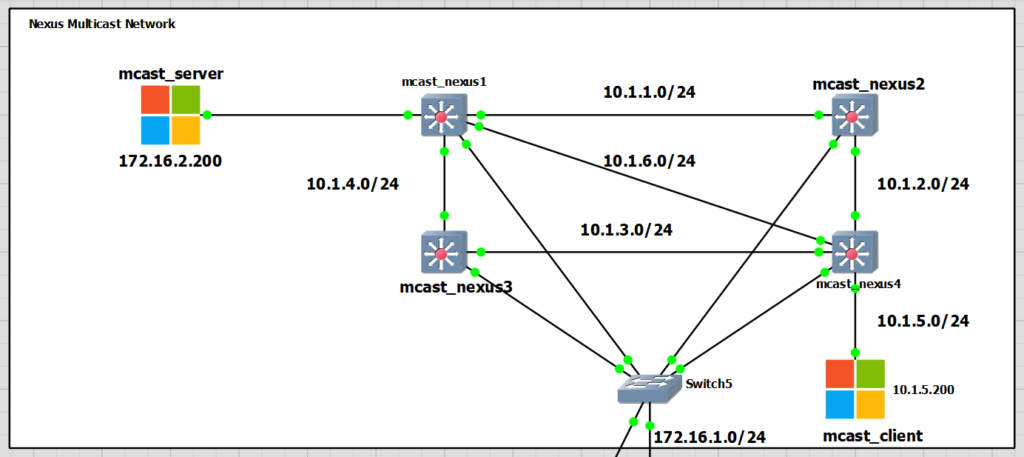
I have added a new interface to the mcast_nexus1 and 4. The network is 10.1.6.0/24, they are PIM neighbours. Below is the output from mcast_nexus1 only.
interface Ethernet1/4
  no switchport
  ip address 10.1.6.1/24
  ip router eigrp 1
  ip pim sparse-mode
  no shutdown

mcast_nexus1# sh ip pim neighbor
PIM Neighbor Status for VRF "default"
Neighbor        Interface            Uptime    Expires   DR       Bidir-  BFD    ECMP Redirect
                                                         Priority Capable State     Capable
10.1.1.2        Ethernet1/1          22:21:16  00:01:33  1        yes     n/a     no
10.1.4.2        Ethernet1/2          22:15:24  00:01:24  1        yes     n/a     no
10.1.6.2        Ethernet1/4          00:01:48  00:01:41  1        yes     n/a     no

mcast_nexus1# ping 10.1.6.2
PING 10.1.6.2 (10.1.6.2): 56 data bytes
64 bytes from 10.1.6.2: icmp_seq=0 ttl=254 time=4.398 ms
64 bytes from 10.1.6.2: icmp_seq=1 ttl=254 time=2.85 ms
64 bytes from 10.1.6.2: icmp_seq=2 ttl=254 time=3.396 ms
64 bytes from 10.1.6.2: icmp_seq=3 ttl=254 time=3.363 ms
64 bytes from 10.1.6.2: icmp_seq=4 ttl=254 time=3.706 ms

--- 10.1.6.2 ping statistics ---
5 packets transmitted, 5 packets received, 0.00% packet loss
round-trip min/avg/max = 2.85/3.542/4.398 ms
The switch from the Shared Tree to the Source Tree using the new 1-.1.6.0/24 interface was almost immediate after traffic started being received by mcast_client.
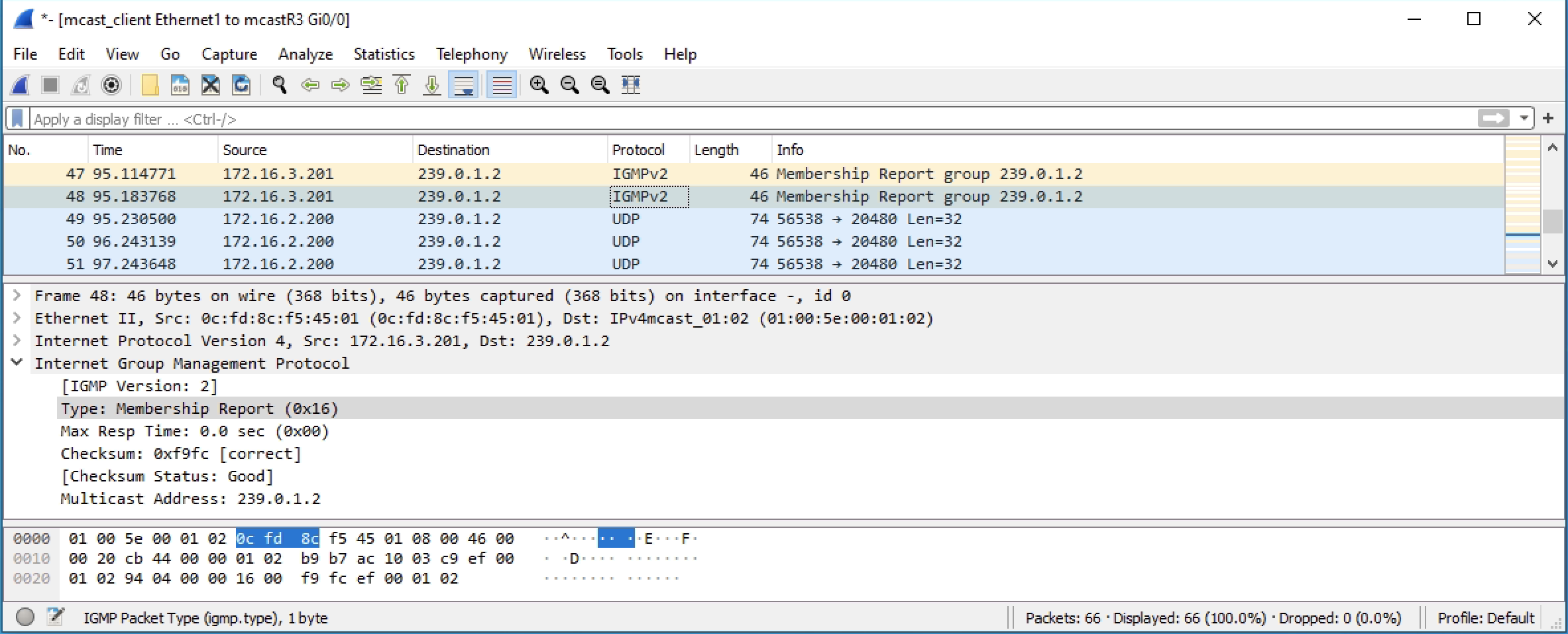
I captured the traffic on the 10.1.6.0/24 link to show the PIM join messages between mcast_nexus4 and mcast_nexus1.
mcast_nexus4# sh ip mroute
IP Multicast Routing Table for VRF "default"

(*, 232.0.0.0/8), uptime: 1d14h, pim ip
  Incoming interface: Null, RPF nbr: 0.0.0.0
  Outgoing interface list: (count: 0)


(*, 239.0.1.2/32), uptime: 00:02:51, igmp ip pim
  Incoming interface: Ethernet1/2, RPF nbr: 10.1.2.1
  Outgoing interface list: (count: 1)
    Ethernet1/3, uptime: 00:02:51, igmp


(172.16.2.200/32, 239.0.1.2/32), uptime: 00:02:50, ip mrib pim
  Incoming interface: Ethernet1/4, RPF nbr: 10.1.6.1
  Outgoing interface list: (count: 1)
    Ethernet1/3, uptime: 00:02:50, mrib


(*, 239.255.255.250/32), uptime: 22:09:39, igmp ip pim
  Incoming interface: Ethernet1/2, RPF nbr: 10.1.2.1
  Outgoing interface list: (count: 1)
    Ethernet1/3, uptime: 22:09:39, igmp
VLANs! Not Routed Ports
This last test is to see the VLAN configuration. I have created VLANs for the two Windows PCs and the link between mcast_nexus1 and 4 only. The rest of the configuration is as was on routed ports.
Reconfiguration
I reconfigured the ports to be using VLANs with the configs below.
mcast_nexus1
vlan 16
vlan 20

feature interface-vlan
int vlan 16
  ip address 10.1.6.1/24
  ip router eigrp 1
  ip pim sparse-mode
  no shutdown
int vlan 20
  ip address 172.16.2.1/24
  ip router eigrp 1
  ip pim sparse-mode
  no shutdown
  ip igmp snooping

interface Ethernet1/4
 switchport mode trunk
interface Ethernet1/3
  switchport access vlan 20
mcast_nexus4
vlan 16
vlan 50

feature interface-vlan
int vlan 16
  ip address 10.1.6.2/24
  ip router eigrp 1
  ip pim sparse-mode
  no shutdown
int vlan 50
  ip address 10.1.5.1/24
  ip router eigrp 1
  ip pim sparse-mode
  no shutdown
  ip igmp snooping

interface Ethernet1/4
 switchport mode trunk
interface Ethernet1/3
  switchport access vlan 50
After the reconfiguration, the only major difference was that I needed IGMP snooping enabling on the VLANs for the Windows PCs and then that in the multicast routing table there were VLANs and no interfaces.
mcast_nexus1
mcast_nexus1# sh ip mroute
IP Multicast Routing Table for VRF "default"

(*, 232.0.0.0/8), uptime: 10:04:04, pim ip
  Incoming interface: Null, RPF nbr: 0.0.0.0
  Outgoing interface list: (count: 0)


(172.16.2.200/32, 239.0.1.2/32), uptime: 00:00:23, ip pim
  Incoming interface: Vlan20, RPF nbr: 172.16.2.200
  Outgoing interface list: (count: 1)
    Vlan16, uptime: 00:00:16, pim


(*, 239.255.255.250/32), uptime: 00:01:50, igmp ip pim
  Incoming interface: Ethernet1/1, RPF nbr: 10.1.1.2
  Outgoing interface list: (count: 1)
    Vlan20, uptime: 00:01:50, igmp
mcast_nexus1# sh ip igmp snooping vlan 20
Global IGMP Snooping Information:
  IGMP Snooping enabled
  Optimised Multicast Flood (OMF) enabled
  IGMPv1/v2 Report Suppression enabled
  IGMPv3 Report Suppression disabled
  Link Local Groups Suppression enabled

IGMP Snooping information for vlan 20
  IGMP snooping enabled
  Lookup mode: IP
  Optimised Multicast Flood (OMF) enabled
  IGMP querier present, address: 172.16.2.1, version: 2, i/f Vlan20
  Querier interval: 125 secs
  Querier last member query interval: 1 secs
  Querier robustness: 2
  Switch-querier disabled
  IGMPv3 Explicit tracking enabled
  IGMPv2 Fast leave disabled
  IGMPv1/v2 Report suppression enabled
  IGMPv3 Report suppression disabled
  Link Local Groups suppression enabled
  Router port detection using PIM Hellos, IGMP Queries
  Number of router-ports: 1
  Number of groups: 1
  VLAN vPC function disabled
  Active ports:
    Eth1/3      Eth1/4
  Report Flooding: Disabled
  Interfaces for Report Flooding: n/a
  Use Group Address for Proxy Leaves: no
mcast_nexus4
mcast_nexus4# sh ip mroute
IP Multicast Routing Table for VRF "default"

(*, 232.0.0.0/8), uptime: 1d22h, pim ip
  Incoming interface: Null, RPF nbr: 0.0.0.0
  Outgoing interface list: (count: 0)


(*, 239.0.1.2/32), uptime: 00:00:07, igmp pim ip
  Incoming interface: Ethernet1/2, RPF nbr: 10.1.2.1
  Outgoing interface list: (count: 1)
    Vlan50, uptime: 00:00:07, igmp


(172.16.2.200/32, 239.0.1.2/32), uptime: 00:00:06, ip mrib pim
  Incoming interface: Vlan16, RPF nbr: 10.1.6.1
  Outgoing interface list: (count: 1)
    Vlan50, uptime: 00:00:06, mrib


(*, 239.255.255.250/32), uptime: 1d06h, ip pim igmp
  Incoming interface: Ethernet1/2, RPF nbr: 10.1.2.1
  Outgoing interface list: (count: 1)
    Vlan50, uptime: 00:11:55, igmp
mcast_nexus4# sh ip igmp snooping vlan 50
Global IGMP Snooping Information:
  IGMP Snooping enabled
  Optimised Multicast Flood (OMF) enabled
  IGMPv1/v2 Report Suppression enabled
  IGMPv3 Report Suppression disabled
  Link Local Groups Suppression enabled

IGMP Snooping information for vlan 50
  IGMP snooping enabled
  Lookup mode: IP
  Optimised Multicast Flood (OMF) enabled
  IGMP querier present, address: 10.1.5.1, version: 2, i/f Vlan50
  Querier interval: 125 secs
  Querier last member query interval: 1 secs
  Querier robustness: 2
  Switch-querier disabled
  IGMPv3 Explicit tracking enabled
  IGMPv2 Fast leave disabled
  IGMPv1/v2 Report suppression enabled
  IGMPv3 Report suppression disabled
  Link Local Groups suppression enabled
  Router port detection using PIM Hellos, IGMP Queries
  Number of router-ports: 1
  Number of groups: 2
  VLAN vPC function disabled
  Active ports:
    Eth1/3      Eth1/4
  Report Flooding: Disabled
  Interfaces for Report Flooding: n/a
  Use Group Address for Proxy Leaves: no
VLANs – Switch Running Configuration
mcast_nexus1
version 9.3(1) Bios:version
hostname mcast_nexus1
vdc mcast_nexus1 id 1
  limit-resource vlan minimum 16 maximum 4094
  limit-resource vrf minimum 2 maximum 4096
  limit-resource port-channel minimum 0 maximum 511
  limit-resource u4route-mem minimum 248 maximum 248
  limit-resource u6route-mem minimum 96 maximum 96
  limit-resource m4route-mem minimum 58 maximum 58
  limit-resource m6route-mem minimum 8 maximum 8

feature pim
feature eigrp
feature interface-vlan

no password strength-check
username admin password 5 $5$Hc4224BJ$IxPH5AyWbHAKGwWAa4U0JyyaUZnBgGTBiSD2WOkroU
6  role network-admin
ip domain-lookup
ip domain-name scrapli.lab
crypto key param rsa label mcast_nexus1.scrapli.lab modulus 1024
copp profile strict
snmp-server user admin network-admin auth md5 0x6ee45ddea6c8ea85dd48009189c953b2
 priv 0x6ee45ddea6c8ea85dd48009189c953b2 localizedkey
rmon event 1 description FATAL(1) owner PMON@FATAL
rmon event 2 description CRITICAL(2) owner PMON@CRITICAL
rmon event 3 description ERROR(3) owner PMON@ERROR
rmon event 4 description WARNING(4) owner PMON@WARNING
rmon event 5 description INFORMATION(5) owner PMON@INFO

ip pim rp-address 10.1.10.1 group-list 224.0.0.0/4
ip pim ssm range 232.0.0.0/8
vlan 1,16,20

vrf context management
  ip route 0.0.0.0/0 172.16.1.1

interface Vlan1

interface Vlan16
  no shutdown
  ip address 10.1.6.1/24
  ip router eigrp 1
  ip pim sparse-mode

interface Vlan20
  no shutdown
  ip address 172.16.2.1/24
  ip router eigrp 1
  ip pim sparse-mode

interface Ethernet1/1
  no switchport
  ip address 10.1.1.1/24
  ip router eigrp 1
  ip pim sparse-mode
  no shutdown

interface Ethernet1/2
  no switchport
  ip address 10.1.4.1/24
  ip router eigrp 1
  ip pim sparse-mode
  no shutdown

interface Ethernet1/3
  switchport access vlan 20

interface Ethernet1/4
  switchport mode trunk

interface mgmt0
  vrf member management
  ip address 172.16.1.115/24
line console
line vty
router eigrp 1
mcast_nexus2
version 9.3(1) Bios:version
hostname mcast_nexus2
vdc mcast_nexus2 id 1
  limit-resource vlan minimum 16 maximum 4094
  limit-resource vrf minimum 2 maximum 4096
  limit-resource port-channel minimum 0 maximum 511
  limit-resource u4route-mem minimum 248 maximum 248
  limit-resource u6route-mem minimum 96 maximum 96
  limit-resource m4route-mem minimum 58 maximum 58
  limit-resource m6route-mem minimum 8 maximum 8

feature pim
feature eigrp

username admin password 5 $5$.EunGd9H$Dhf7FVE.957Wp5Y0etvjhpAGO5tSYIX96karGIjriC
1  role network-admin
ip domain-lookup
ip domain-name scrapli.lab
crypto key param rsa label mcast_nexus2.scrapli.lab modulus 1024
copp profile strict
snmp-server user admin network-admin auth md5 0xd9bea07050b32577a942db367440ea1f
 priv 0xd9bea07050b32577a942db367440ea1f localizedkey
rmon event 1 description FATAL(1) owner PMON@FATAL
rmon event 2 description CRITICAL(2) owner PMON@CRITICAL
rmon event 3 description ERROR(3) owner PMON@ERROR
rmon event 4 description WARNING(4) owner PMON@WARNING
rmon event 5 description INFORMATION(5) owner PMON@INFO

ip pim rp-address 10.1.10.1 group-list 224.0.0.0/4
ip pim ssm range 232.0.0.0/8
vlan 1

vrf context management
  ip route 0.0.0.0/0 172.16.1.1

interface Ethernet1/1
  no switchport
  ip address 10.1.1.2/24
  ip router eigrp 1
  ip pim sparse-mode
  no shutdown

interface Ethernet1/2
  no switchport
  ip address 10.1.2.1/24
  ip router eigrp 1
  ip pim sparse-mode
  no shutdown

interface mgmt0
  vrf member management
  ip address 172.16.1.116/24

interface loopback0
  ip address 10.1.10.1/24
  ip router eigrp 1
  ip pim sparse-mode
line console
line vty
router eigrp 1
mcast_nexus3
version 9.3(1) Bios:version
hostname mcast_nexus3
vdc mcast_nexus3 id 1
  limit-resource vlan minimum 16 maximum 4094
  limit-resource vrf minimum 2 maximum 4096
  limit-resource port-channel minimum 0 maximum 511
  limit-resource u4route-mem minimum 248 maximum 248
  limit-resource u6route-mem minimum 96 maximum 96
  limit-resource m4route-mem minimum 58 maximum 58
  limit-resource m6route-mem minimum 8 maximum 8

feature pim
feature eigrp

no password strength-check
username admin password 5 $5$vSanWsPk$D9Pbt9YPngtF.86fk7ziMvOBB55qsTKVkyUcQYjhrq
B  role network-admin
ip domain-lookup
ip domain-name scrapli.lab
crypto key param rsa label mcast_nexus3.scrapli.lab modulus 1024
copp profile strict
snmp-server user admin network-admin auth md5 0x6277ca456beaed4ced934de603d2b10f
 priv 0x6277ca456beaed4ced934de603d2b10f localizedkey
rmon event 1 description FATAL(1) owner PMON@FATAL
rmon event 2 description CRITICAL(2) owner PMON@CRITICAL
rmon event 3 description ERROR(3) owner PMON@ERROR
rmon event 4 description WARNING(4) owner PMON@WARNING
rmon event 5 description INFORMATION(5) owner PMON@INFO

ip pim rp-address 10.1.10.1 group-list 224.0.0.0/4
ip pim ssm range 232.0.0.0/8
vlan 1

vrf context management
  ip route 0.0.0.0/0 172.16.1.1

interface Ethernet1/1
  no switchport
  ip address 10.1.3.1/24
  ip router eigrp 1
  ip pim sparse-mode
  no shutdown

interface Ethernet1/2
  no switchport
  ip address 10.1.4.2/24
  ip router eigrp 1
  ip pim sparse-mode
  no shutdown

interface mgmt0
  vrf member management
  ip address 172.16.1.117/24
line console
line vty
router eigrp 1
mcast_nexus4
version 9.3(1) Bios:version
hostname mcast_nexus4
vdc mcast_nexus4 id 1
  limit-resource vlan minimum 16 maximum 4094
  limit-resource vrf minimum 2 maximum 4096
  limit-resource port-channel minimum 0 maximum 511
  limit-resource u4route-mem minimum 248 maximum 248
  limit-resource u6route-mem minimum 96 maximum 96
  limit-resource m4route-mem minimum 58 maximum 58
  limit-resource m6route-mem minimum 8 maximum 8

feature pim
feature eigrp
feature interface-vlan

no password strength-check
username admin password 5 $5$I0M6i8Do$V/g0u4OCrhVR7rAHZG7MRJ1N8x38sCVGTPNfAR19aj
8  role network-admin
ip domain-lookup
ip domain-name scrapli.lab
crypto key param rsa label mcast_nexus4.scrapli.lab modulus 1024
copp profile strict
snmp-server user admin network-admin auth md5 0x5a69881844513d1cf03621b56d7b219c
 priv 0x5a69881844513d1cf03621b56d7b219c localizedkey
rmon event 1 description FATAL(1) owner PMON@FATAL
rmon event 2 description CRITICAL(2) owner PMON@CRITICAL
rmon event 3 description ERROR(3) owner PMON@ERROR
rmon event 4 description WARNING(4) owner PMON@WARNING
rmon event 5 description INFORMATION(5) owner PMON@INFO

ip pim rp-address 10.1.10.1 group-list 224.0.0.0/4
ip pim ssm range 232.0.0.0/8
vlan 1,16,50

vrf context management
  ip route 0.0.0.0/0 172.16.1.1

interface Vlan1

interface Vlan16
  no shutdown
  ip address 10.1.6.2/24
  ip router eigrp 1
  ip pim sparse-mode

interface Vlan50
  no shutdown
  ip address 10.1.5.1/24
  ip router eigrp 1
  ip pim sparse-mode

interface Ethernet1/1
  no switchport
  ip address 10.1.3.2/24
  ip router eigrp 1
  ip pim sparse-mode
  no shutdown

interface Ethernet1/2
  no switchport
  ip address 10.1.2.2/24
  ip router eigrp 1
  ip pim sparse-mode
  no shutdown

interface Ethernet1/3
  switchport access vlan 50

interface Ethernet1/4
  switchport mode trunk

interface mgmt0
  vrf member management
  ip address 172.16.1.118/24
line console
line vty
router eigrp 1